I did one of these things for 2011 and 2010, so why the hell not do one for 2012.
This year I moved music stuff around to a couple of places, so that caused music traffic here – already pretty close to zero – to collapse into a singularity. Here’s the most traffic I got here this year:
Only the Eclipse post is from 2012. The OSX one doesn’t count since it’s a blatant re-edit of a previous one.
It’s not surprising the “do my homework for me” post remains my all-time most poopular thing. 15,757 of 51,935 total views for that one post. Pop off that capacitor and be done with it. Arduino electronics remains poopular, with my new post on how to put all the existing tools together making a strong showing.
You have go down to The Halting Problem (Feb 12) to find a music post in the chart (33 views), which I suspect people are looking for details on the the real halting problem. Behind Why iBooks Sucks from 2010. “Real World Haskell” is still $41.99 on iBooks, $22.79 in Kindle, and $41.16 in paper. Still don’t know why you’d want a Haskell book.
Search terms are as always, people looking for “arduino jtag” (you can’t do jtag on an arduino, end of story), people for some reason looking for “iphone 3g schematic” (why?), people trying to find a pirated OSX [Mountain] Lion (pay $20 you cheap bastards) and run it on their G5 (you can’t), and people looking for my old boss (I don’t know where he is, if you see him he still owes me money).
Most views came from the USA (28%), Germany (10%), the UK (6%), and one guy from Ethiopia (0.0035%). Hope that guy has a soldering iron to remove that capacitor.
The top link on this blawg is once again this annotated picture of a capacitor to remove. The most popular download is my arduino library for processing serial commands. My serial library got appropriated by someone and posted on Github, and that’s fine with me. I get a few complaints that the library “doesn’t work” (it works for me, and that’s who I wrote it for), and they can never give me test code to show how it doesn’t work – so I just point them at the github one and say “eh, try this one then.”
This year I gave up on hosting music on wordpress. Primarily because despite all my efforts people would still complain they couldn’t figure it out. How do these people get through the day? Also the wordpress.com audio player frequently gives “file not found” errors when trying to play, and no stats on plays.
I started off moving over to Soundcloud, which has worked out not so bad. The biggest issue is that soundcloud really isn’t made for my circumstances. I have a lot of material (22 hours of released stuff), and that pushes me up into the expensive-as-fuck tier for Soundcloud. Eventually I gave up and did start paying for the expensive-as-fuck tier (€250/yr which is about CAD$350, one step down from the holy-shit-that’s-a-lot tier, €500/yr), so I could push all of 2009-2012 into it. I didn’t put the pre-2009 stuff there, as that’s really a waste of money. With that tier I get lots of features that I have zero interest in like dropbox support (who cares), groups (what?), and pro support (I’ve filed one ticket in history, and that was with the awful redesign). Also soundcloud is really based around “I downloaded this Skrillex thing and put the sound of a fire engine behind it I’m a DJ” culture. A lot of “remixes”, unoriginal material and people commenting “HUGE DROPPP!” Most commenters on soundcloud seem to be the “wow this track is great huge drop join my facebook group” spammers. This is the stuff people on soundcloud actually want to listen to: 1,675,134 plays,312,057 plays, and 18,206 plays.
Okay, having said that let’s talk about some soundcloud stats for 2012. According to the stats I had 2376 total plays and 190 downloads.
Top downloads were Booze ‘n Snooze (16), Double Oh Zero (7), and DRINK DRINK (6). Most plays come from the USA (43%), Canada (12%), the UK (7%), and Japan (6%). For some reason Booze ‘n Snooze is really poopular in Poland. In fact, I have no clue why some pieces are as poopular as they are. Why are people so interested in Booze ‘n Snooze? I have another (unrelated) piece called Booze which gets no traffic, so it’s not keyword searching.
Now, the problem is that soundcloud’s stats overall are a lot of bunk. The stats themselves are confusing as fuck, number of plays don’t correlate with what gets played, and despite being in the expensive-as-fuck tier with the extra stats they don’t really make any sense. Near as I can figure some people use “exfm” and someone shared it on facebook once. The biggest issue I have is what soundcloud counts as a “play.” If you load up soundcloud, find a track, bang on the play button and immediately stop it (< 5 seconds), it counts as a play. (This is your “how to game soundcloud” tip for the year). I figure probably 95% of my “plays” are people who clicked on the play button by accident. Given that most people here on the blawg can’t figure out how to use the wordpress audio player I wouldn’t be surprised. The downloads are probably more realistic because you have to find that tiny download button to actually start it.
Late in 2012 soundcloud went through a redesign, which in a rare departure for this blawg I commented on. Seems to me soundcloud wants to be the new tumblr, with people having the repost ability without having to create anything themselves. I didn’t hear that Skrillex-with-the-fire-engine piece enough already, thanks.
Soundcloud doesn’t have “album” downloads (soundcloud doesn’t even have albums, it has ‘sets’), so I still had to have a place to keep the year-collection stuff. I started out hosting stuff over on mobileme, which went away. Google Drive started up and started out okay, but then the interface for archive zip files changed. Previously I could put a public link and people would click it and it would download – easy. With the change, clicking on the link brought up an inside-the-zip archive view with a download button off to the menu on the side, which nobody could figure out (c.f. unable to figure out how to push buttons called “play”), and then a warning that my archive full of music might actually be full of viruses that they don’t scan for. Way to scare people off. Dropbox also works, but dropbox has a nebulous policy regarding cutting off downloads of poopular public links. Not that I even really ran into that (no actual downloads of the music from dropbox, but lots of arduino library code), but it was a factor. I could have bought “real” web storage with S3 or some other hosting, but if I was going to do that I’d probably end up moving the entire blawg to someplace else and that was way too much effort. I tried out Squarespace and the much-touted blawg import from wordpress was terrible. I didn’t want to go in and edit 250 previous posts to remove all the errors from the import, and besides I couldn’t host the archive files on squarespace anyway (max 20MB file size, despite what people who advertise for squarespace tell you). Use the coupon code “expensiveasfuck” to get 0% off.
The “collection” downloads were: four for the 2011 collection, and zero for 2010’s and 2009’s. I did get one request for the free dvd, which I’ve always offered, but that was from Boz. Boz is a nice guy but he has better internet than I have postal service.
So between soundcloud’s stats fubar and nutbar sets redesign, I started looking for alternatives to this. I ended up starting to use Bandcamp. Bandcamp is cheaper ($120/year instead of $350/year for soundcloud), lets me do complete album downloads (I don’t have to do secondary web hosting), and have players I can post into the wordpress.com blawg posts. I shouldn’t have any problem running into the free download limit, since my number of downloads is actually pretty low. Bandcamp takes a cut of the sales, but I haven’t been charging anything previously so who cares. I put the “name your price, $0.00 accepted” for the albums, just in case some sucker wants to pay for it – but otherwise you can download it for free, and I don’t collect email addresses or other information in order to get it for free. I was once told “you should sell your music” and my response has always been “you won’t listen to it for free, why do you think anyone would pay?” If I wanted a real shit-tonne of plays probably the best thing to do would be to charge a shitload for it and then just put it all on the pirate bay myself. People will always download something for free if they think they’re stickin’ it to the man.
The difficulty starting out with Bandcamp is that Bandcamp accepts only lossless format. That’s not a problem, but all my previous material (made with Garageband, then Logic Pro starting late 2009) I had generated as MP3 format. I didn’t want to be one of those douches that just converts the MP3 to lossless and uploads that, so I had to go and regenerate all the previous material. 2011’s stuff was really just a case of loading up the projects and re-bouncing to lossless, but I was unhappy enough with the 2010 material that I went back and “re-mastered” a lot of the stuff. Some I added new parts into, most I fixed some parts that aggravated me, and all of them I ended up changing the mix. That took a few weeks. As of this writing I haven’t started on the 2009 material yet, as that’s going to be an even bigger job. I sold my 4-track years ago, so I’ll likely never do anything with the pre-2009 stuff, thank fuck. In summary: bandcamp cheaper, solves hosting problem.
The uploading to Bandcamp is hampered by the fact that I have wonderful 1Mbps DSL service from my ISP, which likes to cut off mysteriously during big uploads even though they swear they don’t throttle me. The lossless thing means it’s about 45 minutes to upload one piece, assuming it doesn’t fail. That just means more patience on my part.
I signed up with Bandcamp at the start of December, so it’s only been a month at this point. I’ve still been pushing stuff into Soundcloud as well as Bandcamp in order to see if there’s a preference. I put a poll on this blawg, but since nobody actually listens to music on this blawg I got exactly two responses: one for bandcamp and one for soundcloud. So in typical fashion I do something to save money and end up paying even more, c.f. – everything in my life.
I do like the bandcamp stats. Bandcamp resolves the issue of “what counts as a play” by breaking plays into “skips” (listened to less than 10%), “partials” (10%-90%), and “complete” (listened to more than 90%).
Here’s the all-time (which is actually just a month) of stats from Bandcamp:
More useless math: 56% of the people hitting play give up (skips), 29% get somewhere, and 14% actaully were able to finish. Bandcamp reports how many “visits” my stuff gets. For december-is-all-time, that was 489 (408 coming directly from somewhere else – things like links on twitter and facebook, two people searching for “chiptune”, and 4 from the discover-new-releases). So for 489 visits I got 9 plays (1.8%) and 15 downloads. I figure that’s the same ratio of results I get over on soundcloud, just that soundcloud counts everything as a play. The same period (Dec 2012) on soundcloud I had 301 plays / 25 downloads. Discovery of music by random people on seems more prominent on Soundcloud than Bandcamp, but I suspect that’s because Bandcamp doesn’t have as many Skrillex-fire-engine remixes.
In dollars I pay per play I received (a totally useless stat, since I don’t “pay for plays”, this is just how many plays I’m getting in relation to how much I pay for the service), I pay about $0.14/play on soundcloud, and about $1.11/play on bandcamp ($0.15 if you count partials). Of course my only fan Scott Redman and his compatriot The Admiral actually paid for an album they could download for free (wat), so bandcamp actually has like infinity dollars ratio.
Speaking of services with no plays, I might as well bring up Radio Reddit. “Member for 2 years 20 weeks”, almost no listeners, nobody will submit material, and they rejected AWXMASFY, so of 2012’s material I only uploaded DRINK DRINK (18 plays), On the Uncertainly of Tesselation (29 plays), Orbital Insertion (30 plays), and Pressure Treat (15 plays). Of course with how few listeners Radio Reddit has I’m sure the actual number of “ears” is much less than the number of plays – most of my plays have “0 listeners.” One piece got actually submitted to reddit, which was by my only fan Scott Redman and got immediately “downvoted into oblivion.” I actually like the Radio Reddit idea, just that 99% of the material (like everything) is crap. Of course, I barely listen to music myself anymore, I’m not into Skrillex or fire engines, so I’m not a good judge. The top song of all time on Radio Reddit is a bit sucking up to Keanu Reeves for cheap upvotes.
I only did one theme for someone else this year, Pod of Horrors, which I think may have put out an episode in 2012. I purposely didn’t do any reverse-covers of my own themes-I-made-for-others this year, which I like to think kept the number of claims of me ripping off other people (which happen to be myself) to a minimum. Even with that, 2012 was the year that confirmed that there really are dicks, dicks everywhere, a contributing reason to why I didn’t make more material this year.
Apple continued to push out updates but thankfully no paid upgrades for Logic Pro. I did everything with Logic, as I have since 2010. I’m pretty happy with Logic, but I’m sure when they eventually come out with Logic X or whatever’s next I’ll be first in line to buy it. This year I spent my money on some new software instruments and effects instead. Native Instruments and IK Multimedia occasionally have sales and I’m very thankful that they do, as that shit is expensive, yo. I resisted buying EWQL because that was really, really expensive. Logic’s built-in stuff is pretty nice, but spending the extra bucks for dedicated sample sets with lots of articulation was worth it. You don’t get any bonus points for figuring out which tracks have new instruments, but I think it’s pretty obvious. I think “Xmas at the End of the World” is much better orchestrated using the Miroslav Philharmonik stuff.
I bought a new guitar (Ibanez S420) in late December 2011, bidding a fond farewell to the Dean of Science, who went back to his native land, thanks Scott. I have no stats for it but my perception is I did more guitar pieces this year. Some of the guitar work is done with NI’s Guitar Rig (free version), but IK’s Amplitube (definitely not free version) is the one that went on sale first so it’s the one I bought. In retrospect, I probably should have bought Guitar Rig as well when it was on sale. Both of those suffer from the embarrassment of riches issue: lots and lots and lots (and lots) of options to try and go through. By the time I get knowledgeable about the settings, they’ll probably have a new version out.
I’m still using the same computer from 2008, and the Presonus Firestudio Mobile audio interface, which I still really like and I have had zero problems with it. For some effects control I’ve been using my custom arduino interface which I actually figured out how to control Amplitube inside Logic with. At one point, probably in 2011, I bought a bunch of those little Korg nano controllers (nanokey, nanopad, nanocontrol), but I’ve not been very ambitious to try and work them into my midi setup.
I did get a new ukulele, a tenor to go with my soprano. It’s only on one track though (“Hey Man Do You Know Anything Else?” which actually features both of them). Cheap ukulele’s are cheap and are still better than my ability to play them.
I put out more material this year (5.5 hours) than Jonathan Coulton did, but I don’t tour. I have no agenda planned for 2013.
I also didn’t break any major bones this year, that’s three years in a row now.
Once again, the year comes to a close, and I bundle up all the crap music I’ve put out over the past year and put it out as a single collection for my ego for you.
I went the whole year this time around without an actual title for the collection, which was a pain in the ass when I was assembling tracks together through the year. For this reason I’ve got a title for 2013, assuming I actually make anything in 2013.
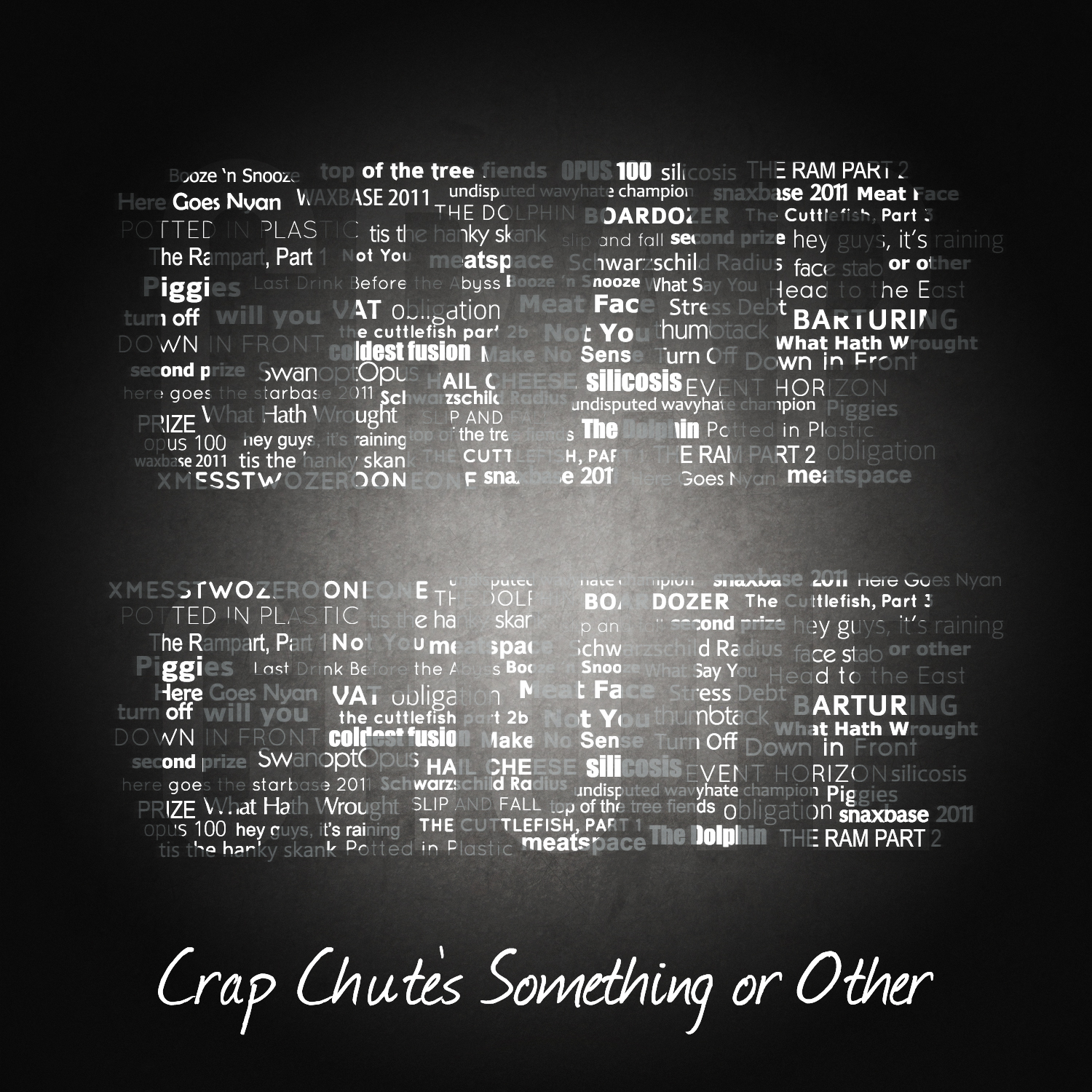
Once again, the best part is the cover art by talented artist Ro Karen. This year’s download contains Bonus Art.
This year I have outsourced the entire download operation to Bandcamp. Rather than have to depend on some skanky download from me.com (me.com shut down), google drive (makes it hard to download an archive), or dropbox (downloads disappear for no reason), this time around I ponied up the money for bandcamp – all for you.
This means I have to remove the entire paragraph from the description of this event: the one where I tell the ogg netbsd-toaster people to piss off. Bandcamp lets you have the download in any stupid format you could possibly want. All this years tracks are “mastered” (snicker) from a lossless source (as opposed to MP3 like previous years), so you can get the maximum sound fidelity or some other equally useless statement about audio quality. Get your own green marker.
Since I don’t control the download this time, I can’t give you the MD5 this year. So I’ll give you this MD5 instead 1ec739c9559e84cf08d9da78e393d0fc. Bonus, here’s an SHA1: f43b4c1714568dbc01079b2a36d061e8ccf12b1a. You never did figure out what those were supposed to do.
This year the collection clocks in at about 5.5 hours, which is more than last year, but still not as much as 2010. Enough to get you through a short day at work taking numerous breaks or a nice stay in the waiting room at the hospital. The download includes zomgfive bonus tracks including two which haven’t been released otherwise.
Like all my previous years’ stuff, the music is under Creative Commons Licence. Yes yes, you don’t care. You’re so l33t because you found it on the internet. Creative Commons isn’t public domain, but it’s as good as you’re going to get – especially since you’re getting it for free. Everyone stand back, here comes that CC logo that seems to offend so many: avert your eyes.
Yes, you can download Lagrange Point for free. Yes, you can enter 0.00 in the box and download it for free. Yes if you download it you can put it on your iPhone or your hipster brown zune. No, if you put it on your iPhone or hipster brown zune you still don’t have to pay anything. No, you don’t have to give your email address or your credit card number or your praypal account. No, I’m not using this to haxx0r your facebook account (paraphrased complaint). I know you’re flat broke, so rather than have me delete your livejournal you should give your money to Ro Karen, or your local animalshelter, or some other hipster doofus. There are better ways to spend your money.
My standing offer still holds: if you can figure out the arduous task of emailing me your address, I will haxx0r your friendface account send you a disc with the music on it for no charge, while supplies last. Number of discs I sent out in 2011: one (1).
I see you, sitting there. You said you hated 2010’s Crap Chute’s Sluice Juice and you wished you could hate it even more.
Well now you can, I have spent a tireless couple of weeks attempting to remaster rebastard 2010’s Crap Chute’s Sluice Juice and now it’s available for free on Bandcamp. That way you can all get it in your precious ogg flac morbo format or whatever it is I won’t do for you.
All the tracks are updated, some have new parts, some have their egregious problems fixed, some probably have new egregious problems. The best part is that unlike the original 2010 edition, it has fewer tracks on it, which must be a good thing.
is in any way better than the previous view of sets:
The Old Set Layout
(If not obvious, the new layout crams all the tracks together into one waveform with no distinction between them except a vertical line. No track names and the only time length displayed is for the entire set)
The new layout completely negates the reason I organise into sets: so people can find pieces by the collection they’re part of. I currently have 223 original tracks over 23 pages on Soundcloud, ain’t nobody want to scroll through 23 pages.
I don’t care, they’re not going to fix this because in their mind it’s not broken. Soundcloud want to be the new tumblr, the new fertile land of reposts and unoriginality.
This digital micrograph script will change all the open image windows to be of the same displayed numerical scalebar length (e.g. 20 micrometers). If the images are of different magnifications then the scalebar sizes will be different, but numerically the same. Calibrations are not changed, scalebars are still correct. I wrote this script to serve a single purpose, and perhaps you will find it useful. If you don’t like it, that’s cool, you’re free to write your own. I kinda posted it here because I didn’t have many options.
// A script to set all the open images to the same displayed scalebar length.
// Doesn't change calibration of images, so if images have different magnifications the bars will be different (but correct) lengths
// Scalebar position doesn't change, but will change length.
//
// Note DM quantizes scalebar display to specific values (0.5 nm, 1 nm, 2 nm, 5 nm, 10 nm, 20 nm, etc), regardless of what you enter.
// Also, choice of a larger fontsize may make the scalebar snap to the next highest display value.  Decrease your fontsize in that case.
//
// Steven Cogswell, P.Eng.
// October 2012
//
// Thanks to Pavel Potapov and D.R.G. Mitchell (Scale_bar_control.s) for information how to handle scalebars and annotations in DM script

Image curr
ImageDocument imgdoc
number NumAnn, AnnID,AnnType,Fontsize
number TextID, left,right,bottom,top, retval, numwindows, i
number scalex,scaley, nmscale, barwidth
string imagename

// User chance to abort entire operation
retval = ContinueCancelDialog("This script tries to give all open images the same displayed scalebar value")
if (retval == 0) {            // 0 if user cancelled, 1 if okay
	result("Cancelled.\n")
	exit(0)
}

// Get desired scalebar length
nmscale=20
retval = GetNumber("Desired Scalebar Length", 20, nmscale)
if (retval == 0) {            // 0 if user cancelled, 1 if okay
	result("Cancelled.\n")
	exit(0)
}
result("User entered scale "+nmscale+"\n")
nmscale=nmscale+0.01  // Rounding makes the scale a little short, this just bumps it up.

// Get desired font size
Fontsize=20
retval = GetNumber("Desired Font Size", 20, Fontsize)
if (retval == 0) {   // 0 if user cancelled, 1 if okay
	result("Cancelled.\n")
	exit(0)
}
result("User entered font size "+Fontsize+"\n");

// Processing
numwindows = CountDocumentWindowsOfType(5)
  // Get number of images open
result("Processing "+numwindows+" images\n")

// Loop over all open windows
for (i=0; i<;numwindows; i++) {

	imgdoc=GetImageDocument(i)
	curr:=imgdoc.ImageDocumentGetImage(0)     // The current image being processed
	imagename = curr.GetName()    // Display name of image

	GetScale(curr,scalex,scaley)
	result("Image "+imagename+" X scale: "+scalex+" Y scale:"+scaley+"\n")
	barwidth=nmscale/scalex     // number of pixels a bar of nmscale would actually be

	//loop through annotation index
	NumAnn = CountAnnotations(Curr)     // Get number of annotations in current image
	for (number j=0; j<NumAnn; j++)
	{
		AnnId = GetNthannotationId(curr, j)
		annType=AnnotationType(curr,AnnID)

		if(annType==31)    // type 31 seems to be the scalebars
		{
	  		result("scale bar found: ")
	  		GetAnnotationRect(Curr, AnnId, top, left, bottom, right)
			result("scalebar box: L:"+left+",R:"+right+",B:"+bottom+",T:"+top+"\n")
	  		SetAnnotationRect(Curr, AnnId, top,left, bottom, left+barwidth)     // Same position, lengthen bar to length of nmscale
	  		SetAnnotationSize(Curr, AnnId, FontSize)   // Set the font size
		}
	}
}

result("All Images Done.\n")
Use SuperDuper or CarbonCopyCloner to make a clone of your existing system out to another hard drive. Buy an external drive, or buy a drive dock and buy bare drives to plug into it. Docks are great for Time Machine backups too. Do not whine that hard drives are expensive. How much is your time worth to you?
Buy and download the OSX Mountain Lion Installer. Don’t pirate it, for fuck’s sake. It’s only $30 $20. Save a copy of the Installer somewhere safe, make an installable DVD or USB Key while you can.
If you’re using Filevault 1, turn it off (and you should be using Filevault, if you’re using a portable machine). It’ll make transitioning easier, and you’ll want to enable the “whole disk filevault” after Mountain Lion is installed. If you’re using Filevault 2 (the Filevault introduced in Lion 10.7), you can leave it enabled – OSX Mountain Lion can install to an existing whole-disk-encrypted volume without any problems.
Install OSX Mountain Lion to the SuperDuper’d Drive and not your internal drive. Don’t do anything to your internal drive.
(alternately: install OSX Mountain Lion to the internal drive, and disconnect your SuperDuper’d drive for safety. This is more work to get back to normal though for when your OSX Mountain Lion goes wrong.)
Find out exactly how many Rosetta apps you didn’t know you have. Start looking for replacements, since Rosetta is dead. PowerPC has been dead for years. Move with the times. I’m also looking at you, stupid developers still shipping PowerPC code
Use it like this for a few days. Try out everything you normally use to find out it doesn’t work anymore. Keep track. Nicely ask developers to get OSX Mountain Lion versions out.
If it doesn’t work out, don’t worry. Just boot from your untouched Snow Leopard Lion drive, carry on as if nothing happened. If you fuck things up, use your Time Machine backup to save your ass.
Did that all turn out nicely? Fine. Your choice at this point:
Install OSX Mountain Lion to your regular drive
SuperDuper your external clone drive with OSX Mountain Lion back to your internal drive. Disconnect external drive and keep it safe.
Make sure to keep your Time Machine backup for when you need to roll back.
iTunes Match is a pretty nifty service that I won’t go into detail about. If you don’t know about it, go read up. When you turn on iTunes Match on your iOS device (iPhone 4 in my case), it ‘takes over’ the music portion of your phone, removes all the sync’d from iTunes music, and makes all your music addable via download from the iTunes cloud server. No problems.
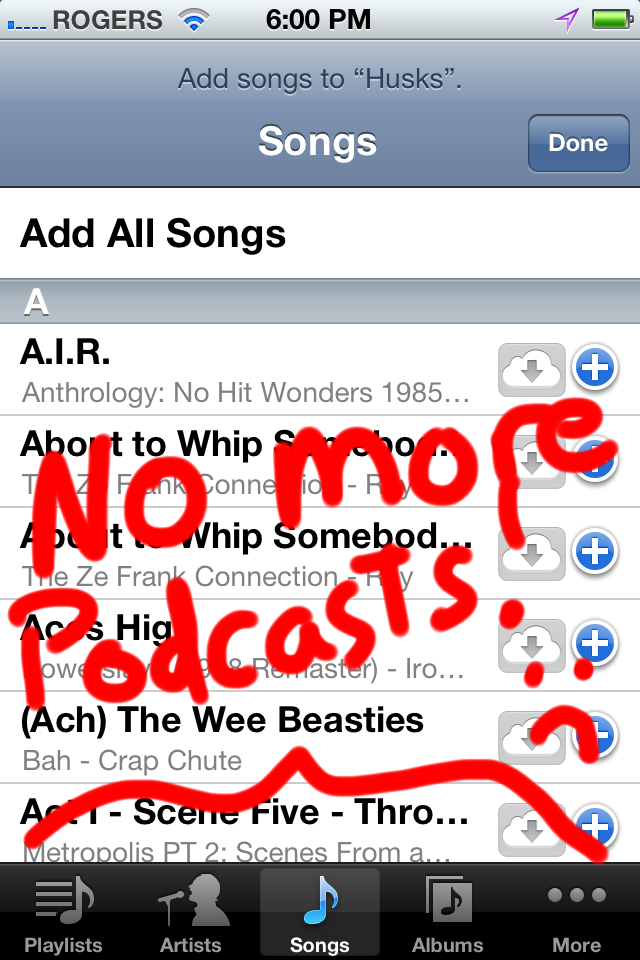
The problem is playlists and podcasts. I know, podcasting is dead, but before iTunes Match, on the iPhone you could add Podcasts to a playlist just like any other media. But now with iTunes Match enabled, and you go to add a playlist on the phone (I’m not talking about making playlists in iTunes, I mean on the phone itself with “Add Playlist” in the Music app), the “Podcasts” icon does not appear in the list of things you can select from anymore:
Interestingly with iTunes match disabled the option appears again. Probably just some silly thing in how iTunes Match is implemented in iOS. Maybe it will get fixed in a revision of iOS, maybe not. Either way, here’s how to add podcasts anyway.
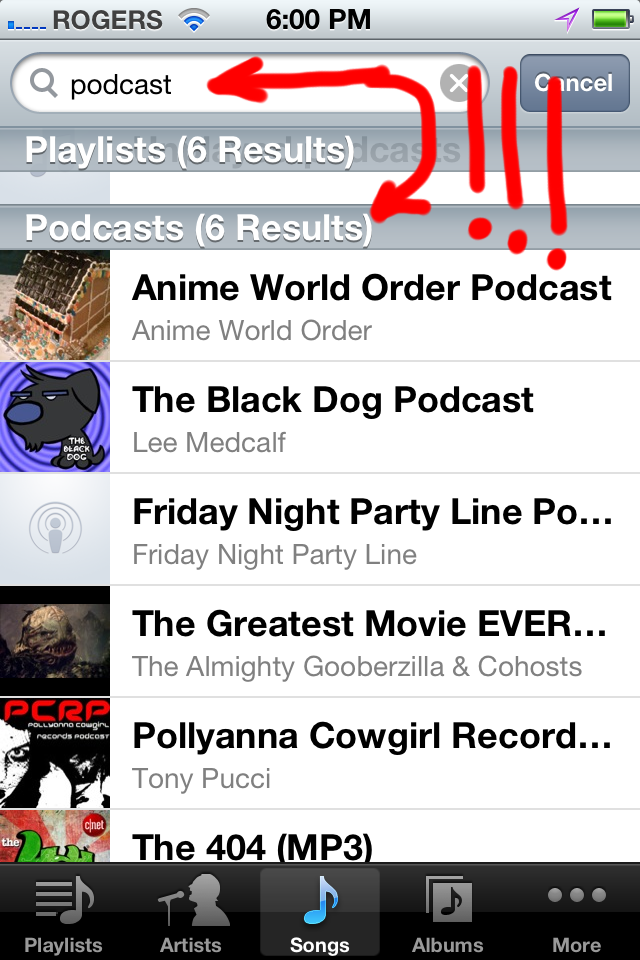
It’s actually pretty simple: When adding tracks to a playlist, drag down to reveal the search box. In the search box you could type the name of your podcast (if you remembered it), but instead just enter ‘podcast’.
You damn right, it knows, it gives you a list of all the podcasts
and scroll down some more for individual podcast episodes.
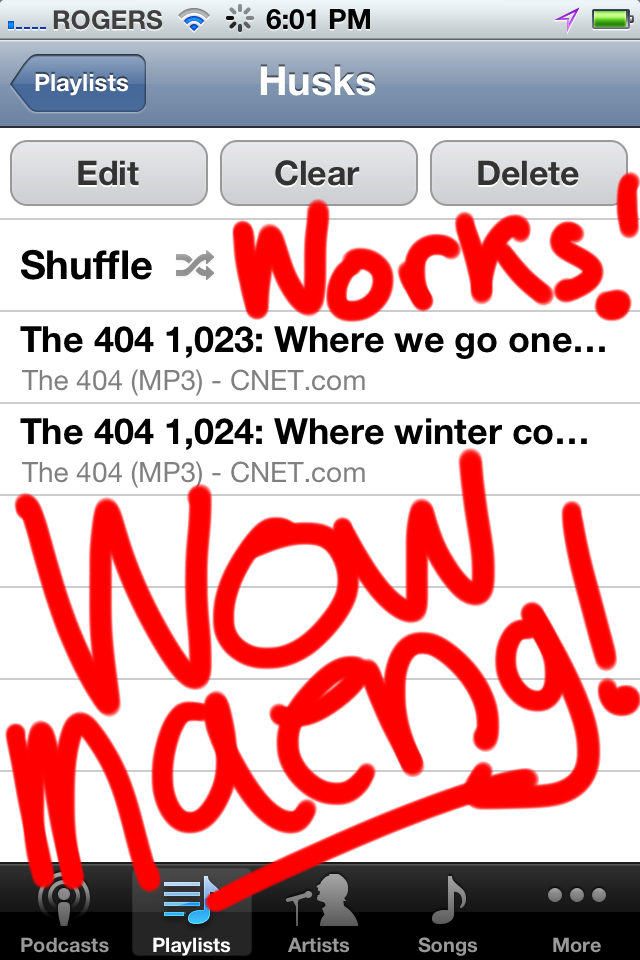
Then you can add those mo-fo’s to your playlist
and presto, it’s like you never spent $24.99 on iTunes Match and had it ruin your ability to listen to podcasts in a playlist.
I’ve written before about using an Atmel AVR Dragon to debug an Arduino board, using AVR Studio 4. I recently had some communication from Stephen Lake where he mentioned he was using Eclipse for Arduino development. I’d looked at Eclipse a long time ago and setting it up was an absolute terror with no real benefit. Stephen said it was much easier now, so I figured I’d have a look. Along the way I found the toolchain is robust enough these days to support DebugWIRE debugging of the Arduino and not have it suck too hard. I spent a lot of time trying to get the setup right, so I figured I’d detail it out if you’re trying to figure it out too, and save you the effort.
I’m standing on the shoulders of giants here. I’ve developed none of the software/plugins involved. I just put the pieces together from some disparate sources, some of which are a little out of date. The real credit goes to the authors of the software used in this. I did the setup on Windows and Linux, and the steps are 90% the same. I haven’t tried any of this out on OSX. This worked for me, maybe it will work for you. Maybe it won’t. I did this with Arduino IDE 1.0 installed.
Here’s what you’re going to need:
An Arduino that’s been modified for DebugWIRE operation
Eclipse
An AVR Dragon. Other debuggers might work, but a Dragon is what I have
WinAVR (Windows) or the AVR Toolchain (Linux)
libusb for Windows
Some patience. Okay, a lot of patience.
Get a DebugWIRE-capable Arduino
I wrote a whole big-ass article on this before, so you can reference that. For this experiment I used my modified Diecimila board. It will probably work with the UNO and other boards, I just haven’t tested them. Your mileage may vary.
Eclipse
More specifically, Eclipse IDE for C/C++ Developers (includes Incubating components). At the time of this writing Eclipse was 3.7.2. The nice thing about Eclipse is that it doesn’t have to be “installed” on your system, you can just unzip the folder and run it from that. That means you can keep many, many different versions of Eclipse configured for different tasks like I do around and not have to worry about trying something that will foul it up in some other aspect. I started out with the base CDT version and added into it. You’ll also need Java for this, of course, since Eclipse requires Java to run. Hey, I hear Eclipse can be used for Java development. groan.
On Ubuntu you can just apt-get it, but I chose to download and unzip it.
Atmel AVR Dragon
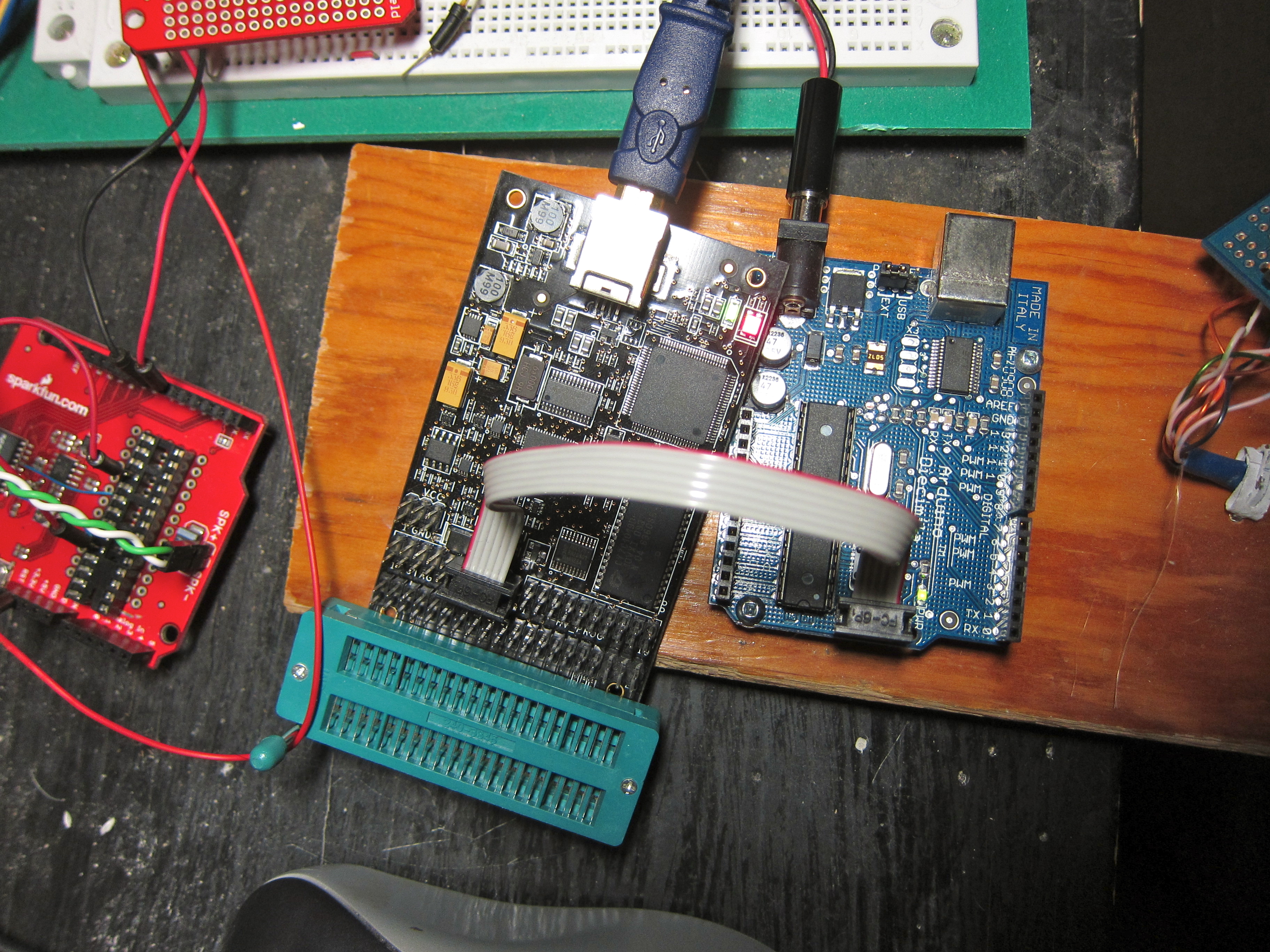
The dragon is (still) only $54 from Digikey in Canada. I’m sure you can get one just about everywhere. You can probably make all this work with the Atmel JTAG ICE III (I didn’t even know they had a III out), but those are expensive and so I don’t have one. You don’t have to do any mods to the Dragon other than maybe put some pin headers on it. I put a ZIF socket onto mine, but we won’t use it for this exercise.
AVR Dragon connected to Diecimila via ISP cable
WinAVR (ie – GCC Toolchain)
For Windows you want WinAVR. I used WinAVR 20100110 in this, and there’s nothing newer (and not likely to be anything newer). You might think that 2010 is old and you need something newer and cooler, but trust me working with the 20100110 is a lot easier than trying to build your own toolchain on Windows. When I started with this I had problems and I thought “a newer version might fix it”, and the problems just turned out to be me, and the building new stuff turned out to be a colossal pain.
You’ll also want some version of AVR Studio. In this I used 5.1 but I know it works with AVR Studio 4, since my previous article involved Studio 4. The thing to note is that v4.x and v5.x want different versions of the Dragon firmware, so if you want to go back and forth between 4.x and 5.x you’ll have to keep re-flashing the Dragon too. That’s a pain in the ass.
On Ubuntu you can just use the stock available AVR toolchain stuff,
As of this writing, the versions were gcc-avr (1:4.5.3-2), binutiles-avr (2.20.1-2), gdb-avr (7.2-1), avr-libc (1:1.7.1-2), avrdude (5.10-3), avarice (2.10-3ubuntu1). Like WinAVR, there are newer versions available but the stock ones worked (I did build avarice 2.12 to test, didn’t make any difference in what I saw). I also had the stock Ubuntu 11.10’s OpenJDK for Eclipse.
From here on out I’m going to stick to the Windows side of things, but really, if you use Ubunnnntu you’ll figure out how to set the right stuff in Eclipse, you’re smart like that.
libusb for Windows
Here’s where the pain in the ass really comes in. I spent the longest time trying to get this sequence of stuff right, and here’s what worked. This is the primary reason I wrote this article, because it was such an orderal figuring out the right way to make this all work correctly.
If you install one of your AVR Studio (v4 or v5), it will install the AVR Dragon USB driver. That’s great. The Dragon works fine in AVR Studio. Problem: nothing else will. The WinAVR stuff won’t talk through the Jungo driver to the Dragon. Instead, you’ll have to install libusb-win32 to provide an alternate usb access that the WinAVR stuff can work with.
Difficulty: when you install the libusb stuff, the Jungo driver is not active, and so AVR Studio doesn’t work with the Dragon. So if you’re like me and you keep popping back and forth between environments, you have to keep changing the driver. The good part is, it’s easy to do, it’s just busyness. There may be an alternate way to make this work, but I couldn’t find it.
So you need libusb-win32 for this. I used version 1.2.6. There is a version that comes inside the WinAVR directory itself, but I wasn’t successful getting it to work flawlessly. It probably does, but if so I wasn’t doing it right. I was able to do it right with the 1.2.6 version, so that’s what I’ll describe.
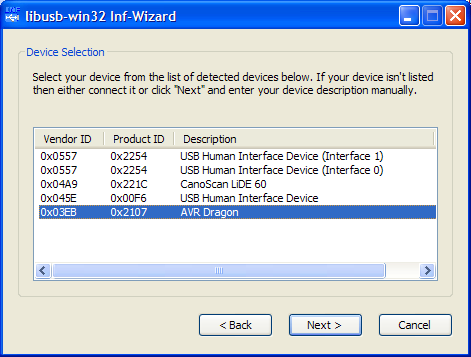
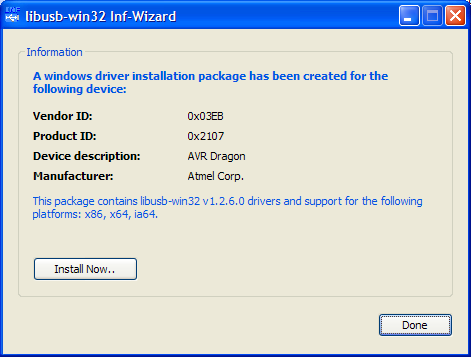
With AVR studio installed, and your dragon attached, you can check in the Windows device manager that you have a driver for “Jungo” in play, and the AVR Dragon is associated with it. Unzip the libusb-win32 stuff, and look inside for the “install-inf.exe” program. If you run that, this will make a very nice .INF style installer for your Dragon that uses the libusb driver.
Once you’re done you can push the “Install Now” button to actually install the driver.
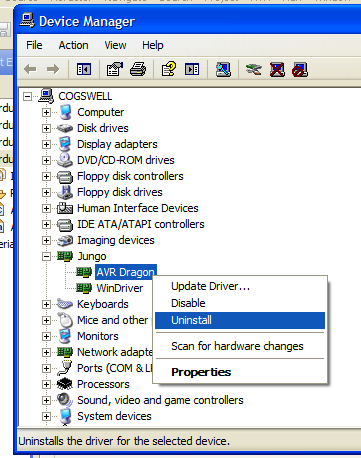
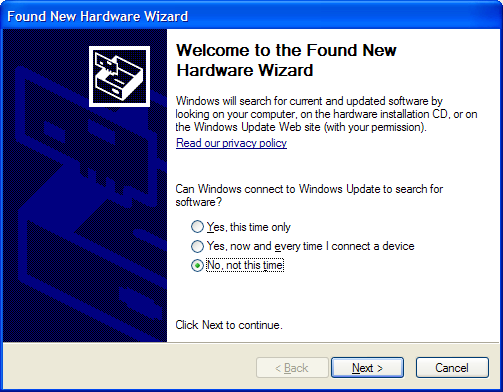
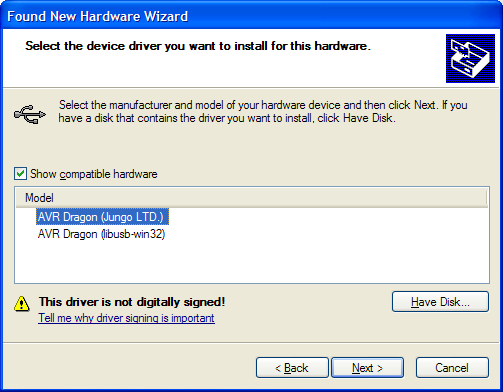
From here on out, if you’re going to go back and forth between AVR Studio and the WinAVR-style toolchain you’ll have to learn how to switch between the Jungo driver and the libusb driver. It’s pretty easy. With your Dragon attached, bring up the device manager. Select whatever driver is currently installed, right-click and select “uninstall.” Don’t worry, this doesn’t remove anything, the driver sticks around on your computer. The driver will disappear from the device manager list. Unplug and re-plug in your Dragon via USB and you’ll see the Windows “found new hardware” message. Walk through the Install New Hardware wizard, but don’t let it automatically install anything. Choose “Install from a list or specific location”, and “Don’t search. I will choose the driver to install.” Then you’ll get to pick between the Jungo driver and the libusb driver.
Verify Dragon Operation with Jungo and libusb drivers
AVR Studio
Before you go any futher, you should verify that you can get your Dragon to work in AVR Studio and the WinAVR toolchain. Switch to the Jungo driver, start up AVR Studio, and start up the “AVR Programmer”.
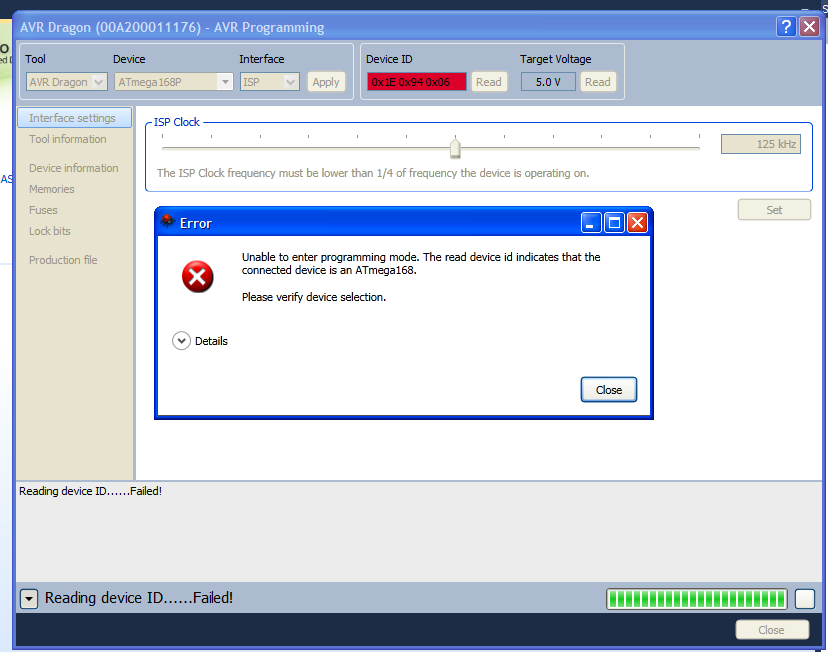
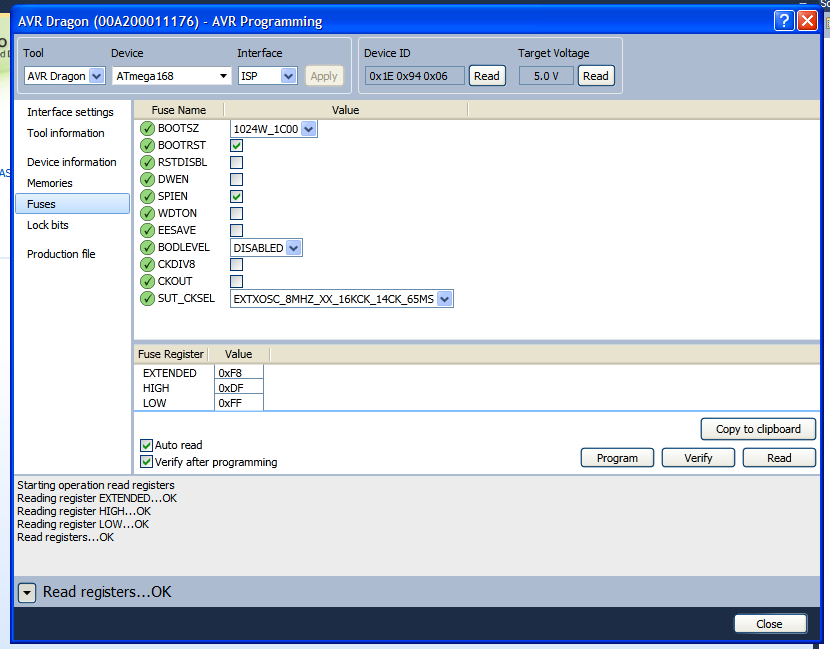
You should be able to connect to your Dragon, and read the fuses on the chip. The nice thing about AVR Studio 5.1 is the programmer will tell you the correct chip if you’ve picked the wrong one. On my Diecimila it’s an ATMega168.
NOTE THE FUSE CONFIGURATION. Messing up the fuses is the easiest and fastest way to making your Arduino experience unhappy. We’re going to be changing some fuses during the course of debugging, so you’ll have to learn how to put all the fuses back correctly when you’re done. If you screw up the fuses, the on-board Arduino bootloader will not work correctly. Also note that the fuses are different for the different Arduino models. The ones I show are for my Diecimila. The ones on the UNO are set differently.
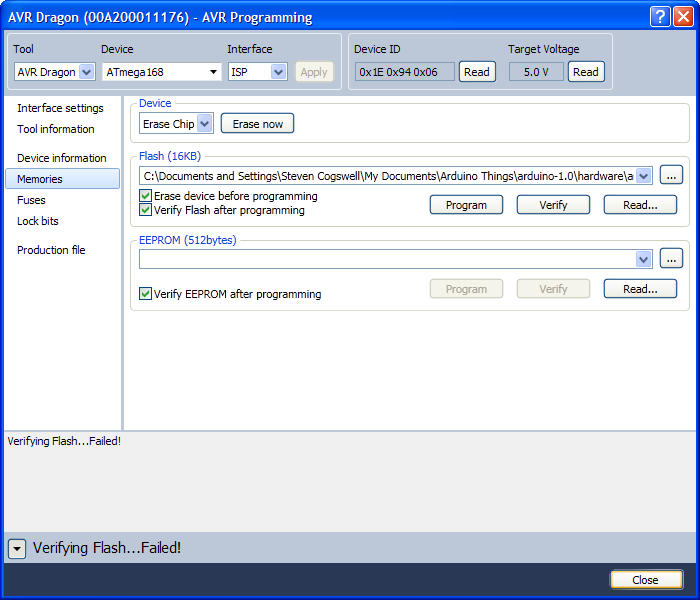
Also, you can use the AVR Studio programmer to burn the bootloader back to the Arduino in the event you mangle things up pretty good. This is useful since the Arduino IDE will let you burn the bootloader with a variety of devices but the Dragon is not one of them. Remember to choose the right bootloader for your chip for pity’s sake.
AVRDUDE and libusb
With your Dragon connected, and connect to your modified-Arduino via the ISP cable, switch over to the libusb driver as described earlier. Open up a command prompt (Start -> Run -> cmd). The main command-line program from WinAVR we’ll use will be AVRDUDE. WinAVR sets that PATH variable, so you can type avrdude commands from any directory.
Easy: Check to see that your dragon even responds. Use dragon_isp with avrdude:
avrdude -p atmega168 -c dragon_isp -Pusb
You should get something like this:
avrdude: AVR device initialized and ready to accept instructions
Reading | ################################################## | 100% 0.17s
avrdude: Device signature = 0x1e9406
avrdude: safemode: Fuses OK
avrdude done.  Thank you.
Sometimes you have to hit the command a couple of times before the Dragon will start talking. You’ll hear windows make that little “dunk” sound as the Dragon resets itself, and if you try to avrdude it too quickly it won’t respond correctly. With the libusb driver installed and set to be the current driver you can unplug/replug as much as you want and it’ll always use the libusb driver. It won’t go back to Jungo unless you uninstall the libusb one and switch back manually.
If you get something like this:
avrdude: Version 5.10, compiled on Jan 19 2010 at 10:45:23
         Copyright (c) 2000-2005 Brian Dean, http://www.bdmicro.com/
         Copyright (c) 2007-2009 Joerg Wunsch
         System wide configuration file is "C:\WinAVR-20100110\bin\avrdude.conf"
         Using Port                    : usb
         Using Programmer              : dragon_isp
avrdude: usbdev_open(): did not find any USB device "usb"
That means you have usb issues. Check that the libusb driver is being used. Try replugging your Dragon and see if that helps.
For even more detail, use the -v flag on avrdude:
avrdude -p atmega168 -c dragon_isp -Pusb -v
You’ll get reams of data. Remember, this is for the Diecimila with the ATMega168. If you have an UNO or a Mega or something with the ATMega328 your results will be different.
avrdude: Version 5.10, compiled on Jan 19 2010 at 10:45:23
         Copyright (c) 2000-2005 Brian Dean, http://www.bdmicro.com/
         Copyright (c) 2007-2009 Joerg Wunsch
         System wide configuration file is "C:\WinAVR-20100110\bin\avrdude.conf"
         Using Port                    : usb
         Using Programmer              : dragon_isp
avrdude: usbdev_open(): Found AVRDRAGON, serno: 00A200011176
JTAG ICE mkII sign-on message:
Communications protocol version: 1
M_MCU:
  boot-loader FW version:        255
  firmware version:              7.21
  hardware version:              1
S_MCU:
  boot-loader FW version:        255
  firmware version:              7.21
  hardware version:              7
Serial number:                   00:a2:00:01:11:76
Device ID:                       AVRDRAGON
         AVR Part                      : ATMEGA168
         Chip Erase delay              : 9000 us
         PAGEL                         : PD7
         BS2                           : PC2
         RESET disposition             : dedicated
         RETRY pulse                   : SCK
         serial program mode           : yes
         parallel program mode         : yes
         Timeout                       : 200
         StabDelay                     : 100
         CmdexeDelay                   : 25
         SyncLoops                     : 32
         ByteDelay                     : 0
         PollIndex                     : 3
         PollValue                     : 0x53
         Memory Detail                 :
                                  Block Poll               Page                       Polled
           Memory Type Mode Delay Size  Indx Paged  Size   Size #Pages MinW  MaxW   ReadBack
           ----------- ---- ----- ----- ---- ------ ------ ---- ------ ----- ----- ---------
           eeprom        65     5     4    0 no        512    4      0  3600  3600 0xff 0xff
           flash         65     6   128    0 yes     16384  128    128  4500  4500 0xff 0xff
           lfuse          0     0     0    0 no          1    0      0  4500  4500 0x00 0x00
           hfuse          0     0     0    0 no          1    0      0  4500  4500 0x00 0x00
           efuse          0     0     0    0 no          1    0      0  4500  4500 0x00 0x00
           lock           0     0     0    0 no          1    0      0  4500  4500 0x00 0x00
           calibration    0     0     0    0 no          1    0      0     0     0 0x00 0x00
           signature      0     0     0    0 no          3    0      0     0     0 0x00 0x00
         Programmer Type : DRAGON_ISP
         Description     : Atmel AVR Dragon in ISP mode
         Vtarget         : 5.0 V
         SCK period      : 8.00 us
avrdude: AVR device initialized and ready to accept instructions
Reading | ################################################## | 100% 0.16s
avrdude: Device signature = 0x1e9406
avrdude: safemode: lfuse reads as FF
avrdude: safemode: hfuse reads as DF
avrdude: safemode: efuse reads as 0
avrdude: safemode: lfuse reads as FF
avrdude: safemode: hfuse reads as DF
avrdude: safemode: efuse reads as 0
avrdude: safemode: Fuses OK
avrdude done.  Thank you.
Remember our little talk about fuses earlier? Take note of your fuse values (in my case, FF DF 00), as you’ll need them later to reset stuff. You can choose to have avrdude write them to a file, but it’s also good just to make a note somewhere.
If your Dragon talks to avrdude correctly with the libusb driver, you’re all set. Practice going back and forth between AVR Studio configuration and avrdude configuration for your Dragon.
Where the ATmegaBOOT_168_diecimila.hex is from the arduino bootloader directory in the Arduino IDE tree (in Arduino-1.0’s case that’s arduino-1.0\hardware\arduino\bootloaders), pick the right bootloader for your chip. Remember your fuses are probably different. Which is why it’s good to use AVRDUDE or AVR Studio to find them out and write them down before you mess with anything. The ultimate reference is your arduino boards.txt (arduino-1.0\hardware\arduino\boards.txt). If you’re too lazy to look there, there is this reference as well, but I note that one of my fuses is slightly different in my Diecimila. Look up what all the fuse codes do if you’re concerned.
AVRDUDE will erase all the flash as a feature of doing this, so if you had an arduino program on the chip it will also be gone when you re-flash the bootloader. When the Arduino is “empty” it sits there flashing the LED (pin 13) on the arduino board on and off.
This is the reason that this whole post is even possible. It used to be a huge pain in the ass. No stop, don’t do anything that article says. Instead take the advice at the top of it and go get this plugin instead. The full installation instructions are there on that nice person’s site. Thanks very much for that.
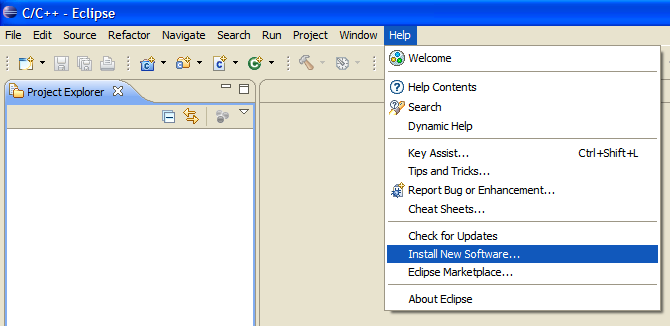
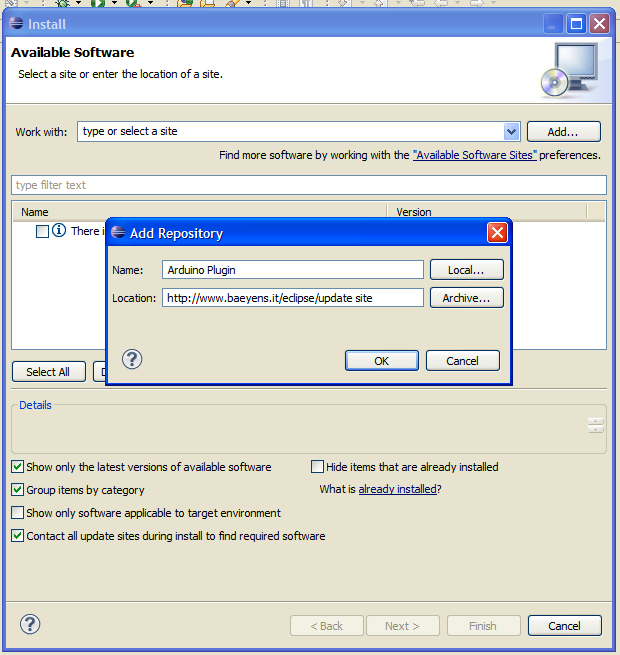
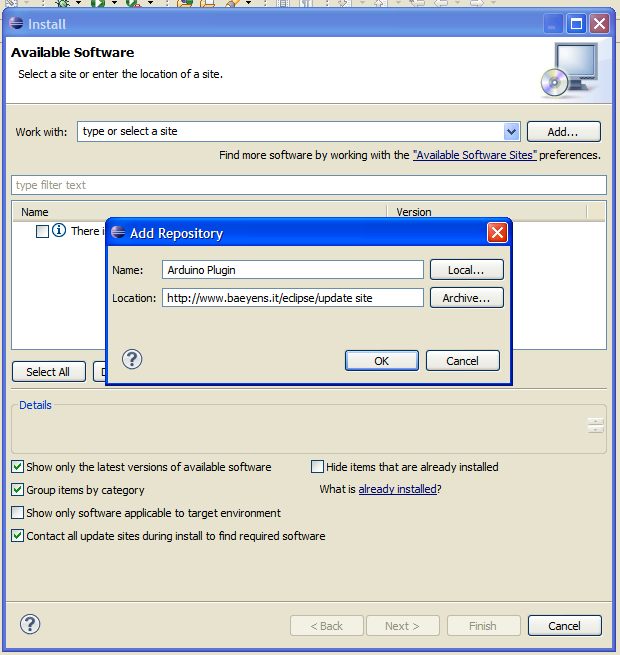
In short: in Eclipse, choose “Install new software”, enter his plugin repository address, and add the latest version of the plugin (1.2.1 as of this writing).
Now at this point you’re all set to do Arduino development in eclipse. You can write code in Eclipse, and upload it in Eclipse (via avrdude). There are some differences between doing development in Eclipse vs. doing it in the Arduino IDE. If you’re new to Eclipse you’ll find it has a shit-tonne of features and things that make you scratch your head. Also, code you develop has to be modified slightly to conform to the Eclipse CDT standards. This is detailed in the baeyens.it instructions. In particular Eclipse will throw out tons of warnings you never knew about for code that works fine in the Arduino IDE, because the Arduino IDE is set to compile with the warnings off. Warnings on is helpful if you’re trying to figure out problems, but if you’re new to the whole coding scene it will probably be pretty daunting to wrap your head around them. Also, the Eclipse ide still requires prototypes for functions, which if you’re written functions in the Arduino IDE you’re probably asking “What are prototypes?” I wouldn’t call using Eclipse for Arduino development a beginner’s task. Learn to do stuff with the Arduino IDE first. Again, the reason I’m writing this is because we want to move on to doing hardware debugging with Eclipse.
Install GDB Hardware Debugging into Eclipse
Most of this is similar to this setup for doing debugging with basic AVR chips, and not specific to the Arduino. I’ll give some specific setup points for integrating this with the Arduino plugin.
Here’s some more magic install stuff. In Eclipse “Install New Software”, and you can select “Work With: all available” sites. You will see a staggering amount of extra stuff you can install into Eclipse, only a fraction of which I even know what it does. What you’re looking for is GDB Hardware Debugging, so you can enter “gdb” into the filter box, and it will narrow the list down.
I didn’t install SimulAVR (the simulator), because I didn’t care about that. I also didn’t set up AVARice as an Eclipse “external tool” because quite frankly figuring out this debugging setup was more difficult that way. I found it much easier just to rely on running the WinAVR tools from an open command-line window.
Most of the settings are project dependent, so you’ll have to set them every time you start debugging a new project in eclipse, so I’ll go through that using some demo code.
A Simple Project in Eclipse
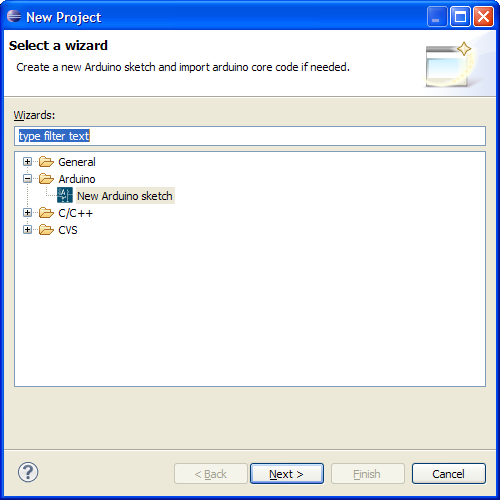
First off, make a new Arduino sketch in Eclipse using the Arduino plugin instructions. (File -> New Project)
Note that this will make two projects in your Eclipse tree. One for your test project, and one which contains the core Arduino code in a separate project meant for your specific Arduino board. In my case, the Diecimila. I called my project “ArduinoDebugTest.”
In the ArduinoDebugTest.cpp file, let’s use this code:
// Do not remove the include below
#include "ArduinoDebugTest.h"
#define LEDPIN 13
//The setup function is called once at startup of the sketch
void setup()
{
// Add your initialization code here
    pinMode(LEDPIN,OUTPUT);
    Serial.begin(9600);
}
// The loop function is called in an endless loop
void loop()
{
//Add your repeated code here
    digitalWrite(LEDPIN,HIGH);
    digitalWrite(LEDPIN,LOW);
    delay(1000);
    digitalWrite(LEDPIN,HIGH);
    Serial.println("I turned the LED on, off, and on again");
}
This code is pretty simple, because all we want is something simple we can use with the Dragon debugger to see that it works. It’ll flash the LED on the arduino board, then print something via the Serial porn on the Arduino.
Build this code with Eclipse (there are many ways to do this, including the little hammer icon on the toolbar, also right-clicking on the project). You’ll see in the console lots of messages go by as it builds the Arduino Core and then builds your program. If everything works out the final message will include the size of your code:
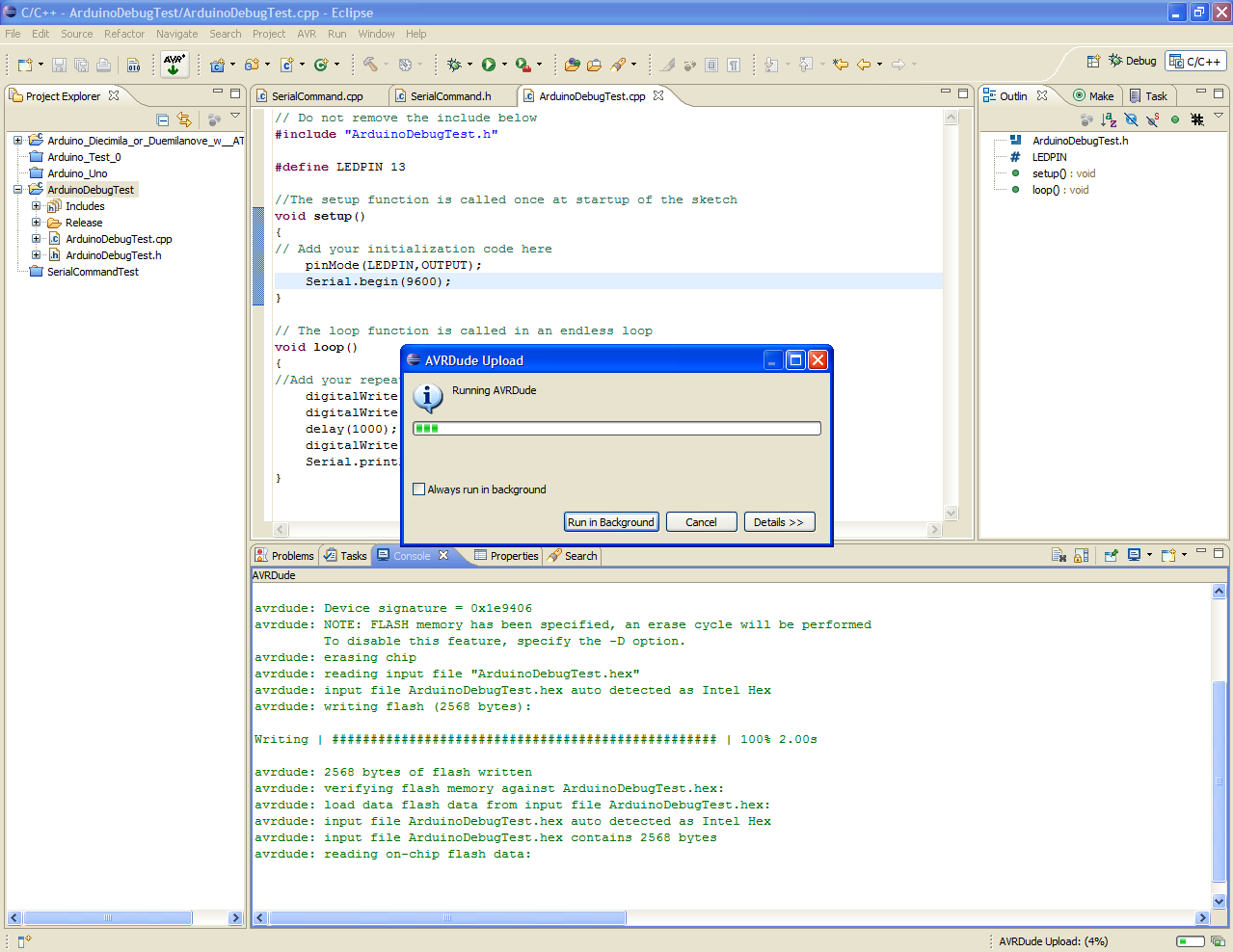
That should look at least partially familiar, since the Arduino IDE also reports a size when it’s done compiling. Connect your Arduino board via USB to your computer and upload the code with Eclipse (the AVR upload button). Note that the Arduino Plugin very nicely sets up avrdude for you for the upload.
Here’s a fine point to remember: because you’ve modified this Arduino board to work with DebugWIRE, you’ve also lost the ability for avrdude (and the Arduino IDE, which uses avrdude) to auto-initiate the upload. So you have to be quick and push the reset button on the Arduino board when you start the upload. That will trigger the bootloader to look for a new upload for a couple of seconds, then it starts your on-chip arduino program. Timing is important. I find I can push the “AVR Upload” button, then immediately push the reset on the Diecimila and the upload works fine. You can see it works if the TX/RX led’s on the Arduino furiously light up for a few seconds. With the Arduino 1.0 IDE your timing has to be more precise because the IDE always does a build before the upload, so you have to wait until the build part is done – push the reset button – and then catch when the IDE’s upload starts. Also, in Eclipse you’ll see some status messages in the Console saying the upload is working and finishes.
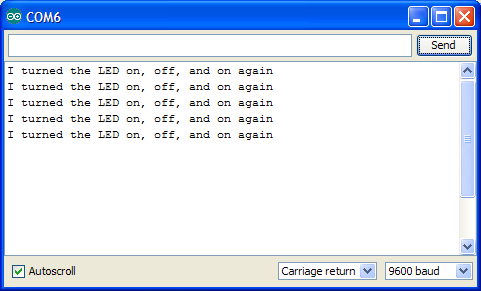
After the upload finishes you should see the Arduino LED start to flash. Then start up the Arduino IDE’s serial monitor (or your favourite terminal program that you know how to get to talk to the Arduino’s usb-serial), and you should see this:
Congratulations, you’ve successfully gotten the code-edit-build-upload workflow working. Now the real fun starts. You can actually stop here and happily continue on your life using Eclipse for Arduino development and never have to bother yourself with hardware debugging.
Build your project with Debugging Info Available
With Eclipse, normally you have build configurations for “Release” and “Debug” versions. When you build for debug the compiler adds in extra symbols and shit which the debugger (GDB) uses to figure out just what the heck is going on in your compiled code, and trace that back to what the source code was.
I had issues making a “Debug” build configuration work with the Arduino plugin, and I think it’s because of the separate project for the Arduino Core that has to be compiled against. Headers would get confused and code wouldn’t build (“pins_arduino.h” kept getting involved, so something was wrong). So in the end I just elected to turn on debugging in the Release configuration and it works fine. The Arduino IDE normally does build things in debug mode (-g), and I think from the output the Arduino Eclipse Plugin is the same, so this may not make any difference – but I set some options to be sure.
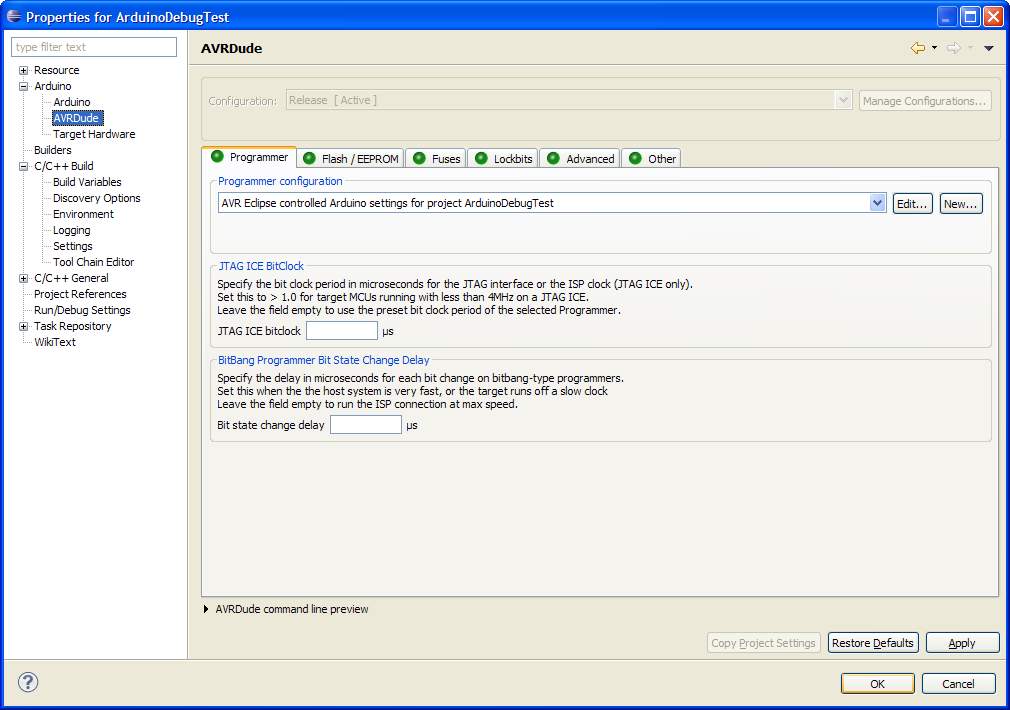
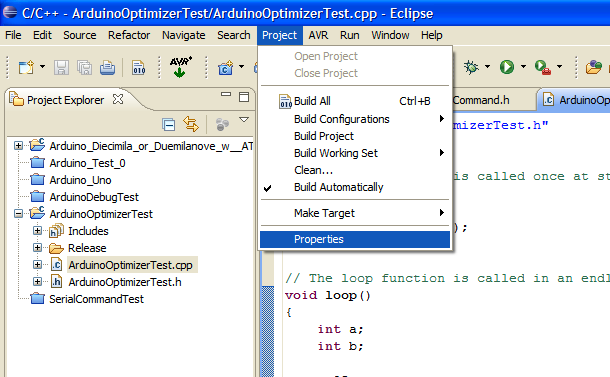
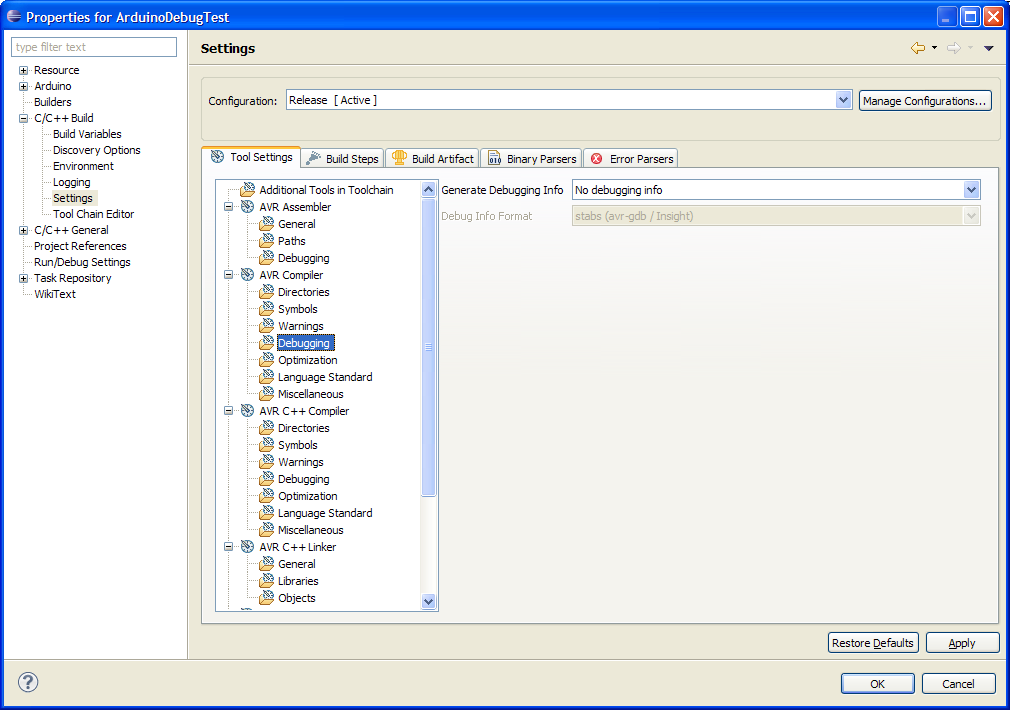
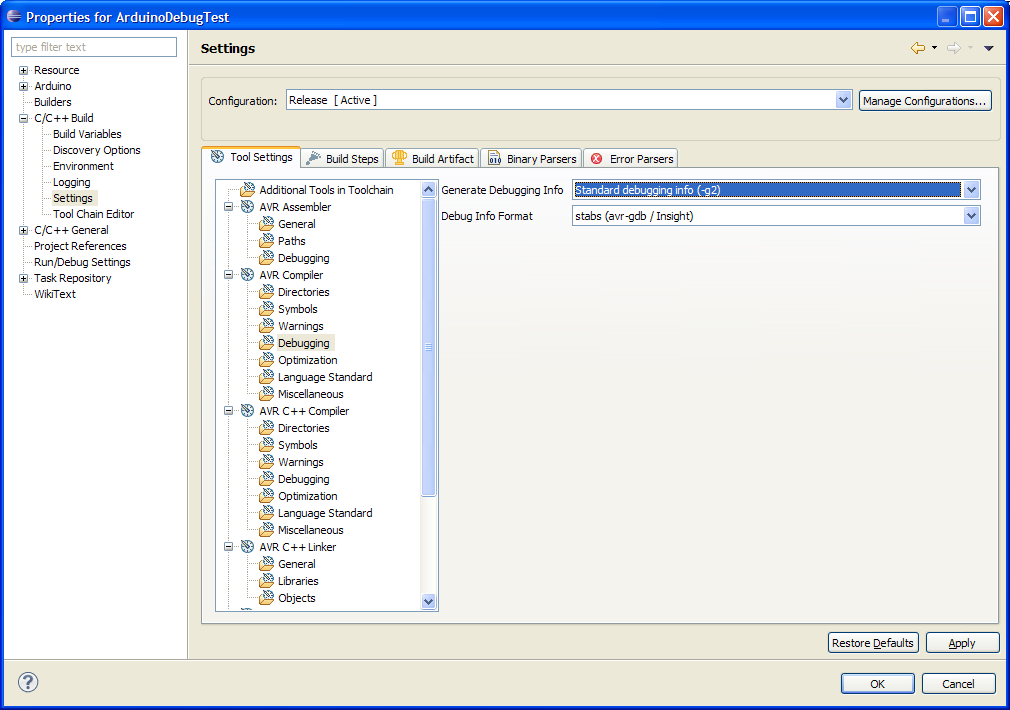
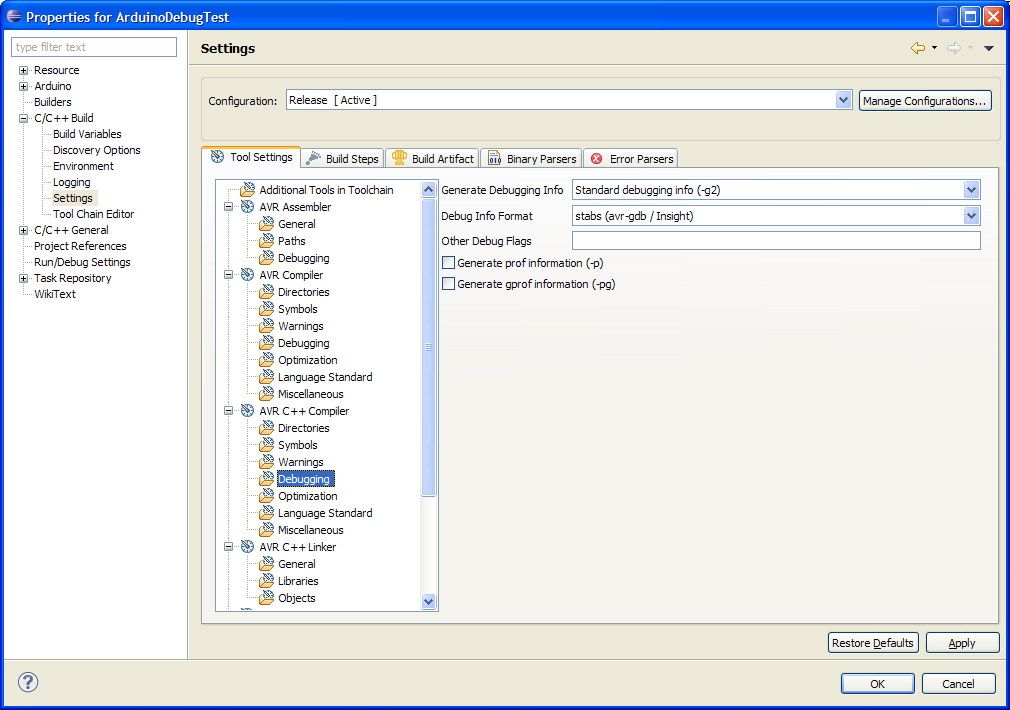
In the properties for your project (not preferences for eclipse – these properties are stored for each project), go to the C/C++ Build Settings, and in the Release configuration (the only one which should be there) you want to turn on debugging information.
Normally it looks like this by default:
Change it to “Standard debugging info -g2” and “stabs (avr-gdb / insight)”. Do this for both “AVR Compiler” and “AVR C++ Compiler” to be sure.
(This may not make any difference, as the Arduino Plugin is already setting flags, but this makes me feel better).
After this you should rebuild your program, and upload it to the Arduino over the USB port.
If you have consistency problems with building, trying doing the “make clean” before rebuilding, as that will make it recompile everything. Computers are fast, you can wait the ten extra seconds.
Put Arduino chip into DebugWIRE mode
This is pretty easy, but very important. The Dragon can only debug in debugwire if debugwire is turned on in the AVR chip (duh). Problem is when debugwire is active SPI is not available, so you can’t leave debugwire on all the time. So get used to putting it in and out of debugwire mode.
To set debugwire mode, the easiest way in this workflow is to use avrdude to set the appropriate fuse. You can use the fuse calculator in eclipse, or one of a million online ones. You can also use AVR studio, but if you do this you’ll have to pop back to the Jungo USB driver, then back to the libusb driver to get anything more done.
In my case, the Diecimila’s regular hfuse setting is 0xDF (we saw that earlier with avrdude, remember?). To enable DebugWIRE the hfuse setting has to be changed to 0x9F. Use avrdude to change it:
You may have to do the operation twice, as avrdude might have trouble on the first pass and ask you to redo the command without powercycling. There is a “-c dragon_dw” mode you can use, but I find that avrdude is smart and notices the dragon is in Debugwire mode and switches as needed.
After you change the debugwire fuse state, you have to power-cycle your Arduino. You also might as well power-cycle the Dragon itself, since I have much more “first try worked” success if both get power-cycled.
Once you’ve enabled the debugwire fuse, the Arduino’s on-board bootloader will not work. SPI is disabled and so the bootloader doesn’t function correctly. So make sure you’ve got the correct code uploaded before you enable debugwire. Otherwise you’ll have to disable it, upload, then re-enable it.
Hardware GDB Debugging with the Dragon
If you found the stuff up until now not complicated enough, this probably will satisfy you. What we’ve done up until this point is essentially the same workflow as the Arduino IDE does. What we’re going to have to do now is change the build process slightly in order to accommodate GDB, which is the program behind all the debug session stuff we’re about to do. Then we’re going to find a really big pitfall, but more when we get to that.
Debugging is accomplished through GDB. Eclipse talks to GDB. GDB knows how to talk to AVARICE. AVARICE is the program that knows how to run DebugWIRE on the AVR Dragon. The Dragon is the board that talks via DebugWIRE over the ISP cable to control the execution of code on the Arduino board. Make sense? We have to get all these layers to talk to each other correctly or none of this shit works.
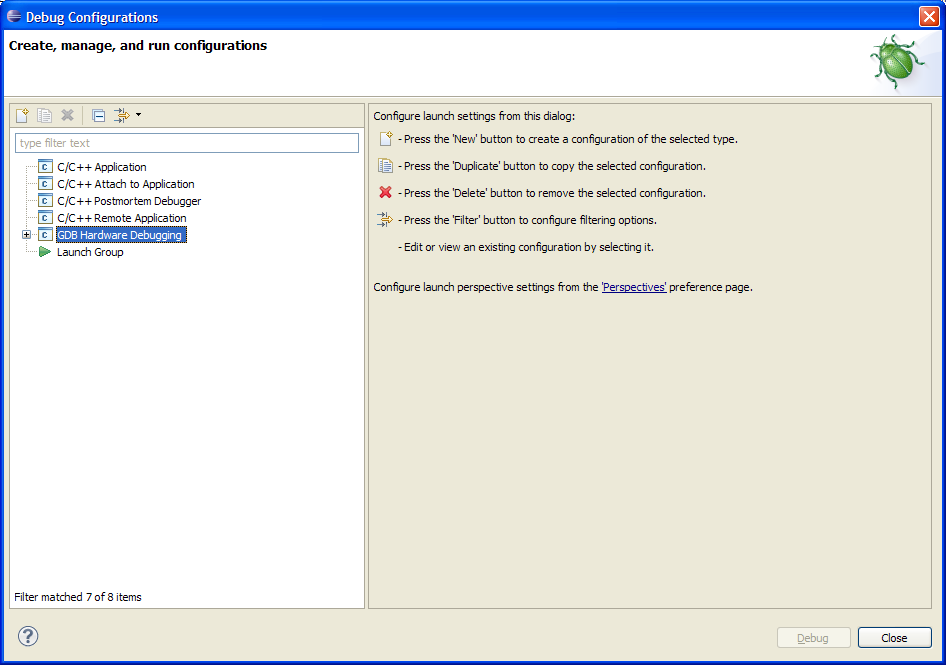
We’ll start on the Eclipse end. Start by making a new “Debug Configuration” in Eclipse (click the arrow next to the little picture of the bug, a couple of squares to the right of the hammer… sigh). A dialog starts up with a bunch of C/C++ options on the left side. Click and add a new configuration on the one called “GDB Hardware Debug”
Then we’re going to march through the tabs on this debug configuration.
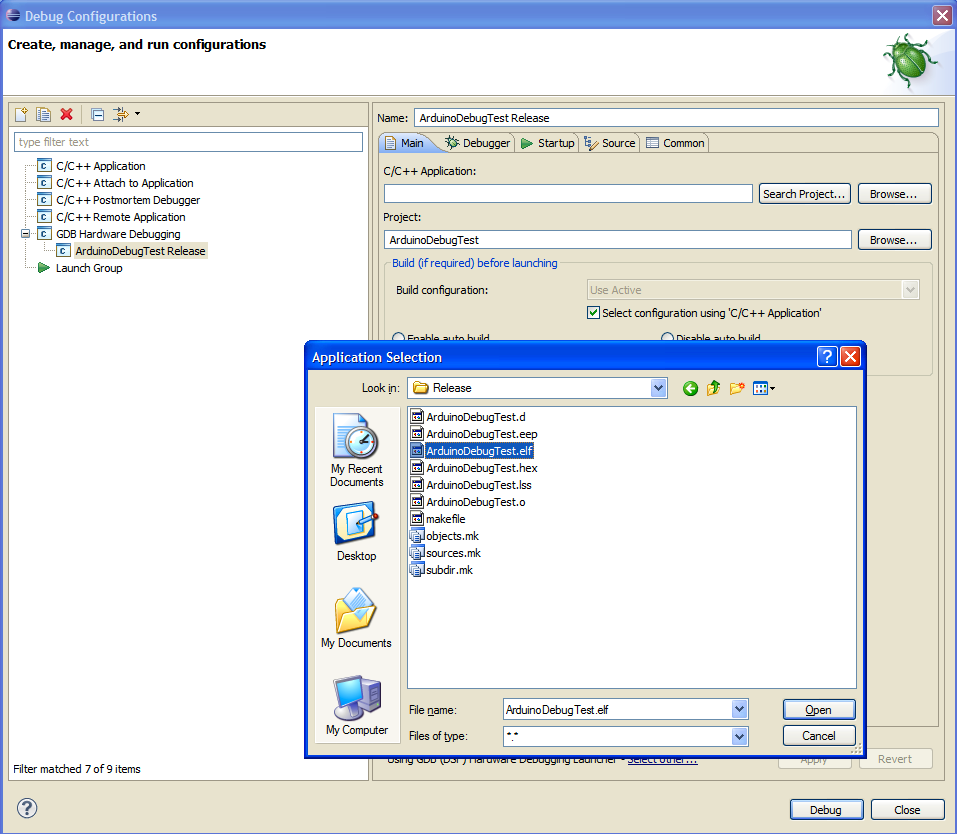
First thing is in the “Main” tab to pick your .elf file, which is the compiled code used by the debugger which has all the symbols and shit in it. When I use this with the standard AVR development plugin it auto-inserts the proper .elf file for me, but with the Arduino plugin you have to navigate to your Arduino Eclipse workspace and select the .elf by hand. No big deal.
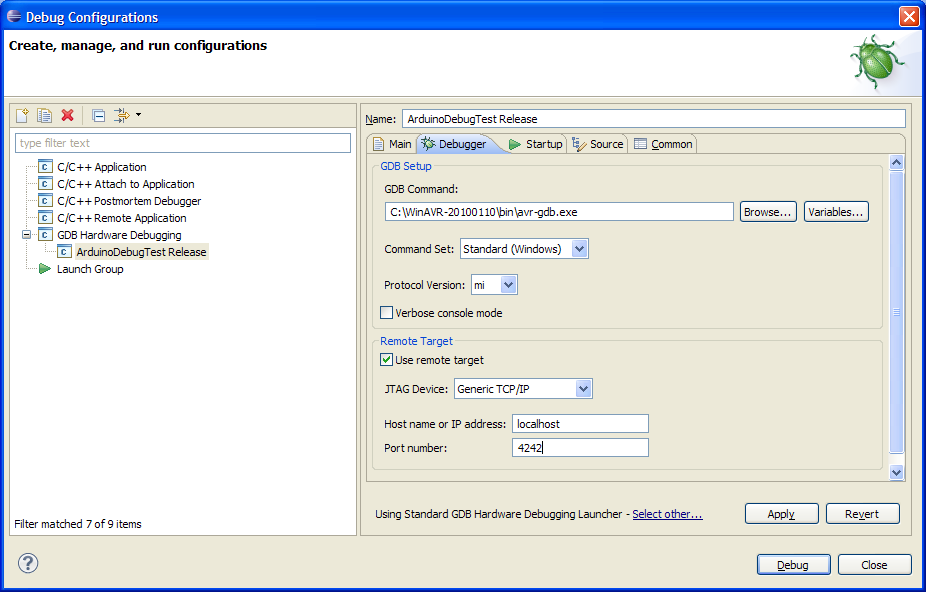
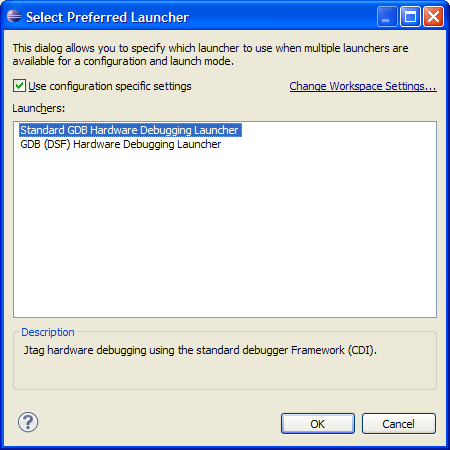
Set your GDB command to be the avr-gdb.exe in the WinAVR directory. You need to change the preferred launcher to the “Standard GDB Hardware Debugging Launcher” down at the bottom of the dialog window. I couldn’t make this work with the DSF launcher. You can tell you’ve got the right one because it has the option for “protocol version: mi” as shown. I change the port number to 4242, only because the original AVR Debugging article does that.
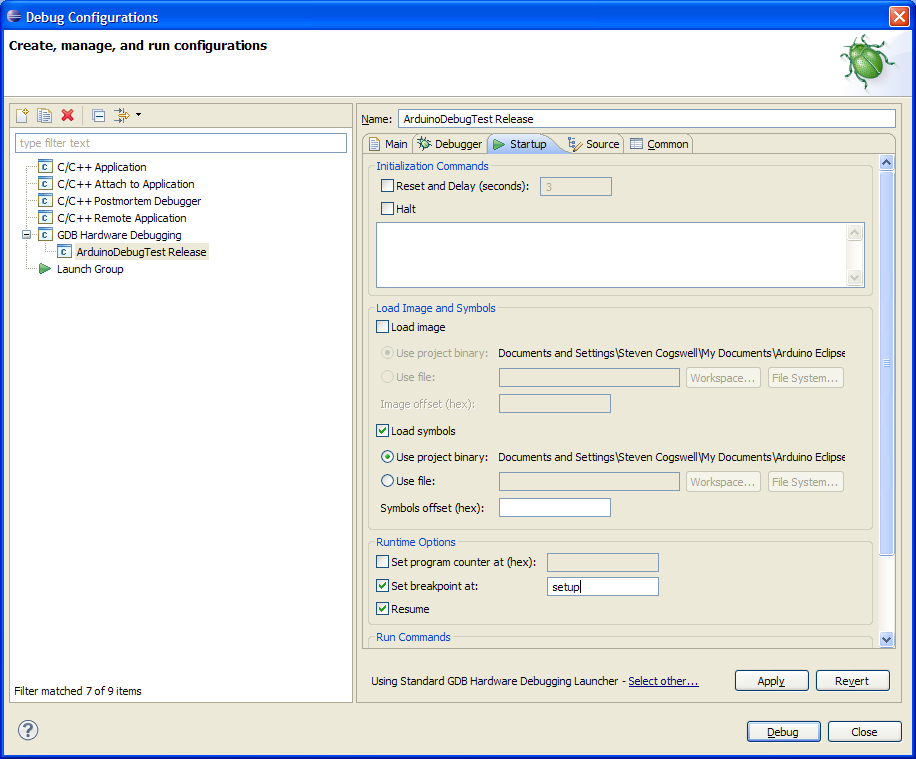
Then in the “Startup” tab have the setup as shown. Note this is different than the AVR debugging article setup. In particular rather than break on “main” we’re going to break on “setup” since in the Arduino version of the world the “main” is hidden. Turn off reset, halt, and load image (I couldn’t get it to work anyway). Turn on load symbols. I don’t make any changes in the next two tabs (source, common) so you can leave those as is.
Once you’ve got all the settings done, you can click “Apply” and close the dialog. Don’t bother trying to start “Debug” yet, because we need to get AVARICE running.
Running AVARICE is pretty easy. In a command window:
avarice --debugwire --dragon --ignore-intr :4242
If your Dragon is connected properly, you have libusb active as the driver, and your chip is in DebugWIRE mode. you’ll see this:
AVaRICE version 2.9, Jan  7 2010 22:42:57
JTAG config starting.
Found a device: AVRDRAGON
Serial number:  00:a2:00:01:11:76
Reported debugWire device ID: 0x9406
Configured for device ID: 0x9406 atmega168
JTAG config complete.
Preparing the target device for On Chip Debugging.
Waiting for connection on port 4242.
If you get an error, check that you’re using libusb. Also in most cases just cycling the power on both the Dragon and the Arduino puts it back to working. If you give avarice a -v flag for verbose it will constantly spit shit out for you to read and not be interested in as you debug.
Are we there yet? Start the Debug Session
Okay, with your eclipse debug configuration set, debug-enabled code uploaded to the arduino, debugwire enabled, and avarice up and running and waiting for a connection, it’s time to start up the debugger. Click the little bug and select your debug configuration. It will want to change “perspective” on eclipse to show the debug windows, go ahead. It’ll also rebuild your code, but don’t worry about that, since it should be the same version that’s on your arduino already (right?).
if you look at your command window, you should see AVARICE has hooked up with GDB:
Connection opened by host 127.0.0.1, port 4951.
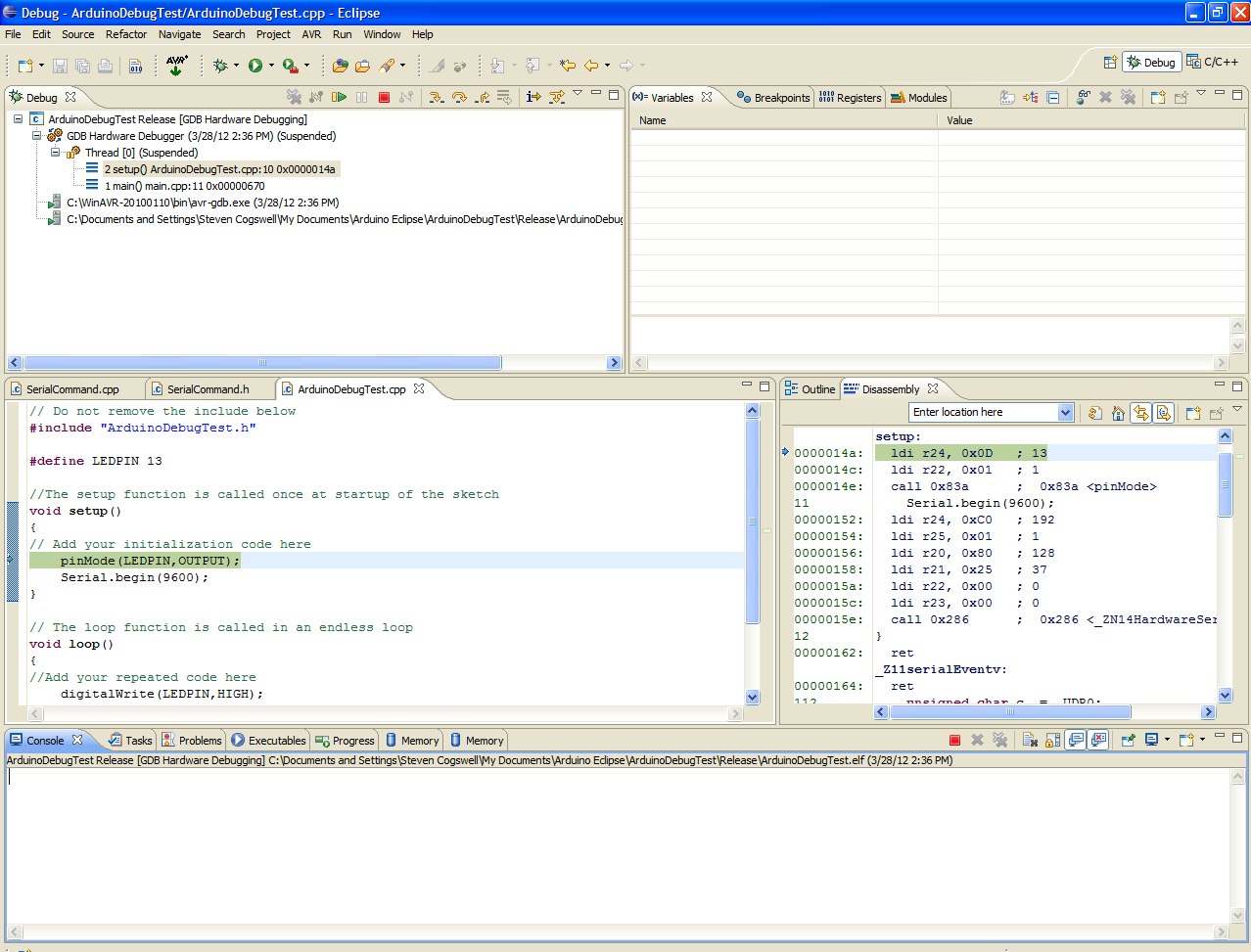
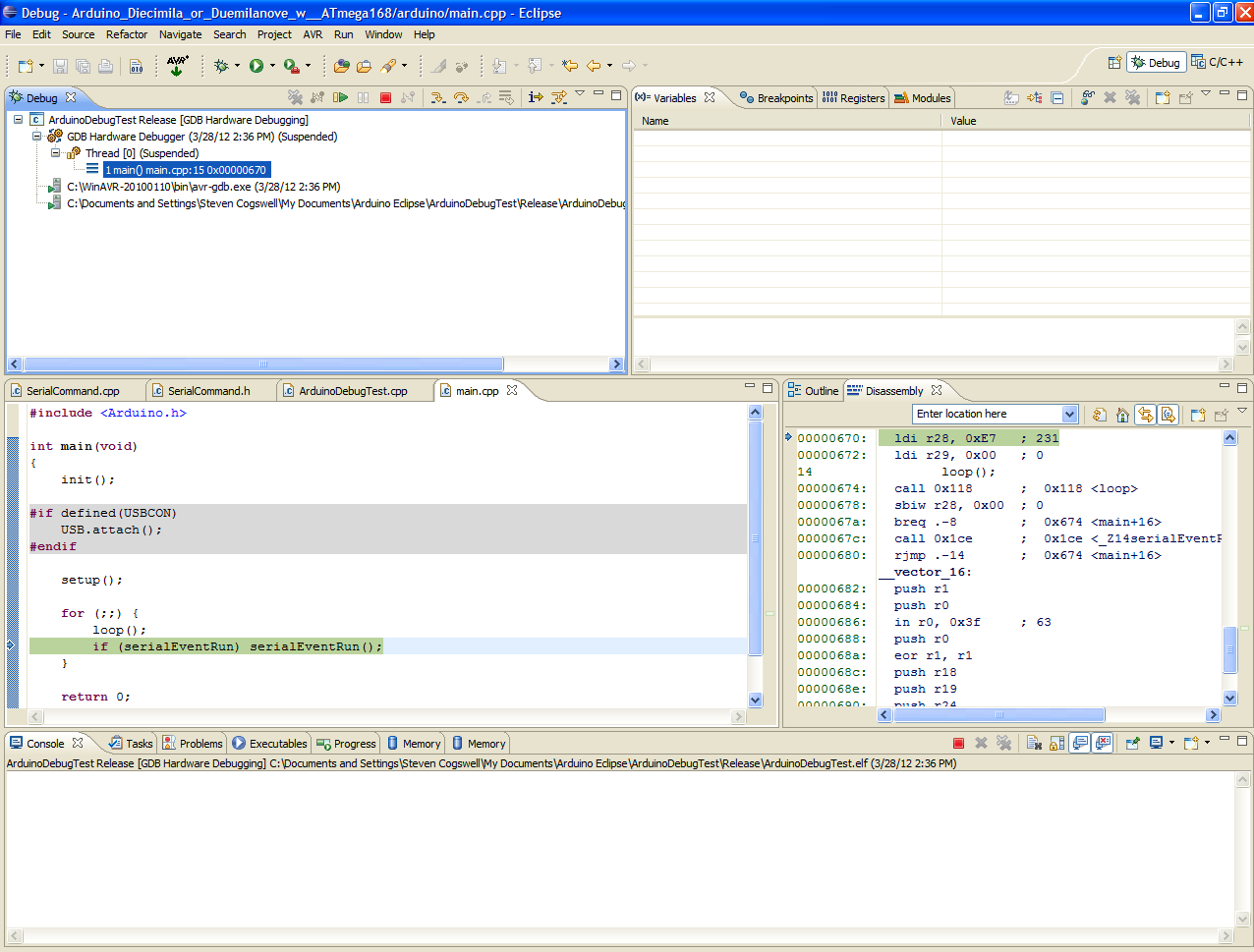
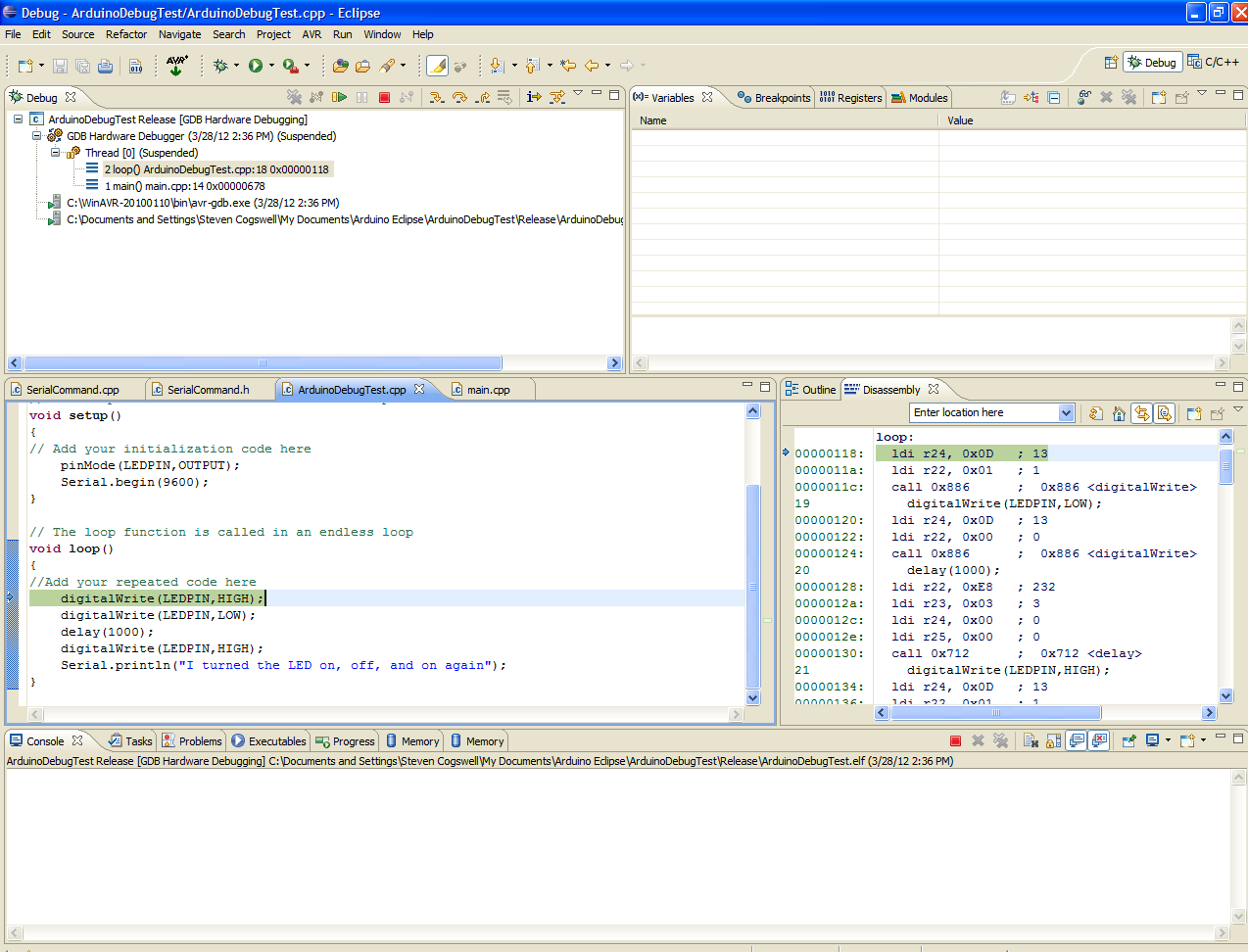
and ta-dah, that’s really it. Because you set the breakpoint for “setup” the code initialized and stopped at the beginning of your setup() routine. Now you can use the single-step commands in the toolbar to march through your code. When you end your debugging session AVARICE will quit, so you need to restart that before you restart debugging. The chip will remain in debugwire mode so you’re all set.
So now, you’re debugging, is it what you expected? Arduino’s success as a platform comes from the fact that the hardware is cheap, the IDE is easy to use, and the Arduino Core is a shitload huge library of awesome functions that make coding for it easy. If you use the “step into” command you’re going to be buried under the mountain of code that goes together to make your own Arduino code run, which will get pretty tedious, and you normally don’t have to debug yourself anyway. Also, timing based things (delay(), sending serial stuff) is going to get seriously broken if you try single stepping through it. Your friend in these cases is the “step over” command in the toolbar, which essentially says “run this whole command, including any subroutines, and come back after you’re done since I don’t want to see any of that single-stepped”.
As the exercise, you can single-step (step into/step over) until you get into your loop() routine, and then you can use step-over each of the digitalWrite() commands, and you should see the light on the Arduino change accordingly. When you hit the delay() and the Serial.print() you’ll want to use step-over unless you’re not bored enough single stepping.
You can set breakpoints and use the “resume” toolbar icon to say “just run until this line gets hit, then I’ll start stepping”, which can be useful if you have a lot of code that runs before your routines you want to debug are executed.
You’ll find your code keeps jumping out to this previously-hidden main() routine, which is how C/C++ actually works, so you just have to step through that back into your loop() code each time.
Also debugwire disables SPI, so if you were hoping to use this to check SPI hardware, I’m afraid you’re out of luck. Back to Serial.print(), or using something like a logic analyser (I have the Salae one).
To get back out of debugging, there’s a red button on the toolbar called “terminate”.
Note that when single-stepping it can take a seemingly long time between steps, because GDB/AVARICE/Dragon is doing a lot of talking amongst themselves getting status from your chip. I believe every time the single-stepper stops the Dragon dumps the entire contents of the Arduino’s ram for display by GDB/Eclipse. You do get lots of fun light flashing on the Dragon during all this, though.
Optimization Can Be a Bitch
The sample program above didn’t have any variables, on purpose. When you’re debugging in Eclipse one of the windows shows the variables in your program, which is – in my opinion – the best part of debugging. It lets you spy into the variables and see if variable “a” is really holding what you think it’s holding. I didn’t use any variables for illustration above because it wouldn’t have worked right, here’s why, and here’s how you work around that.
The Arduino is an embedded platform with limited ram and storage (flash). The Arduino people (correctly) turned on size optimization in the Arduino’s compiler. Optimization is big topic in compiler design, and it essentially boils down to “the user wrote this code to do this task, and as the compiler I will re-write it to make it work faster/better/smaller”
The problem with debugging optimized code is that… well, it’s different code than what you wrote. In particular, the size optimizer (-Os) on GCC will do some amazing stuff like “you set this variable, and never used it, so I removed all references to it from the actual compiled code.” There’s also the general case of “oh, you didn’t have a lot of variables, so instead of keeping them in ram I kept them in registers instead for easier access.” Variables held in registers tend not to show up in the “variable” window so you can’t spy on them, you have to go look at the registers directly.
Let’s do a little experiment to show this. Make a new Eclipse Arduino Sketch called ArduinoOptimizerTest and use this code in your .cpp file:
// Do not remove the include below
#include "ArduinoOptimizerTest.h"
//The setup function is called once at startup of the sketch
void setup()
{
    Serial.begin(9600);
}
// The loop function is called in an endless loop
void loop()
{
    int a;
    int b;
    a=25;
    b=a+a;
    Serial.print("a is ");
    Serial.println(a);
    Serial.print("b is ");
    Serial.println(b);
    delay(1000);
}
Now this is a damned boring program. It stores a number in a variable, does some math, and prints it out. Yawn. You don’t need an Arduino for this, but we will do this to show just how much the Optimizer works to make you a better person. To show we’re not cheating, build this with the debugger info set, load it onto your arduino, and check it with the serial monitor to see that it does give output. (“a is 25” “b is 50” over and over).
Easy, it worked, right? This is a stupid experiment, right? So now go into debugging mode with the Dragon. Put the chip into debugwire mode, do a debug config, and start debugging in Eclipse and have a look at what’s going on.
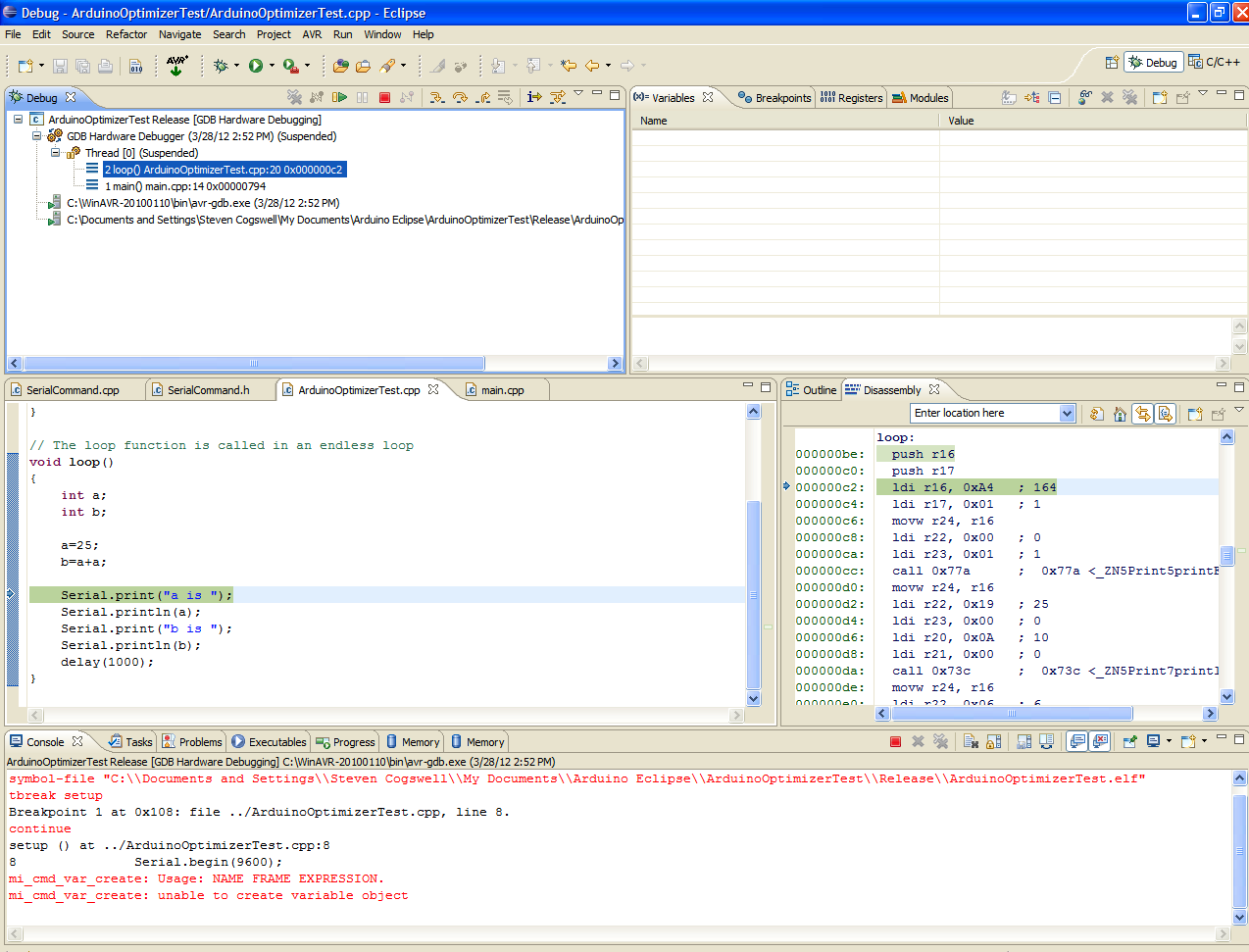
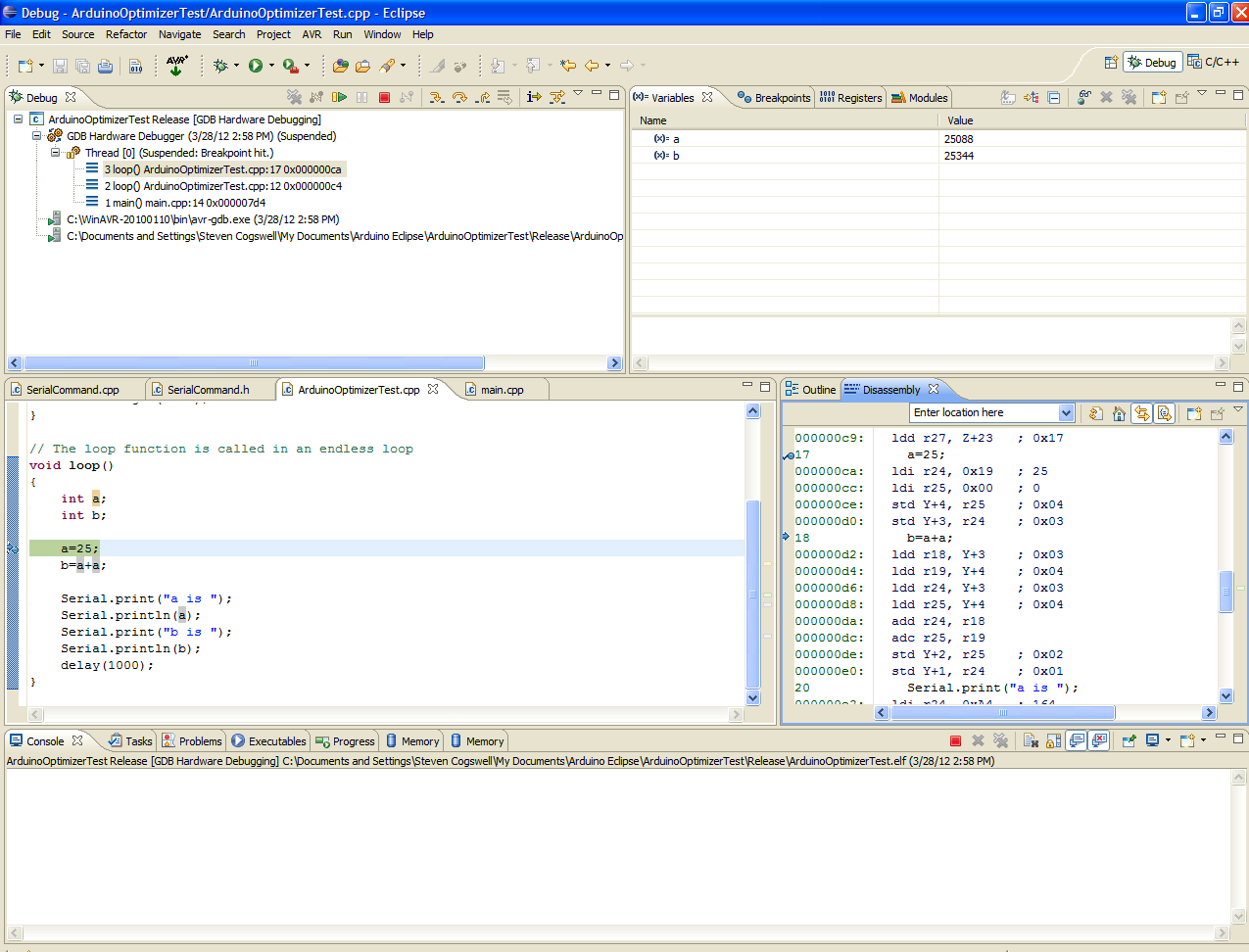
Oh shit, check it out. See when you ran your program and single stepped it… it never ran the a=25 / b=a+a lines, for some reason the single step went right over them to the Serial.print() line. Why did it do that? Well, check the disassembly window on the right hand side. The Disassembly is the “these are the actual machine code instructions GCC compiled your code into and are running on the Arduino.” It’s a lot of strange looking little single-purpose instructions but you can see how your code has been translated into the machine code.
See how it says “loop:”, a couple of push r16/push r17 and then the instruction pointer for “Serial.print” is that “ldi” instruction? The GCC -Os optimizer said “you know what, you set those a and b variables, but never actually use them other than to do that print, so we just skipped all that and moved it all into the print call itself. The code was simple enough that the optimizer optimized it all away. The results are the same, but the execution is different than you expected.
Note that this is not actually a problem, this is a good thing. It means the compiler is looking out for you and trying it’s damnedest to make your code fit in the limited Arduino space and still do everything you want. It does mean that if you’re stepping through the code you may get surprised.
As an aside, many many many years ago when I was writing unix code on Sun systems you could not debug optimized code at all with the debugger. You had to debug with the un-optimized code only. So if you had a bug that showed up when optimized, but not when un-optimized, you were really shit-outta-luck. It was the best thing evar(tm) when GCC started doing enough work to let you debug stuff that had been mangled by the optimizer.
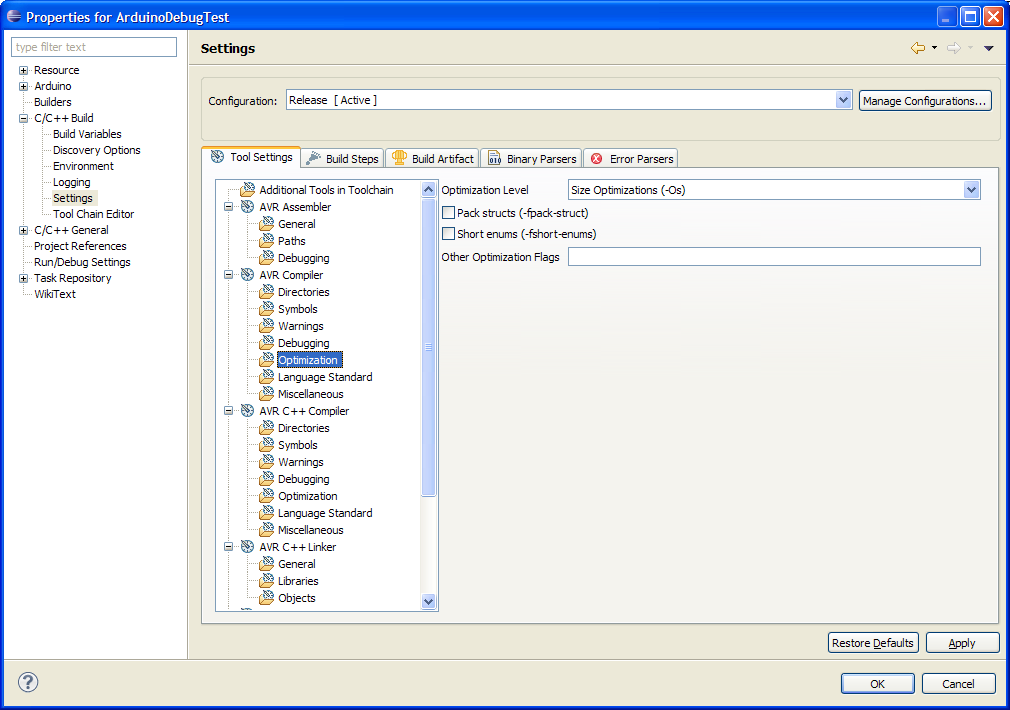
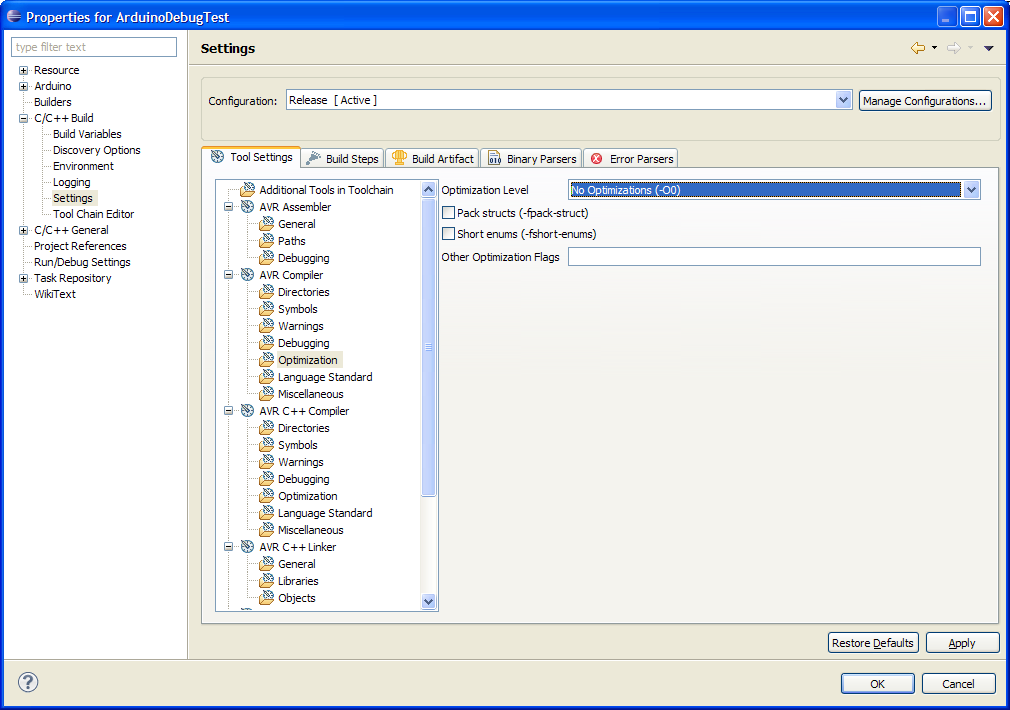
So okay, as an academic exercise now, what if you want the “pure” code you wrote to debug, and not the optimized version? Easy. We go back into the project properties and turn off the optimizer (-O0 instead of -Os for both the AVR Compiler and AVR C++ Compiler).
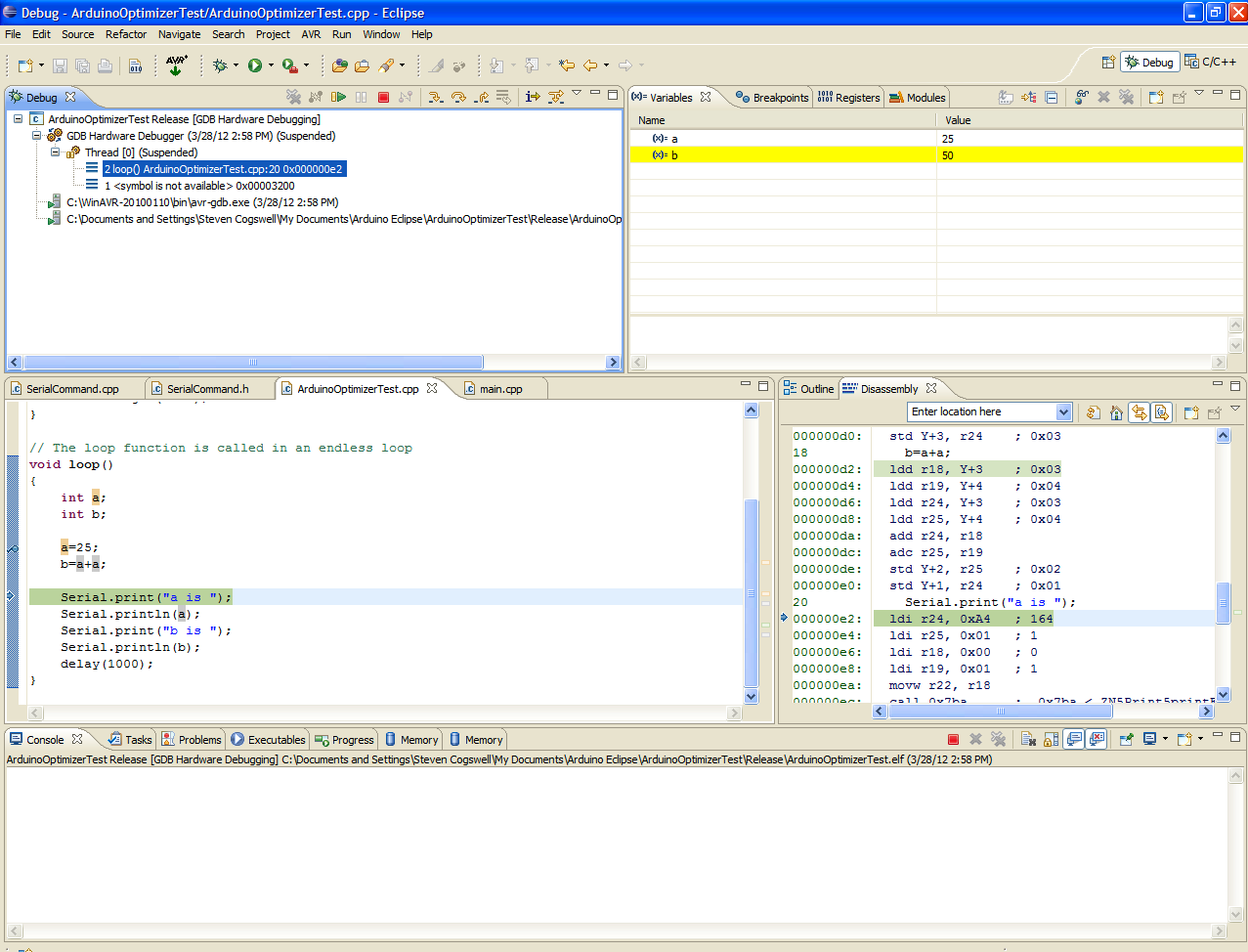
Then you have to rebuild – right click your project and do “make clean” first, to make sure all the code gets rebuilt without optimzations. When your build finishes you’ll see that sure enough, your code is larger than when it was built with -Os. You could get a problem where the code could be too big to fit in your Arduino, but in this test case it’s still okay. Upload the code to your Arduino (remember you’ll have to take it out of debugwire mode to do that, then re-enable debugwire again), start up AVARICE, start up the debugger, and here’s what you’ll see:
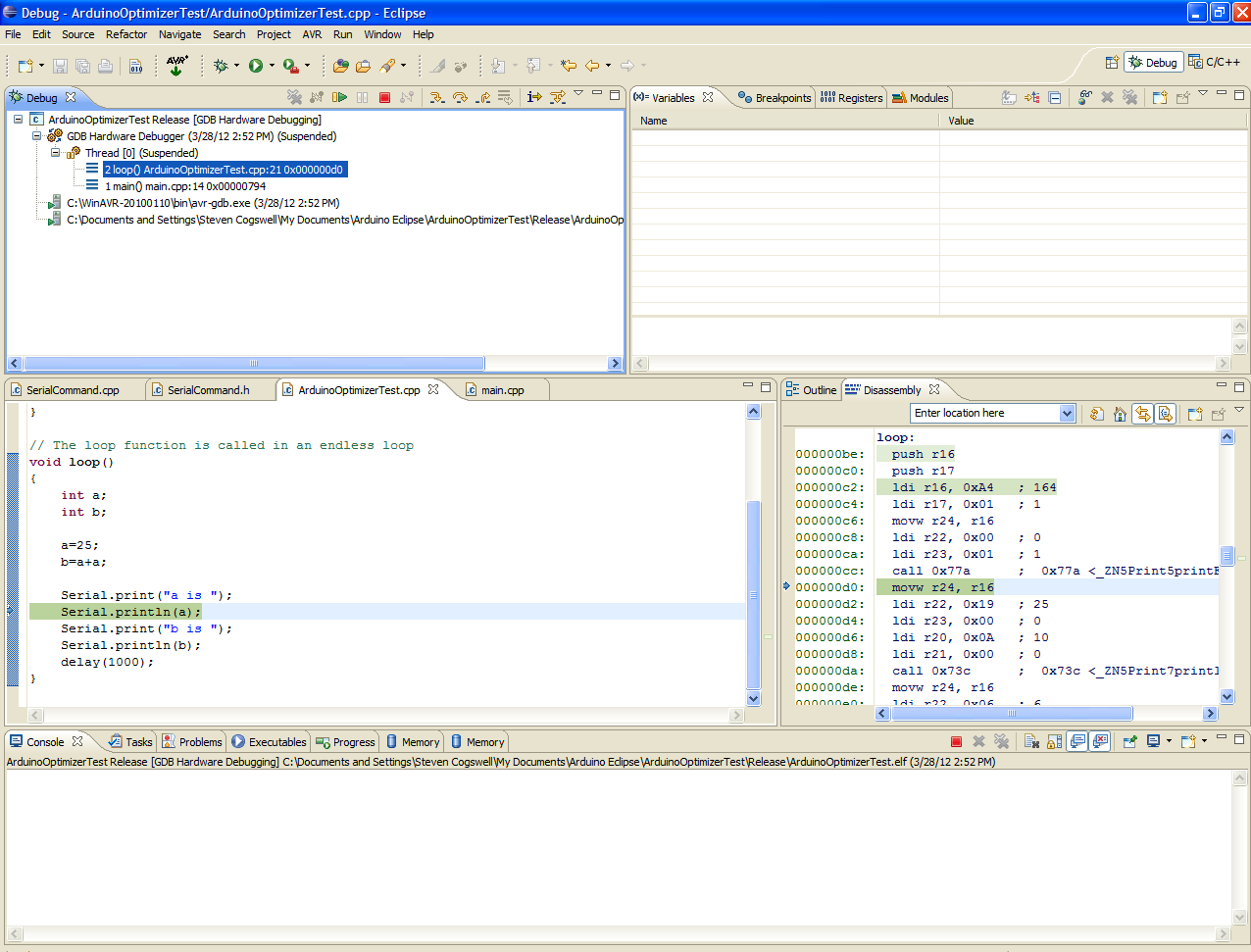
See that the instruction pointer will actually be able to land on the “a=25” line, and the disassembly shows that there’s actual code assigned to it now. You can also see the disassembly directly for each of the instructions that follow (a shit load of instructions to do something that seems simple, isn’t it? This is why the optimizer works so hard for you).
In the two screenshots you can also see that “a” and “b” were set to some random values before being initialized, which is the reason you initialize variables.
Remember to re-build your projects with optimization on (-Os) again if you’re going to continue.
If you’re doing all this on Linux, you don’t have to worry about the libusb steps, since avrdude/avarice work on linux just fine with the default ubuntu install. Also there’s no AVR studio for linux, so hey, no having to deal with that end at all. Just remember how to set your chips back to factory with avrdude if you mess things up.
Condensed Version
Write Code in Eclipse, build without errors
Upload to Arduino over usb-serial in Eclipse
Enable DebugWIRE on Arduino with AVRDUDE
Start AVARICE
Configure and start up debugging in Eclipse
Debug until your eyes cross
Disable DebugWIRE when done
Summing Up
So this works for me, maybe it will work for you. Is it easier than debugging using my previous method with AVR Studio? I guess that depends on how much you like Eclipse.
Is this any better than debugging using AVR Studio? Not sure on that one yet, I’m still investigating doing the debug with AVR Studio 5.1. Certainly less toolchain setup in that case. Using Eclipse in the mix does give you better diagnostics on code errors than using the Arduino IDE, at the cost of more complexity.
Is any of this easier than just using Serial.print() statements? Hell no. But if you really can’t figure out why something’s not right, this might be the best way.
Finally, here’s another Arduino picture, as required by law.
Last year I wrote up a big nothing about the stats here on my repository of garbage. This year I figured I’d do something similar but I’d dial it back a bit.
First off, here’s the top viewed stuff during 2011.
Post Title
Views
Modify an Arduino for DebugWIRE
4,952
(Yet Another) Sparkfun SerLCD library for Arduino
1,291
The Arduino Duemilanove with ATMega328 and that Reset Line
710
A Minimal Arduino Library for Processing Serial Commands
654
An Arduino Library for the ADT7310 SPI Temperature Sensor
478
So, you want to move to OSX Lion.
448
An Arduino-Based MIDI Wah Controller for Logic Pro
375
Using the Sparkfun Speakjet Voicebox Shield with an Arduino in Passthrough mode
268
A Too-Simple Arduino Library for Handling the Seeeduino Relay Shield (and Generic Relays)
You don’t give a shit what I think of Duke Nukem Forever, and neither do I.
129
Don’t get Lien’d on in New Brunswick
118
Dark Sparkling Crystals
88
Why iBooks Sucks
79
Easily Melted
79
Pay No Attention to that Crap Behind the Curtain
69
Get yer mail from Thunderbird into GMail in Zero Steps
54
Late to the Party
50
Torchwood: Miracle Day Review and Analysis
46
Invalid Opcode at 0027 with Spinrite
45
Loop it through Jones
44
It’s no surprise that the “do my homework for me” posts are top of the list, as usual. Most people reading the OSX Lion post are either (a) trying to get it to run on their G5 (it won’t), or (b) trying to find out how to pirate it (pay the $29 you cheap fucks). The first music-related post you get that’s on the list is Dark Sparking Crystals, and the problem is those aren’t even real stats.
This year was the year of wordpress referrer spammers. I won’t go into the details of referrer spam, but essentially if I were to look at my stats for things, this is the sort of bullshit I’d see.
I even went as far as to change the url of Dark Sparkling Crystals (see what the url is there), and that didn’t have any effect. I’m sure if you’re a big time famous blawg that these things barely show on your radar, but in my case most of 2011 is made up of referrer spam.
The next highest musical bit was from Easily Melted, which was just a case of mistaken identity. Easily Melted – which was published in August 2009 – got a big bump in August 2010 from people searching for (natch) “Easily Melted.” I figured it was some political thing, given the results I see when I search for “easily melted”.
Late to the Party makes the list again as the post that’s the “next” post from the DebugWIRE post. People surf in to try and get the DebugWIRE post to do their homework for them, click the next, have to see Merlin Mann, then quit.
So yep, of the new music done in 2011. The most poopular was Loop it through Jones. The sad part of that was that unlike everything else I make, The Dolphin was the one piece of specifically crapped together just by tossing apple loops into an assemblage. That was a reaction to the accusation that all I did was “stick apple loops together” (which I don’t), and sure enough it becomes the most poopular. I can’t win.
You have to go a bit down the list to find the first original music post, and it’s The Rampart Part 1 from Rampant in the Carpark (35 views), which I think drags a lot of people in searching for “Reaping previous system.” The next one is XMESSTWOZEROONEONE from Tis the season to cash in (28 views), and think that’s because this blawg’s only reader Scott Redman pimped it out a lot before xmas.
I won’t bother detailing out a list of results like last year, but suffice to say that the median number of views for a musical post is 7.
I didn’t really get any fun search terms this year. Just things like “caustic soda instructions”, “steven cogswell asshole”,people with homework to do, and lots and lots of people looking to pirate osx for their G5.
The all-time champ for music is still 2009’s The X Stands for CASH (2009’s xmas bullshit). Now runing at 90 view.
The most popular downloads are the schematic from the “do my homework for me post” (420 downloads, which I’m sure is ironic), and the second being my SerLCD arduino library (225 downloads). I suppose it’s a mark of achievement when I find my libraries being reposted as other peoples’ work. Sigh.
So what about other things? This year I continued with Radio Reddit, which near as I can figure is pretty much dead. It overflows with people submitting music and nobody actually listening.
This year I submitted “Boardozer” and “Thumbtack”, and here’s my to-date-since-joining-Radioreddit stats. Last year’s AWXMASFY submission never got approved, so I never bothered trying submitting this years xmas crap.
I bet if you were to multiply the number of plays through by the number of listeners the results would be pretty poor. Also, nobody ‘submitted’ my music for voting this year – which only exemplifies the lack of interest in Radio Reddit.
I also bought “ad space” on Radio Reddit for two months (not to promote myself, for someone else) and while the Radio Reddit guys were really good at taking my money, I got zero communication from them. I was supposed to get statistics and such and got nothing. I emailed, I submitted questions and nobody would get back to me. So I gave up on that.
Back in September 2011 I joined Soundcloud, as it was the one site that will let you embed a player on a wordpress.com blawg. From the stuff I see people can’t figure out how to use the wordpress audio player. (Hence my Public service announcement for dorks). I thought maybe the Soundcloud one would be a little more obvious.
Soundcloud is pretty easy to use. The problem is their business model doesn’t fit for guys like me with tons of hours of material. The “Solo” level costs me €79 a year, and still “only” gets me twelve hours of storage space. The 2009-2011 stuff comes out to about 16 hours as it is, without counting what I call “the old music”. Hence I didn’t put any of the 2009 or earlier material on Soundcloud. The next tier up is a mind-numbing €131 a year, and I ain’t payin’ that much just to contribute to my loser hobby.
Soundcloud’s stats are flat-out confusing, and at one point there was a post from them acknowledging they were wrong. I’ve never been able to make sense of their charts. Here’s the best I can get you:
The problem with Soundcloud is that – unlike wordpress.com – if I look at my own stuff, even while logged in, it counts it as a view. So I have no clue how much of that is me, or is someone else. Pro tip: if you’re looking to game Soundcloud, you’ve just seen how. Most of Soundcloud seems to be made up of people who toss loops together and call themselves “DJ’s” anyway.
I did get a bit of hate mail this year, which I won’t bother talking about, and I did get one ‘thanks’ for the “help me do my homework” post. So, thanks. Scott Redman remains the only regular listener, near as I can tell. Scott’s a great guy.
I didn’t make it onto No Agenda this year, but I did make a new theme to replace my old theme for Starbase 66, the international Starlost podcast. I had a bunch of stingers show up on Here Goes Nothing, and For Those About to Rock, but it’s doubtful you would have noticed those unless you were on the lookout. My post on Duke Nukem Forever was enough to get me an appearance on a plodcast – which then got cancelled. I also made a terrible appearance on Starbase 66 #100, for some reason I haven’t figured out yet.
This year I tried to avoid doing as many “cover” pieces as I have in years past, since they just invite complaints. I did still manage to put a couple in, however. No lawsuits yet. From my own stats, Schwarzchild Radius, Boardozer, and The Rampart Part 1 were the ones I listened to myself the most. I did like the bit starting around 5:00 in Undisputed Wavyhate Champion (what a terrible title that is), and Last Drink Before the Abyss I think manages to mesh my amateurish ukulele playing with the rest of my amateurish playing. Will You was so well received someone thought it was a joke piece I’d ripped off from someplace else. Oh well.
Summary: 2011 sucked ass, but at least I didn’t smash any bones up this time. AWTFY.
And With That, the end of 2011’s disastrous run of music comes to a close. As is the tradition (2010, 2009) I’ve bundled up all the garbage of the last twelve months and stuck it into a single archive so that both people who read this can download it. You can still listen and download individual tracks from the 2011 music page, on Soundcloud or Bandcamp.
According to my expert calculations this year’s stuff clocked in at four hours, forty-seven minutes and forty two seconds. Slightly longer than 2009 – for which I only published for about half the year, but quite a bit short from 2010, which was just over seven hours. As I was famously told once, it’s hard to get up when you’re standing on my neck.
There’s nothing new in the archive that wasn’t in the previously-available download. Don’t bother downloading it thinking you’re going to find l33t crackz or keygens in it.
Maybe you can download the archive here (521 MB). (Mirror which will also go away) Those went away, as expected
The MD5 is cb39faabd9247157efab6c32c4a0da1d. You still don’t know what MD5 is, and I still don’t care. Apple’s me.com is going away, and so this archive will be unavailable from me.com after it goes away, because that’s what going away means.
Update:If you were really, really dying to have this in an obscure or lossless format, well then you want to go to Something or Other on Bandcamp, where you can get that. It’s still free.
This year’s cover was again designed by Ro Karen, who spent more effort making this cover than I probably did making anything to go with it.
Speaking of not caring, as usual the licence (license) for this is the same as always, some Creative Commons mumbo jumbo that you’re not going to bother adhering to.
Yes, everything is free. Yes, you can download it for free (even the lossless Bandcamp version). No, you don’t need to go try to find it on the pilates bay because it’s for free right here. If you want to do something with your money give it to Ro Karen or your local animal shelter. I know, you won’t, because you’re so poor. Since I’ve not charged you anything, I’ll not entertain any complaints about how it doesn’t play on your ancient computer or it isn’t ogg vorbis or I haven’t provided you with source code so you can run it on your hipster coffee machine. I’ve already made a lot of snide comments about people’s inability to follow simple instructions in the previous years’ roundup archives, so if you want better jokes go read those.
As I did last year, if you send me a request I’ll mail you a disc with everything on it.
Note: number of requests for discs I had in 2010 was zero (0).
















 The inability to follow simple instructions




You must be logged in to post a comment.