Recovering Installed Firefox Extensions (i.e. – Socialite)

Let’s ignore the fact that today that my car got repossessed – not because of me, but because the previous owner that I bought it from a year ago declared bankruptcy and the credit union still had a lien on the vehicle, all news to me. As usual, it gives evidence to my conjecture that people are stupid and everyone will let you down. But enough of that.

I like Reddit. I also like the firefox extension for Reddit called Socialite. Socialite gives you an extension-level toolbar at the top of the screen when you click on a link to an article in Reddit. Some people like that for the up/downvote and submitting links. I don’t use it for any of that garbage. I use it to get me back to the comments page for the link, since I tend to open a half-dozen tabs at a time and then can never find the original comments thread for it again.

Problem #1: The current Firefox is 3.6 (4.0 is in Beta, I don’t use 4.0). The current version of Socialite does not install under 3.6, despite saying it has compatibility. The author at one point pushed out an update (1.3.3.8) that did install and work under firefox 3.6 – but it was labelled as experimental.

Problem #2: This 1.3.3.8 extension has disappeared completely from the mozilla add-ons site. Or at least, I can’t find it anymore. 1.3.3.1 doesn’t install, and 1.3.3.8 is gone. I don’t think the author is working on it anymore since it’s been 2009 since an update. I can’t blame them, I wouldn’t want to deal with updates. There are also reports that voting is broken on Reddit with 1.3.3.8 (perhaps due to an API change in reddit itself).

Problem #3: Alternative? The reddit “toolbar” you can turn on in your Reddit preferences really just sucks. Frequently you don’t get the page content because it’s been re-framed. Things like Reddit Enhancement Suite really don’t do this function.

So, what? I had the problem I was installing Firefox on a different machine and couldn’t install Socialite 1.3.3.8 from the Mozilla Add-Ons (and hence how this whole thing started). The saving grace: I already had Socialite installed on another computer. Except…

Problem #4: It’s not that obvious how to move an extension from one Firefox installation to another. I could move the whole profile, but I didn’t want to do that.

So, I eventually fixed this by doing some google searching and found a Firefox extension called FEBE or, the “Firefox Environment Backup Extension”. FEBE allows you to back up stuff from your Firefox installation. The nice part? It collapses the extensions back into .xpi files.

Long story short: I installed FEBE onto a machine with working Socialite. Did the backup, pulled the Socialite{1.3.3.8}.xpi from the backup, copied it to another machine, and installed it into Firefox. With .xpi files all you need is to open it from “File -> Open File …” and pick the Socialite{1.3.3.8}.xpi file. You’ll get the standard warnings about installing things you don’t trust (which, if I look, seems to be just about every got-damned extension on the Mozilla Addon’s site, since none of them have verified authors). Worked like a charm.

Also probably actually useful for backing up your Firefox extensions in general.

Addendum: You can get Socialite 1.3.3.8 as source from Github, but you’ll have to build it yourself.

Addendum: May 12, 2011: Socialite 1.4 is finally released and works with Firefox 4. I can finally upgrade

Pay No Attention to that Crap Behind the Curtain

So, since 2010 is but a distant memory and 2011 has already started to suck ass, I figured I would share with you some of the stats from this lousy stuff.

Technically I got these stats on January 11th, 2011, so they run the calendar year Jan 11 2010 – Jan 11 2011.

Boringly, let’s look at the search terms that land losers in this place.

Search Terms # of Searches
debugwire 233
arduino debugwire 79
debug for arduino board 61
arduino jtag 39
debugging avr dragon 36
arduino dragon 30
avr debugwire 30
debugwire arduino 30
avr dragon debug arduino 28
arduino debug wire 23

Notice a trend?

I think the most interesting search terms were “asshole instructions” , since I guess some people don’t know how to use theirs correctly. Related, whoever keeps searching for “jim tranquilla, microwave technology”: If you’re reading this, he still owes me $33,253.63.

First off, here’s the “non-musical” posts. You know, those ones about the microcontrollers and shit where people are trying to find someone to do their homework for them.

Post Views
Modify an Arduino for DebugWIRE 2,910
The Arduino Duemilanove with ATMega328 and that Reset Line 481
(Yet Another) Sparkfun SerLCD library for Arduino 178
An Arduino Library for the ADT7310 SPI Temperature Sensor 141
iPhone 3G and iOS 4.0 slowness 57
Why iBooks Sucks 26
Get yer mail from Thunderbird into GMail in Zero Steps 25
Solution for iOS4 on iPhone 3G 14
Woe to the Stupidshield 9
Buy Craig Bevan’s Album Instead 6
Rub a bum bum (Tim and Brad’s Xmas song) 6
Macrowaves and Peeps 5

Okay, take a look at that first post (the “do my homework for me” post). 2910 views. Now, let’s look at the musical posts. The top musical post is “And Something About A Witch”, which got 47 for the year. I have no idea why that’s the top one, other than Brad Thornton is a talented and popular guy.

I often joke about the fact that only two people actually listen to my stuff, and that pretty much shows. For the sake of brevity, only things with 5 or more views for the year are listed. Some actually have zero views, and that’s cool. I have wordpress set to annoy the five people in the magic ice cream club who follow me on twooofter and I usually get more rebleats than actual views. I also realize that WordPress’ stats aren’t exactly accurate.

The dull as dishwater musical details:

Post (music title in brackets) Views
Nothing about Big Dogs (And Something About a Witch) 47
That’s some Big Dog(WHO BEAMED THE BIG DAWG OUT) 46
Guaranteed to Offend (Hail the Eternal King of Olympus Mons) 41
In a Galaxy Just Next Door (Theme from the Waxbase) 32
Late to the Party (Mein Waffle) 31
2009’s Pig in a Slanket Collection. (2009’s music as a collection) 30
Come On, Now You’re Not Even Trying. (Dean of Science) 25
The X Stands for CASH (Suxmas, from 2009) 24
The Past Future Imperfect of Law Enforcement (Lament for a Cyborg) 23
Make It Stop (WTFTATR) 21
Rampant Attempt at Seasonal Commercialism 2010 (AWXMASFY) 17
The PenIs Mightier than the Sword (You Got Kicked in the Pills) 17
Crackpot, Buzzkill, Asshole (Buzzkilled and In the Morning, Yo. Featured on No Agenda) 17
Catbounce (Nitrogene) 16
I Warned You. (Glaze) 15
Still Ruining Other People’s Work (She Insisted) 14
Green’s Function and Reciprocity Chicken Chicken Chicken (Euclidean Space) 14
Decompression Fitting (Wrath of the Waxbase) 14
A Public Service Announcement for Dorks. (not music) 13
Load of the Rings (Amon Hen Goes Nothing) 13
QUOTA IS NOT MET (Omatic) 13
Sham Along (Fence Post) 13
Fifty Seven Seconds (The UxHJ, not music) 13
Whoring Out Roundup (Theme from Sexbase 69, For Those About To Disco, and
A Very Special For Those About to Rock)
11
Live from Douchestock (A Flash of Internal Organs) 11
You still won’t like it (Haus of Waxbase) 11
Intermission (L’Hopital’s Rule) 11
Move along, nothing to see here (Teared, from 2009) 11
… and Special Guests The Harlem Globetrotters. (Metalologist) 11
Creep’s Show (Feature Creep) 11
The House the Tired Meme Built (Eerie Ham) 11
Meh. (Meh) 10
The Cut of your Jib (Herp deDerp) 10
Stink it up (Stink the Bismarck) 10
Bonus Wound (Ah Pretension) 9
The Defendant Ate The Witness (Trial for the Shark) 9
PUT THE GLASSES ON. (THEY SUCK) 9
Ratyuan Poroga Westip Ubucap (Yarga Lomba) 9
No Profanity Contained Wherein (The Pimento Oaf) 9
Executive Derision (And With That) 9
Cleanse the Patella (Le Parc du Coq Sac) 8
And now there only was. (Fart in a Spacesuit) 8
The Contractual Obligation Piece (Interstellar Crotchicanery ) 7
Two Thousand and Ten and One and Two and Three and (Sacrifical Anode) 7
Genie in the Bottle (Spilled) 7
The Dork Knight (Midknight) 7
Decoughinated (Punitive) 7
Timed and Timed Against. (KICKSTANND) 7
Sabre Dance (Conference Slide) 7
The Interactive Nonfiction Best-Seller (Antialiased) 7
With Powdered Milk Love is Eternal (Interior Liquid) 6
The Hedgehog’s Hedge Fund (Beatstone, from 2009) 6
You want your money back. (Auld 2010) 6
Five Pack of Brown Paper Bags (Endless Chicken at the Ritz) 6
Sold. (Kimg of the Assholes) 5
Voided (Destination Waxbase) 5
Fourteen Sticks (Skein of Evil) 5
Movie of the Weak (Oak) 5
You can’t catch salmonella from Cooley-Tukey. (Walt’s Crack, from 2009) 5
Mindless Repetition is Boring. (Fawdown) 5
Screaming Bunny Ninjas (The Catscape Expanse) 5
Dubious Achievement Unlocked (Have You Seen) 5
The Gene Pool Can Be Pretty Shallow (Off the Weak End, from 2009) 5
2010’s “AND WITH 2010, FU” Collection (2010’s music collection) 5
Fatfinger and the Humminao Zwo (Humanatio, from 2009) 5
Wide Open Throttle (WOT) 5
Carborundumbest (Reaction Bonded Carbide Blues) 5

Now, those are post views, and all the music posts have the embedded flash music player (I can’t get stats for if anyone actually plays anything from the flash player), but you can also download the MP3 to keep if you wish. Very few people do that. Top one of those is “Hail the Eternal King of Olympus Mons” (16 times), and then “Euclidean Space” (9 times). Lots of people download the schematic for where to pop off the capacitor from their Arduino, for some reason.

In trivia, the reason Meine Waffle is so high up the list is because it’s the post adjacent to that “do my homework for me” thing with 2910 views. People read about how to cut off a capacitor, click to see the next post, and then… leave.

Also in trivia, the “all time” top music post is “The X Stands for CASH”, 2009’s xmas crap (67 total).

I’m also dismayed that “Dean of Science” is as poopular as it was. Scott Redman, one of the two people who actually listen to this stuff, (unsolicited) sent me one of his guitars from his collection. The Dean guitar is beautiful, and a damned order of magnitude nicer than my Ibanez EX350 I’d been using up until that point. I took it out of the box, didn’t tune it, plugged it in and recorded something and pushed it out. Mr. Redman also sent along the acoustic guitar from “Teared” which appears in a few places. Thanks, Scott, who didn’t have to do that.

I should point out that I don’t ask for money or anything, as I am rich in the spirit of our Lord and Saviour Geddy Lee. Hell I’ll send you a disc of this shit for free if you actually figure out how to ask. If you want to support someone, donate some money to your local animal shelter or your favourite Podcast. Sometimes those are the same thing, I think.

I have this habit of taking existing themes/pieces and backing over them again like you would an old lady at the intersection. Big winner this year was the theme from podcast Starbase 66, for which I managed to squeeze out 1,2,3,4,5 versions, plus 6,7 which were the “Big Dawg” variations. Starbase 66 got so damned tired of listening to me do this they replaced their intro music with a variation of Theme from the Waxbase.

For Here Goes Nothing’s theme I ended up doing 1,2,3 (SB66 Crossover),4 and also Metalologist which featured a clip of Casey from HGN playing guitar. I also did a couple of stingers that made it onto HGN (“That’s Not Metal/Now That’s Metal”, and the F-U-Haiku backing track)

I did 1,2,3 bits based on For Those About To Rock, and by virtue of being the only entry did 1,2 show intros for them. “A Flash of Internal Organs” was a bit I took on as a challenge issued by the FTATR folks during an episode to cut their jibjab during that show into a song.

To round out the whoring-out report, Lament for a Cyborg got chosen by Brad Thornton as a closing theme for the first couple of episodes of his podcast A Brief History of Music.

In an embarrassing situation, the bit I’ve done that the most people have probably heard was “In the Morning, Yo”, which I managed to assemble from some snips of Adam Curry during an episode of No Agenda. I sent the thirty-three second piece to Adam and to my surprise he played it on NA244. No Agenda says they have around 450,000 listeners. Thankfully he did not credit me on the show.

This year I also submitted a few tracks over to Radio Reddit, and according to theory they add things to their playlist. The reality seems to be “they will add it to the playlist if I make a donation”. Well, not really. It just feels like that. I submitted AWXMASFY (2010’s Xmas crap) a few weeks before xmas, they even put out a call for xmas music to play on Dec 25th, and as of Jan 11th it still hasn’t been approved. Only two songs have actually been “submitted” to reddit by listeners anyway. (Unlike some folks, I’m not a whore and don’t submit my own stuff from Radioreddit to Reddit). Not really a compelling use case for Radioreddit, but hey, it’s there.

In technical terms, up until “Dean of Science” all the guitar bits were done with my Ibanez RG350 which I got at the pawn shoppe and has a shitty floating floyd rose tremelo I can’t stand. All the post-“Dean of Science” bits are done with the Dean. Scott’s a great guy, unlike myself.

The only other equipment change was at one point I got completely fed up with my Digitech GNX3000, which I’d been using for the guitar work. The GNX3000 was nice when it was new, but as of OSX 10.5 it had become just about useless. It was perpetually not being recognized as an audio input, making me hack the xml files and constantly reboot to get it to work, which kinda cramps your muse. I also noticed I was never actually using any of the onboard effects (which is what it’s for, dammit) – I was doing everything with the realtime processors in Garageband/Logic anyway. So I sold that and it went to a nice home, and got a Presonus Firestudio mobile unit, which runs over firewire and has been absolutely rock solid. I got that around the end of April, so probably everything from May onward was done with the Presonus. The acoustic is recorded with a Shure SM57 which also goes into the Presonus. I know, you don’t care.

Up until “Smoak”, other than a couple of test pieces from 2009 everything was done with Garageband. I had famously bought Logic 8 and hardly used it due to the learning curve. When I plunked out another five hundred bucks to buy Logic 9 I figured I had to learn it. First was “Test Was Negative” from 2009, then “Smoak”, and from “Theme from the Waxbase” on everything is done in Logic 9.

So, what did I personally think of this year’s shit? I’ll freely admit that I’m vain and I listen to my own music, since why the fuck not – that’s why I make it in the first place. Some pieces I think turned out not-so-bad were “Wrath of the Waxbase”, “Destination Waxbase”, “Spilled”, “Your Wallet, Sir/And Your Watch”, and “She Insisted”. Some other pieces have some nice segments (4:05 in “The Hazmat Suit Suite”, 5:34 in “Have You Seen”, 2:20 in “Conference Slide”, 10:25-11:45 of “A Flash of Internal Organs”, 2:05-3:00 of “Haus of Waxbase”). Some of them even I won’t listen to (“Omatic”, “Artherioysuisocialism”, “Deneb”, “Stump”). I have no clue what the two listeners liked/disliked.

Last year’s big piece that took forever was “You Look Feiss Today” (because it used so many tracks). This year’s big winner for time suck was “A Flash of Internal Organs” because of all the bits I had to do to meld in the lines from FTATR.

As if you can’t tell by listening to them, “Ah Pretension/The Ibuprofen doesn’t help” were quite literally experiments in “record something really fast and try to build something out of it”. I really liked how those turned out in the end.

I think the official count for 2010 was somewhere between 90-95 pieces depending on what you wanted to include. I only had a few things that I did that I never published. After hearing “Omatic” you’d have to figure that I’d publish anything. I have a few unfinished things that either I didn’t like anything I could do with them, and one case of a collaborative project that I think has died on the vine. I think the best part was tricking convincing Ro Karen to do the cover art.

So, that’s it. I haven’t picked out a name for the 2011 collection yet. And with that, fuck you.

2010’s “AND WITH 2010, FU” Collection

December 2012 update: There’s now a remaster edition available, Here’s some more details on that.

It is with great trepidation that I present to you, 2010’s complete collection known as “Crap Chute’s Sluice Juice” , which if you were observant would have known about since January 2010.

Here’s the best part only good part, the cover art:

Yes, you can download the full size cover art

The cover art was created specifically for this project by talented artist Ro Karen. You can find more of Karen’s work at http://www.lobablanca.com, which I guarantee is a place far more coherent and articulate than this site.

You can download the entire 2010 collection in one zip file here. me.com is dead

You can download the entire 2010 collection in one zip file here. google docs is dead

(Here is a Mirror in case the first one is offline). dropbox is dead

Do yourself a favour and get the 2012 remaster version instead. Yes it’s still free, it’s still CC-BY-SA, you can enter $0 for a price and I won’t be mad.

It’s 836 MB. Total running time is about seven hours and nineteen minutes. There’s nothing in this zip that hasn’t already been published, except for the things that haven’t been. If you want to download individual tracks go ahead. Just be aware that you’re still under the conditions to not be a dork. Don’t complain to me.

Once again, don’t write to me and complain that it doesn’t play on your Victrola, or your Kinescope, or your Sinclair Spectrum.

The MD5 is 8ccccde97d4a8d292d07129f47e764db. Again, if you don’t know what an MD5 is, don’t worry about it.

The bit nobody reads: Like I said last year, I could fuss all I want about licensing but I know nobody will read it or follow it. Having said that, if you somehow make money from this you could consider giving some to me, or to Ro Karen, or to your local animal shelter, or your rich uncle’s lawyers. I still reserve the right to come and punch you in the face, regardless. This is under a pretty loose Creative Commons license. If you want to know more read this. I know you won’t.

Creative Commons License

For a limited time, or until my DVD supply run out, if you send me a nice email with your name and address, I will mail you a DVD with everything from 2009-2010 on it. No charge. I may even autograf it. I probably won’t. Hell, I’ll mail it and you’ll probably never get it. Don’t complain to me. I’ll leave the exercise how to email me with a request to you as an intelligence test.

AW 2010, FY.

Woe to the Stupidshield

(There still is no music associated with this post)

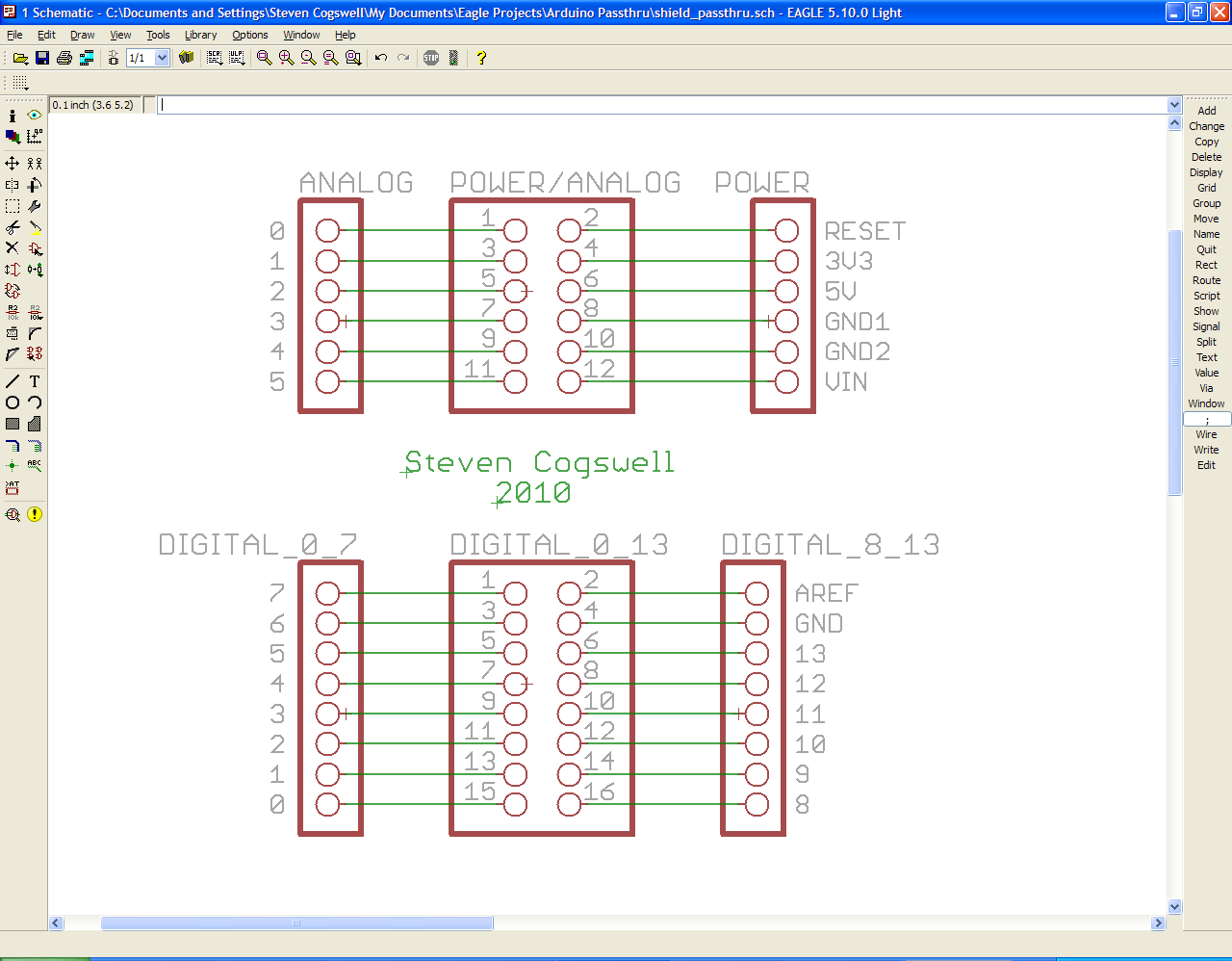
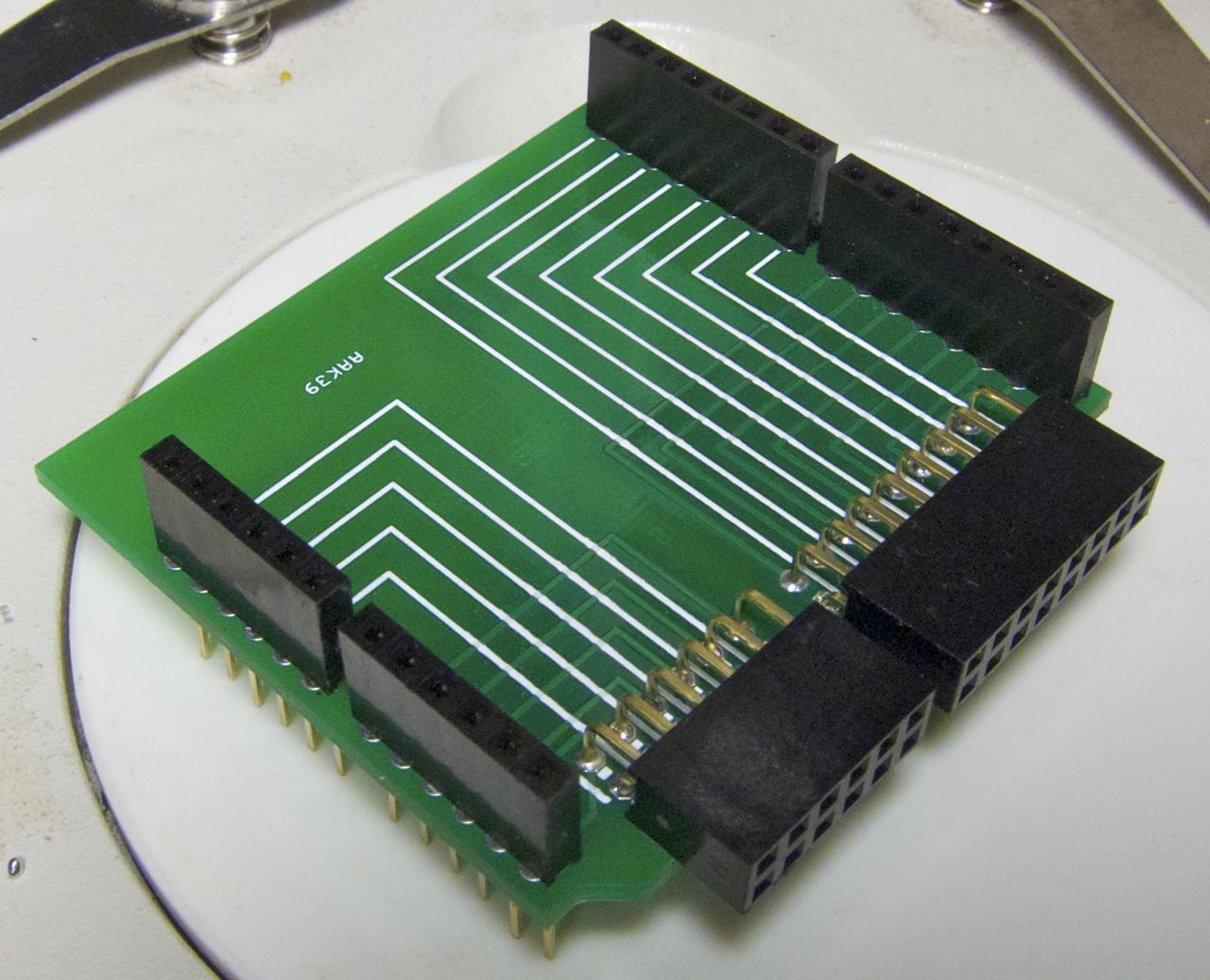
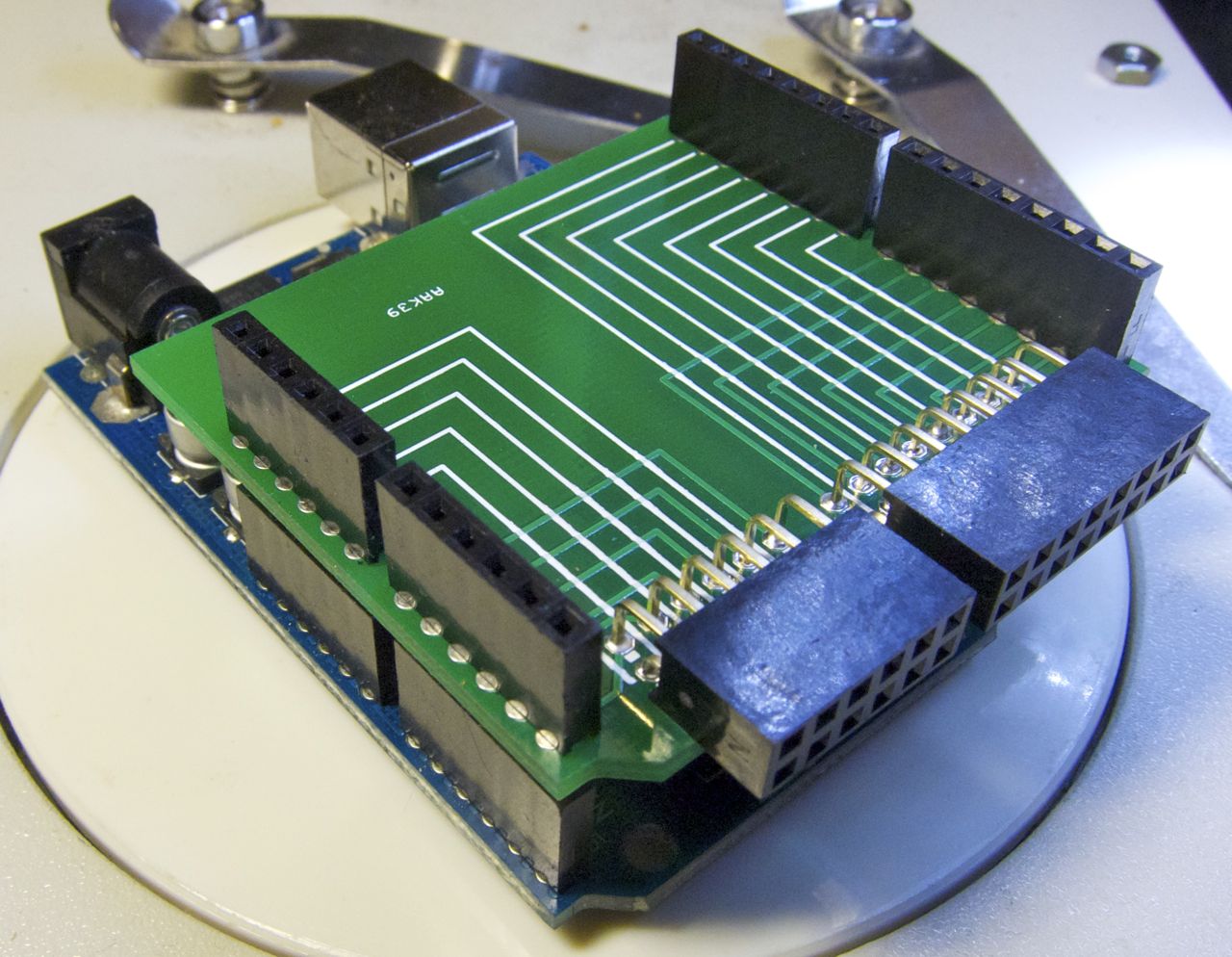
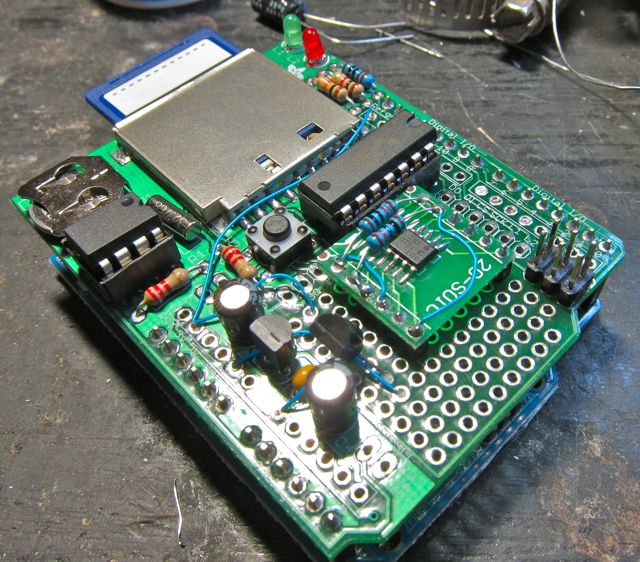
Here’s what I figured was a useful shield for an arduino that I wanted when I was debugging all that bullshit SPI interaction when I was making the ADT7310/Logshield combination. It’s a passthrough shield that has a breakout for all arduino pins that can be inserted between the arduino and a shield. Not fancy, but let’s you get access to any pin easily without having to grope around and get a spring clip onto a board.

Having said that, I finished the ADT7310/Logshield long before this thing showed up from the boardhaus. Maybe this will be helpful on my next project.

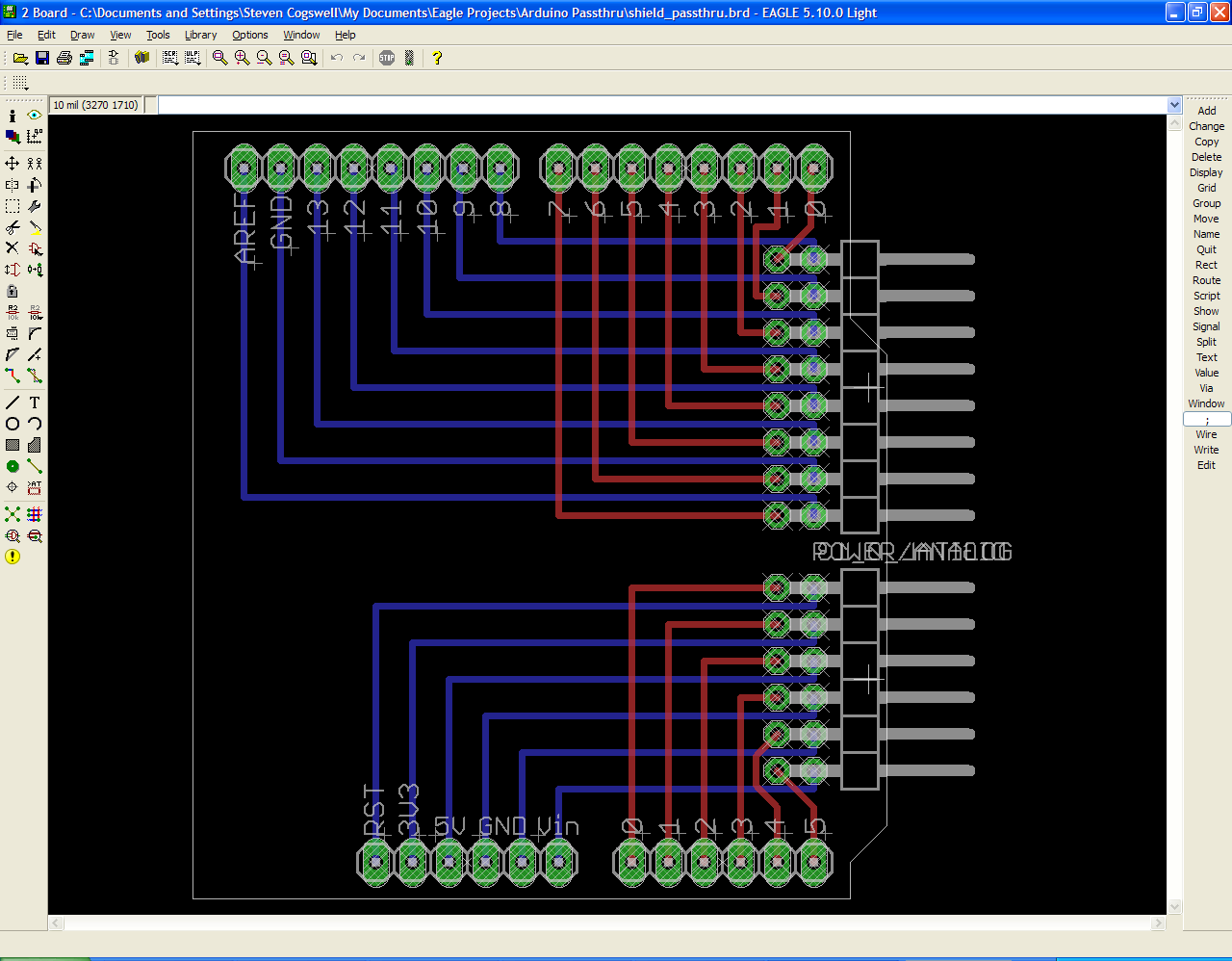
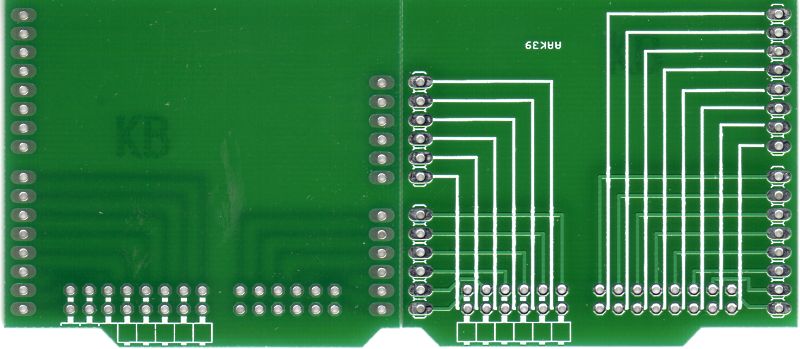
You don’t need me to show you this, here’s the schematic and the board layout. These were done with Eagle, but come on – you could lay these out with an ink marker if you wanted. I hand routed the traces since that was easier than watching the autorouter put tons of vias in.

I started the Eagle design from the Macetech Scaffold (there is a newer version than I used), simply because it has the board outline and header positions right. The Arduino has non-standard pin spacing between the headers for some unfathomable reason, and now that shields are designed around it they can’t change. Another option is to start from a design like the Adafruit protoshield, and just toss out the bits you don’t want.

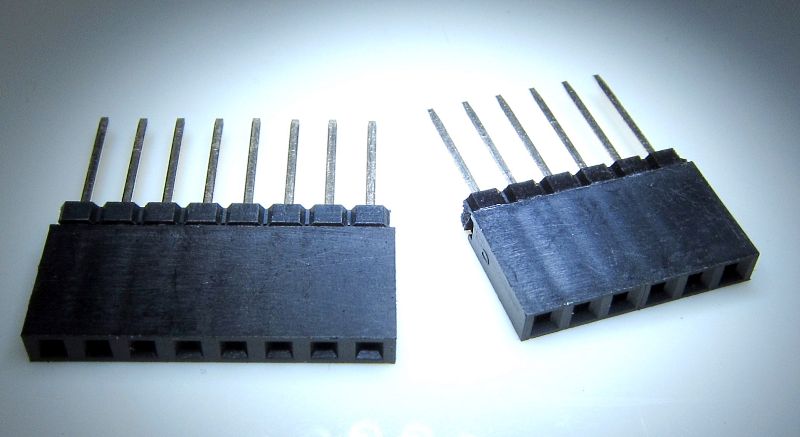
The two 90-pin connectors are digikey # S5559-ND and # S5561-ND. I’m sure you can get them just about everywhere.

90-Pin Connectors S5559-ND and S5561-ND

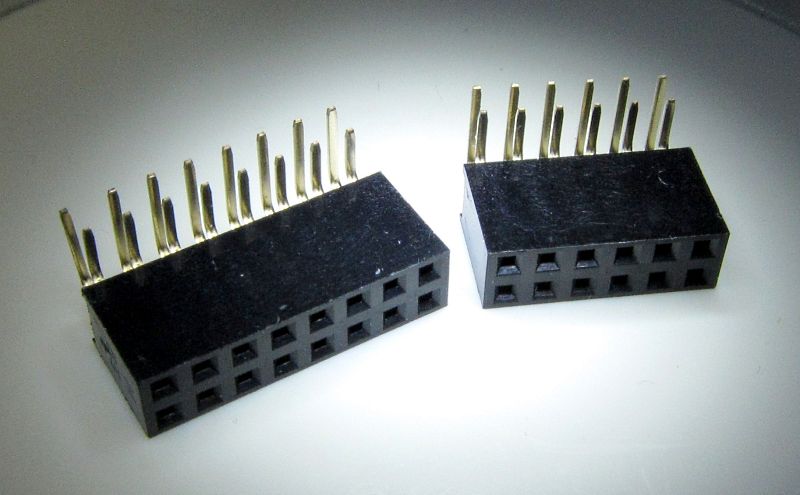
You can get the stacking headers from Adafruit, although I got mine from eBay.

Stackable Headers

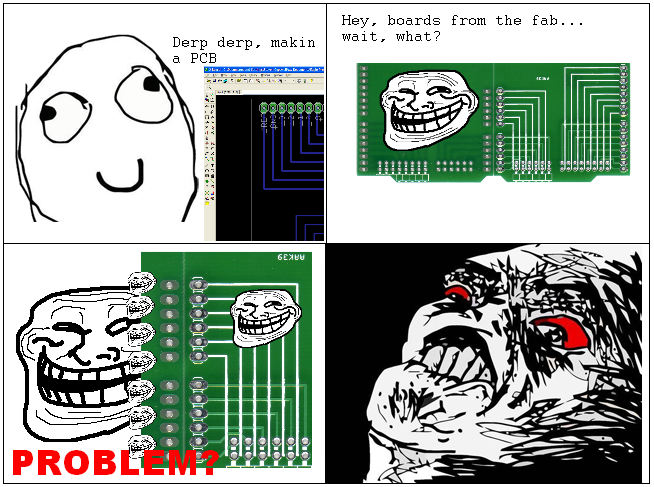
Unfortunately, there was an error at the boardhaus, and the boards showed up… wrong.

That was supposed to be copper, not silkscreen

At first I thought I messed up the gerbers, which would be pretty damned embarassing considering how simple this board is. I checked with le boardhaus, and it turned out to be manufacturing on their end – the place that actually produced the board mistook the copper layer for a silkscreen layer. I have no clue how you could, they were named correctly and passed all the DRC checks, but hey. They offered to make me another set for free, or give me a refund. I elected to get them to make me a proper set, what the heck.

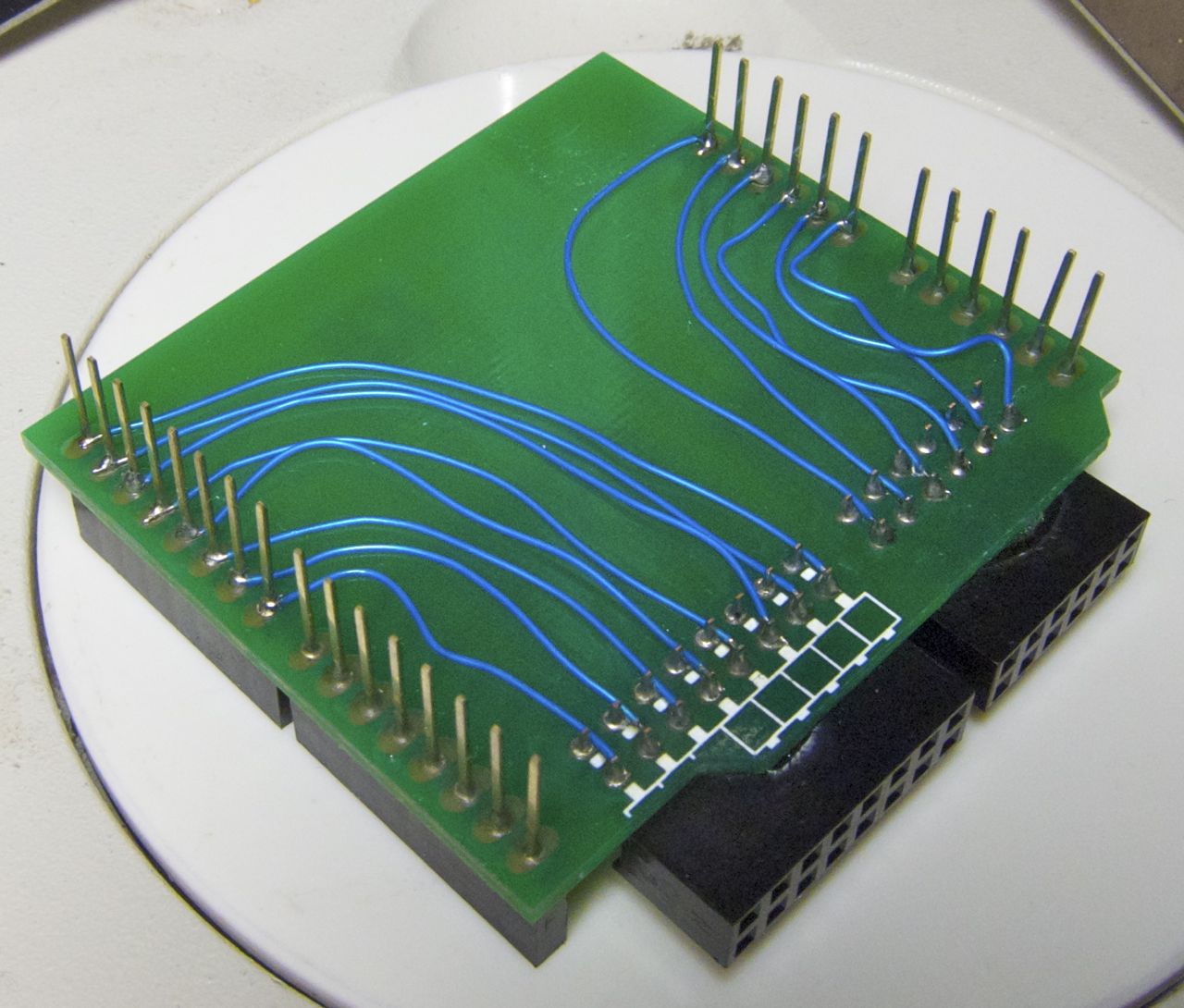
Of course, the last set took a month to arrive, and I didn’t really want to wait another month before writing this post assembling the board, so I resorted to my gorilla/guerrilla bluewire ratnest fix.

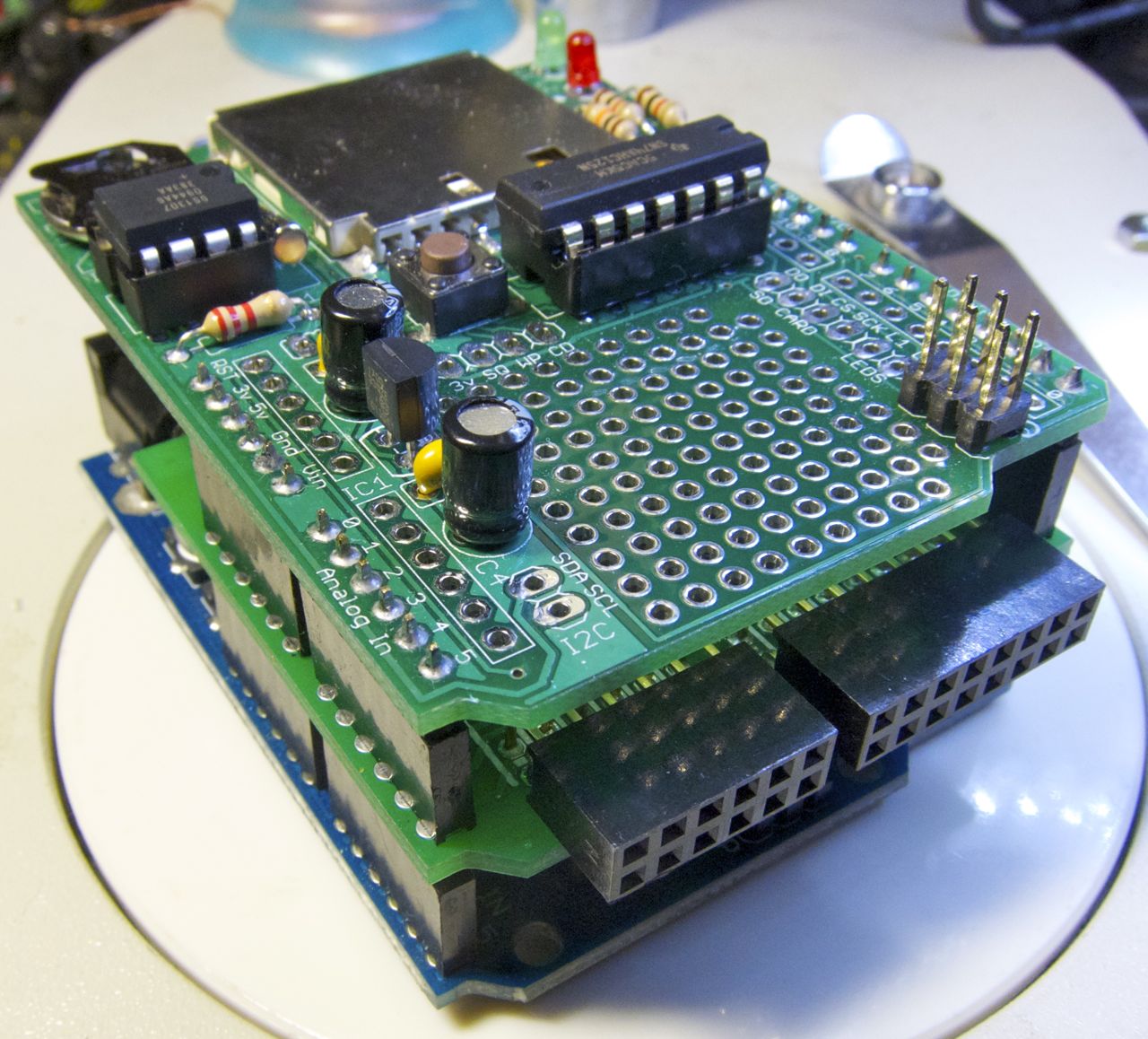
and finally, here it is doing it’s actual job – sandwiched between an Arduino and a shield.

Stupidshield on Arduino Stupidshield and Logshield, note connectors peeking out from the stupidshield

An Arduino Library for the ADT7310 SPI Temperature Sensor

(There is no music associated with this post, either)

I wanted a temperature logger for monitoring one of my labs. In the first iteration I used an Adafruit Data Logging Shield with a TMP36 sensor, pretty much as they describe in their fridge logger tutorial.

Problem: the problem that always comes up with microcontroller measurements. That stupid 10-bit A/D converter. I realize that microcontrollers aren’t supposed to be high-accuracy data acquisition systems, but damn I wish they were at least 12-bit. 10-bit means 1024 (2^10) discrete measurement levels. That’s great when reading a potentiometer position, but it introduces a lot of quantize error with things like the TMP36.

Quantizing sucks

The TMP36 works from -40 C to +125C, with 750mV output at 25 C and 10mV/C range. If you use the TMP36 with the 3.3V source and reference, that means that 10-bits gives you… 3.22 mV resolution per bit.

Example: The arduino A/D reads a value of 200 (0.645 V with a 3.3V reference). That corresponds to temperature (0.645-0.5)*100 = 14.45 C. If the A/D reads 201 (one bit higher), that corresponds to a temperature of 14.77 C. So you can see that your temperature quantizes to 0.32 C. You can’t read 14.6 C, it clips to either 14.45 or 14.77. If you’re monitoring room temperature that kinda sucks.

Who cares

So, what to do? You can get a more sensitive temperature sensor. The TMP37 has a sensitivity 20 mV/C. Still not a lot of bits in the range I want to use it in. If the lab gets above 100 C I figure it’s time to get the fuck out anyway.

Another solution You could get a different outboard A/D and use it to read the TMP36. I’ve used MCP3304’s (12/13-bit SPI A/D), but that’s a lot of effort just to read one sensor. the TMP’s are only really rated at +/- 1 C at 25 C anyway, so at some point the sensor itself is going to be the limit.

The route I went was: find a temperature sensor with a digital output (SPI, I2C, whatever) that has higher resolution, skipping the A/D issue. For no good reason I picked the Analog Devices ADT7310. It has an SPI interface, doesn’t require calibration, and is 16-bit capable (0.0078 C resolution). They were also fairly cheap ($3 from digikey).

Package issues

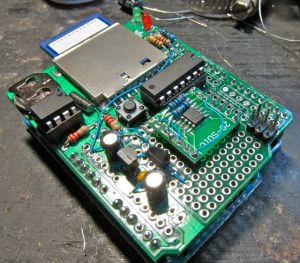
First issue was just wiring the stupid thing up. I wanted to use it with that Adafruit Logger Shield I mentioned earlier. The ADT7310 is an SOIC package, and the Logshield doesn’t have any footprint placement for SOIC parts (the protoshield does, but the logshield just has some through-hole places). A long time ago I shunned surface-mount parts because I solder like a gorilla, but in these times if you want IC’s you have to go surface-mount. At least it wasn’t a BGA.

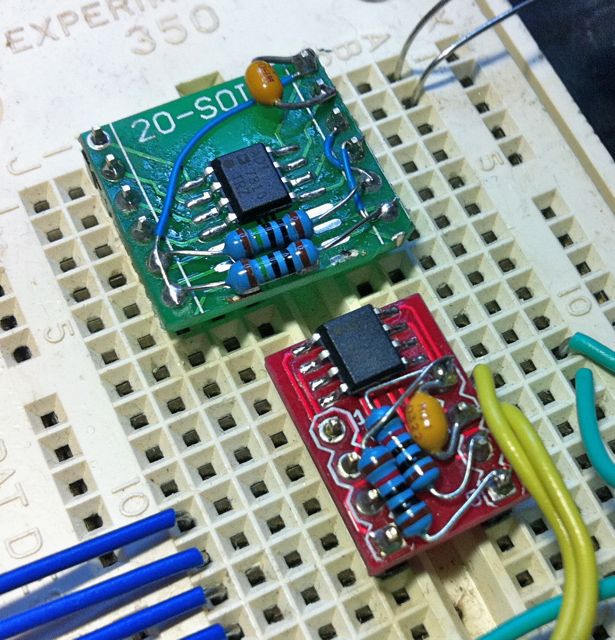
To solve this first problem, I used a couple of different little SOIC-pin header adapter boards. The first couple I built I adapted from a 20-pin SOIC board I had lying around, so I cut the board short with a dremel. Nice but the spacing is wide, so it covers lots of holes. A later one I use some really sexy small adapters from Sparkfun. $2.95 was a little much, but still cheaper than making my own board.

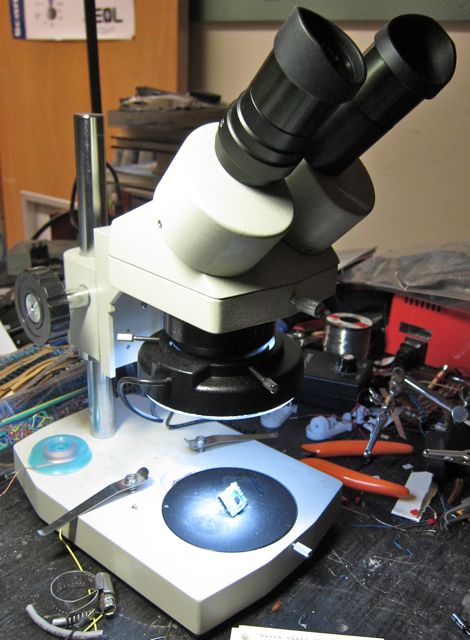
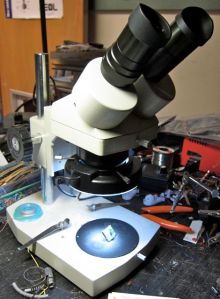
I’m old, half blind, and my hands aren’t all that steady. All of that can be compensated for by doing something easy: solder under a microscope. I bought a cheap stereo dissecting scope from eBay a few years ago and it makes soldering all these fine pitch things a dream. Use a fine-tip iron, thin solder, and a solder fluxpen and yer golden.
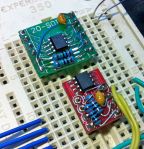
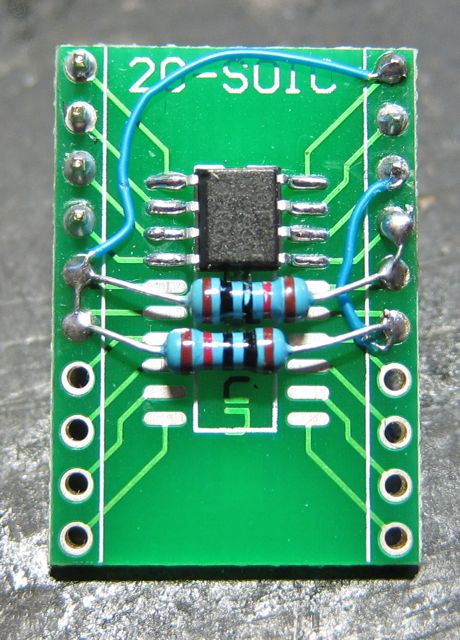
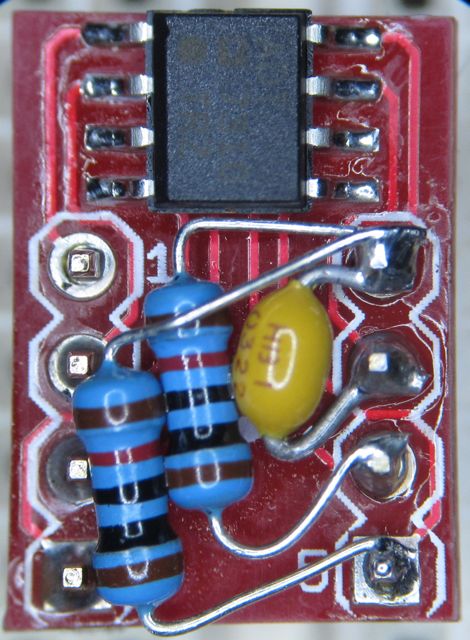
Here’s some of the completed modules.
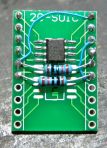
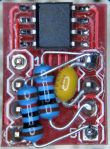
I put on a 0.1 uF capacitor, as recommended (ADT7310 needs it), and the two recommended pullup resistors for the alarm pins. I don’t know if the chip works just as good without the pullups, but it was easy to put them on. Shows how small this package is when it’s dwarfed by the through-hole resistors. In a better design you could use some SMT chip resistors.

Some issues found during the breadboard stage

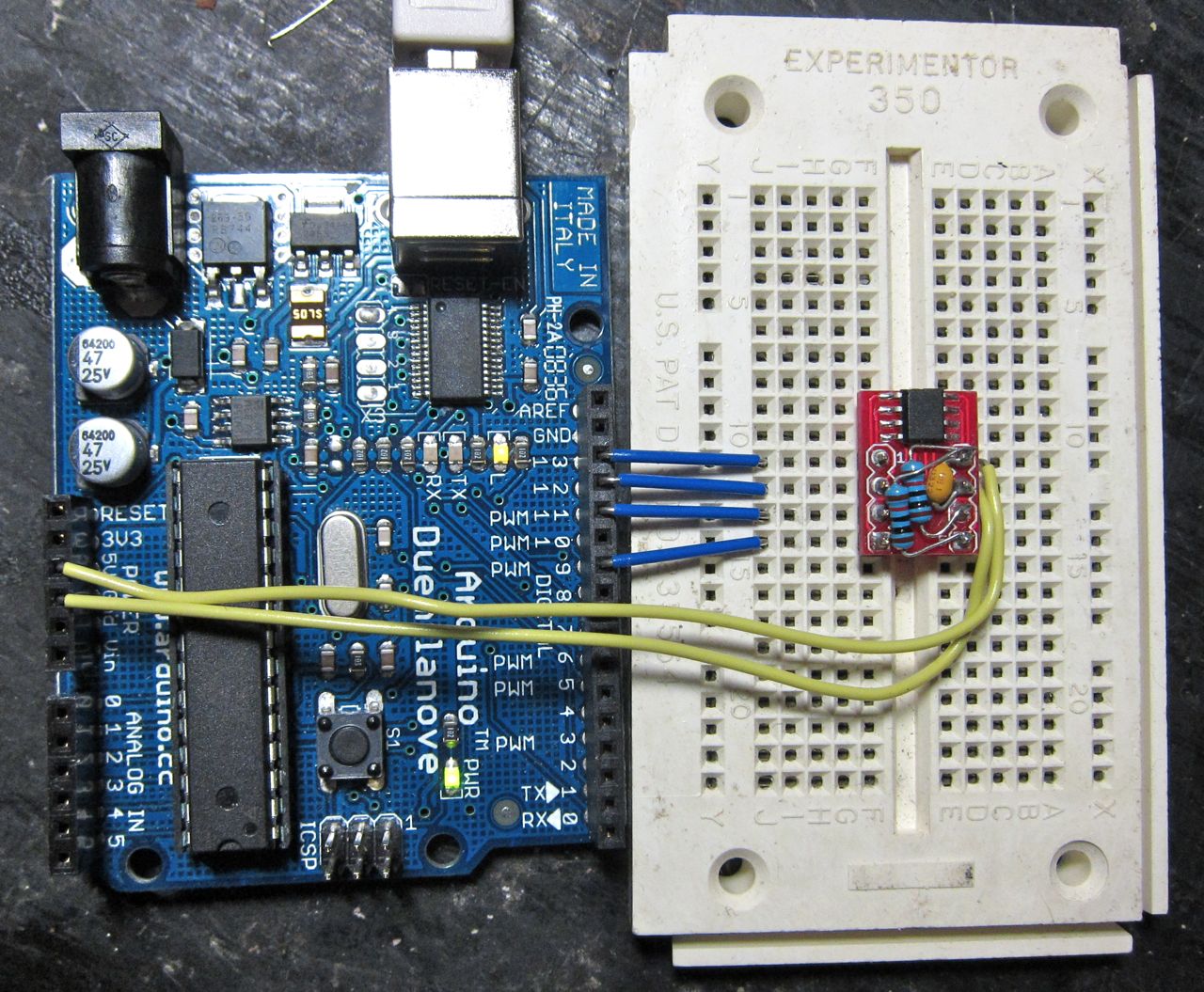
First thing, is this silly chip is really fussy. That decoupling cap on the power? Yeah, you really need that. I had a hell of a time getting the communication over SPI to work with this chip, and a lot of it was fixed by adding the decoupling cap, and using shorter leads to the breadboard. The chip would happily clock along and drop an error every few measurements. Decoupling cap dropped that to a few dozen measurements, and short leads meant I could run tens of millions of measurements (no joke) without errors.

Errors? Yeah. With some SPI devices, selecting them with the chip select does the reset and sets things up for a read/write and you’re good to go. The MCP3304 works like that, I believe. The ADT7310 powers up, gets its registers configured, and then you communicate with SPI. If the chip gets fussy or you lose a bit or a clock somewhere, it goes into sulk mode and won’t respond with anything other than “0” on output. The only way out of this is to do the soft reset – clock in 32 or more “1’s” on the SPI line and the ADT7310 resets itself. It also means you have to reconfigure your configuration registers if you changed them from the default powerup settings.
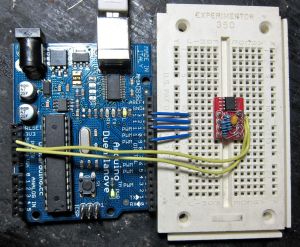
In the first few trials writing for this guy I was doing “bit-bang” SPI, where I was providing my own clock and control signals directly. This works great, but again mr. fussy ADT7310 was very specific about when the clocks had to come. Mysterious stuff like losing the last bit on a read, that sort of thing. Although I did get that working I then re-coded everything to use the Hardware SPI, as I was able to make the SD card (which also uses SPI) and the ADT7310 co-exist on the Arduino logshield without interfering. Using Arduino’s hardware SPI library is a lot easier, too – let it do all the heavy lifting.

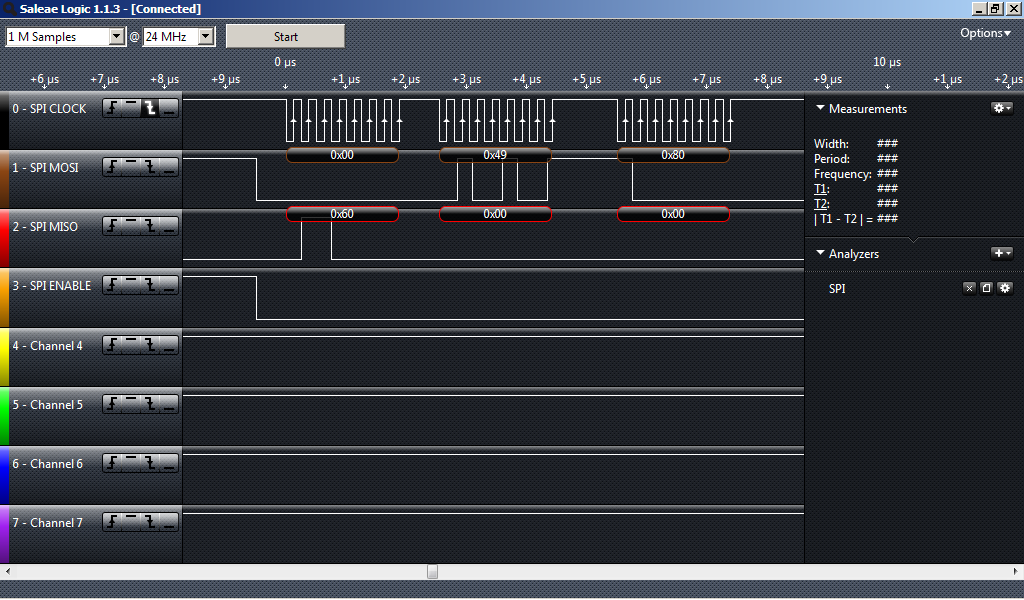
The problem I had was trying to determine if you’ve lost communication sync. If the chip is sulking all it will do is crank out “0” on the output. If you were actually reading a temperature that was around zero that might make it hard to detect. The technique I eventually settled on was to do things the hard way: after reading the temperature, check the Tcrit setpoint register (the ADT7310 has a couple of setpoint registers that can hardware assert two pins on the chip for alarm interrupt purposes, the setpoints are set through writing to one of the registers, and can be read back). Register 0x04 (Tcrit) very nicely has a default value of 0x4980 (147 degrees) at powerup, so it’s got enough bits to give me confidence things are still reading right (0x06-Thigh has 0x2000 and 0x07-Tlow has 0x0500, not enough ‘set’ bits to be confident you’re reading them all correctly). Mind you, you can always load one of these registers with whatever value you wanted.

Something that would have really helped doing this was spying on the SPI bus with a logic analyser. Using an oscilloscope is okay, but it can be hard to track what you’re seeing if you don’t have storage. Although I figured out my bit-bang issues before it showed up, I broke down and bought a Saleae Logic Analyser. I hooked that shit up and it worked exactly as advertised. I should have bought it sooner.
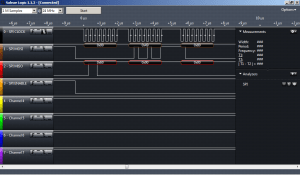
So in general, my strategy was:

  • Read temperature register 0x02
  • Read Tcrit register 0x04, compare with known value (0x4980)
  • If you get 0x4980 from 0x04, the temp was probably fine. If not, you’re probably desynchronized and should reset the chip.

So once I had things actually working, I coded everything up into a functional ADT7310 Arduino Library. Like the SerLCD library I’ve previously discussed, putting it up as a proper object-oriented library makes things nice and clean and encapsulates a lot of the busy work so you don’t have to worry about it.

The ADT7310 has lots of operation modes (16-bit, 13-bit, continuous, one-shot, etc). I really only tested all this in 16-bit continuous mode. Everything is just SPI commands though, so it should work (cough). The Datasheet explains what all the modes do, and I include some #define‘s to make it simpler to initialize the chip. I didn’t include any support for the “continuous read” method (I didn’t really care about doing that), or reading the status of the Tlow/Tcrit/Thigh flags (since they don’t appear in the 16-bit read), but you can just pull the bits out yourself from the register 0x02 read value.

Download the library here. This version is now old, the github version is the current one.

You can also download it from github.

Again, like the SerLCD one I made it’s under LGPL because I really don’t give a crap, and I know all you people trying to do your homework aren’t paying attention to licenses anyway.

The library includes functions for reading and writing registers in 8/16 bit modes. It also has a reset function to reset the chip (but does not reprogram the mode, you do that yourself), and it includes a function to convert the 16/13/10/9bit values into temperatures. Why you would use this chip and not go for full on badass 16-bit mode is beyond me, but it’s there. The library also includes a demo example on using reading temperature and checking for desynchronization error. It does depend on the SPI.h library, which is included in the Arduino software package now. I’ve tested this under arduino-0021.

It’s one of those “it works for me” situations now, your mileage may vary. If you don’t like it, tough.

(Yet Another) Sparkfun SerLCD library for Arduino

(There is no music associated with this post)

Recently I did a little project with an Arduino board, using an LCD based on that HD44780 chipset. Reliable, fairly standard. The problem in that project was I essentially ran out of digital control lines. By the time I had analog inputs, SPI, I2C, and this LCD going in 4-bit mode (using 6 lines, 7 if not cheating the Read/Write), I was out of pins. That project finished up fine, but I figured I would investigate using a Serially-enabled LCD for the next thing I did.

The problem with serial-enabled LCD’s is that you can get boring HD44780 parallel units for like a dollar from electronics surplus stores, and the serial-enabled ones are like $80. That’s what put me off them in the past, since I see parts and like to buy a couple and have them sitting in reserve for when I want them.

After this last project I ended up buying a couple of the Sparkfun SerLCD modules. Their unit is pretty cheap ($17 for just the backpack, $25 with an LCD). I got the 5-volt version since the arduino is 5V.

With the HD44780 you have to worry a lot about timing and initialization, although there is an arduino library for them which works fine and abstracts a lot of the mess.

The usage of the SerLCD couldn’t really be simpler. If you send it characters, it prints them on the screen. If you send some special single-byte commands it will do functions like turn the display off, move the cursor, set the position, etc. The SerLCD also has backlight PWM control so you can control the brightness of the illumination of the LCD, which is something you can’t do with a raw parallel HD44780 unit. This is all documented in the SerLCD manual [PDF].

Using the SerLCD with an arduino is also really simply. Send characters out the serial port, and you’re done. There’s already an example in the Arduino Playground that shows this. I recently wrote an actual arduino “library” for another chip I was working with, and so I figured I’d try to apply this blundering knowledge to writing a SerLCD library. There probably are a dozen other libraries that do this already, but this one is mine.

Putting together the SerLCD library means that you can address the SerLCD in that nifty Object-Oriented style that other libraries (LiquidCrystal, Serial, SPI, etc) do without having to fuss with too much precursor setup. Should also make the code more portable between your projects too.

I designed the library to use NewSoftSerial, which you can get from Mikal Hart. I think there are rumblings that NewSoftSerial will get rolled into the main Arduino software eventually, but for now you just have to get it manually. I used NewSoftSerial because the Arduino has a dedicated serial interface on digital pins 0/1 which is also shared with the USB-serial interface. So if you wanted to do USB communication at the same time as drive a SerLCD you need to move the SerLCD to other pins which the Serial class doesn’t do. I think the ArduinoMega’s have multiple hardware serial ports, but I wrote this for an Arduino Duemilanove. Mega’s have tons more digital pins anyway to run HD44780’s directly, so who gives a crap.

If you want to use the HardwareSerial port, the library is trivial to change.

In the library I (tried) to implement all the features of SerLCD. I’ve only tested it with the 16×2 display though, so your mileage may vary. I didn’t include anything towards changing the SerLCD bootup splash or resetting the baud rate, since you have to do those when the SerLCD is first powering up and I didn’t want to be bothered. The only issue I encountered with the SerLCD v2.5 firmware seems to be that it would lock up until powered off/on again if you hammered backlight control commands at it too fast. I put a couple of delay() statements in the backlight settings and haven’t have problems.

Using the library is pretty easy. Download the .zip, and unzip it into your Arduino user-contributed-libraries folder (On Windows, this is your My Documents/Arduino/libraries folder, not inside the Arduino IDE directory. I tested this with arduino-0021 on my Duemilanove with an ATMega168 (not the ATMega328, but there’s no reason it shouldn’t work the same), so again – your mileage may vary.

Download the library here. This version is old, the github version is the current one.

You can also download it from github.

The library includes a demo program in the examples directory. Since most of Arduino is LGPL I made this LGPL, but I know most of you people in your plz send me teh codes mindset don’t obey any licenses. If you don’t like LGPL, tough.

A very basic program would be:

#include <NewSoftSerial.h>;
#include <SerLCD.h>;

// NewSoftSerial Object on pin 2
NewSoftSerial NSS(0,2);
// SerLCD object using that NSS
SerLCD theLCD(NSS); 

void setup()
{
  // Remember to start the NewSoftSerial port 
  // before doing things with the SerLCD
  NSS.begin(9600); 
  Serial.begin(9600);
  // This will attempt to initialize the display to 
  // blank with the backlight on 
  theLCD.begin();   
  // Display some massively important informative text
  theLCD.print("Hello, Jerk"); 
}

void loop() 
{
       // nobody cares  
}

WordPress.com’s code tags are still crap

I tried to do this the “right” way and designed SerLCD to inherit from Print::print , that way it picks up all the methods that print() can do – like formatting floats, handling different variable types – without me having to write a stitch of code. Hopefully it also means it’ll keep lockstep with the Print::print automatically that way, so any new features in Print::print are usable by this. I got this idea from this guy’s post where he implements it for an OLED screen. Yes, I know you’re a much better coder than I. Again, it works for me, any your mileage may vary. If you find this useful, enjoy. If you don’t, well then I don’t care.

Here’s a stupid picture (SerLCD’s Rx is connected to arduino digital pin 2):

and here’s a stupid video:

Get yer mail from Thunderbird into GMail in Zero Steps

(There is no music associated with this post)

I had been a long and loyal Thunderbird user for many years now. My problem with Thunderbird became:

  • POP mail scattered about many machines, so I had to make sure “leave mail on server” was always enabled, so I could get my mail from whatever machine I was at.
  • IMAP not an option, since the workplace had at 25MB mail quota. Sigh.
  • Thunderbird 3.x disabled two of my favourite add-on’s for Thunderbird 2.x (“Attachment Sizes” and “Tb Progress History Extension”), that 3.x still can’t do itself – this in itself is lame, but not the focus.
  • Thunderbird 3.x’s search blows total goat.

I actually have a lot of email accounts for work and crap. Since my little trip to the hospital last year, I started consolidating everything into Google’s GMail so that I could get all my mail in one spot, and be able to actually find things via search. Some accounts I’m able to forward from, and some accounts I still have to have GMail get via POP3, but it works.

My holdout is Thunderbird on my desktop at work, which still brings in mail via POP3 because of my years of mail built up in mbox’s on the hard drive.

Up until last week I’d been using Google Desktop Search to try and find things in Thunderbird’s mail, since 3.x’s new search blows goat and the 2.x style search is slow as hell. Much to my disdain I found out that somewhere along the way Thunderbird 3.x broke Google Desktop Search and I haven’t had any mail indexed since August. Uninstal/reinstall/reindex GDS to no avail. Turns out it’s just a lame-ass bug in GDS, which probably won’t get fixed anytime soon.

Windows Desktop Search 4.0 for XP doesn’t even bother to try to index Thunderbird. I understand that Search on Windows 7 will, but my computer at work is eight years old. We’re stuck on XP until the building burns down.

So I took the bold step of migrating back to Thunderbird 2.x, which the indexing reputedly still works for. It brought up again the spectre of “I wish I just had all that old mail in GMail”. I figured I would try again.

Previously I’d tried GMail Loader, which does work but was about the worst solution: it emails all your old mail to your GMail account. Hence, inbox full of ten-year-old mail in about five minutes. Fuck that noise.

I started trying to use Google’s Outlook Migration Assistant, which sounds nice but only works if you’re a Google Apps customer (not the regular GMail, but if you have a Google Apps for Domains account that you pay for). That also would have necessitated moving all my mail from Thunderbird into Outlook for the sole purpose of moving it back out again. Feh.

So, out of the blue I hit on a solution that’s easy, actually works, and doesn’t require any other software. It’s so easy I kicked myself and wondered why I hadn’t thought of it before, stupid me:

  • In GMail, go to your account settings and enable IMAP. That means you can get your GMail via an IMAP client
  • In Thunderbird 2.x/3.x, add your GMail account (via IMAP, not via POP3) to your list of accounts. Once you’re setup, you’ll see all your GMail tags showing up as folders.
  • The easy part: drag your Thunderbird email folders into your GMail IMAP account. That’s it. Thunderbird moves it all in. It’ll show up with a GMail tag the same as the name of the folder in Thunderbird.
  • No, that’s it. That’s the last step. You’re done. All your old mail from Thunderbird in GMail, no fuss. Just a lot of waiting as it copies across the intarweb.

Since it uses only Thunderbird itself, this should work on any system Thunderbird works on (Windows, OSX, Linux, Plan 9).

Now the Thunderbird on the desktop is only around for historical legacy purposes for when I get fired and they want all my old mail.

Crackpot, Buzzkill, Asshole

Here’s a strange one. In a total shock to myself, and likely their listeners. A mockup of some of my FAT BEETS was played mocked on No Agenda Show 244 on October 17th, 2010 by none other than Adam Curry and John C. Dvorak themselves.

I’m the asshole, in case it’s not obvious.

IN THE MORNING

Mocked on No Agenda 244

So, when life gives you lemons, punch it in the mouth.

and, a different take.

Creative Commons License

The Future of

In 2016, I managed to wedge this content into a music track I made for Night Attack.


Solution for iOS4 on iPhone 3G

After much experimentation and research, I’ve determined how to fix iOS4 running on the iPhone 3G. No warranty is expressed or implied. YMMV.

Preparation:

  • First off, make sure you’re updated to iOS 4.0.2
  • Make sure your phone is backed up, and do two hard resets (holding down the sleep button and home button until it resets).
  • Then do a normal power off (hold the sleep button, slide to power off). Wait 30 seconds and power back on
  • Do a DFU restore of iOS 4.0.2
  • After you’ve done the restore, don’t restore from the backup. Reinstall all your applications and re-enter all your data. Don’t sync any music yet.
  • Backup the iPhone again

The Important Part:

  • Put every application into Folders. Not just willy-nilly. It’s important that you put all the applications of the same category into the same folder (i.e. – All the “Social” applications in one folder, all the “Navigation” into a different folder). I’m not sure if you should have them sorted alphabetically in the folder, but it can’t hurt.
  • Go to Settings -> General -> Home Button -> Spotlight Search and turn off Spotlight for everything except Notes.
  • Turn off Push Notifications. Wait at least 15 minutes for the servers to catch up. Then turn Push Notifications back on
  • Sync your music. Use iTunes to sync the “only checked songs” and then incrementally sync the iPhone by genre (i.e. – check all the 50’s music, and sync. Then check all the 60’s music, and sync. Check all the Pop music, and sync.). After each Sync do a power off-power on sequence.
  • Convert all your videos to h.264, but make sure you’re using Main profile with 8 b-frames, CABAC, and CQ mode of 19. Use FFMPEG. It’s actually pretty easy to write a bash shell script to do all this, so I won’t bother including it here. Make sure you get all those little options right
  • If you have ringtones, make sure none are longer than 29.97 (30p) seconds, and none shorter than 23.976 (24p). Use Garageband or Audacity for this
  • Give up on iOS4 on the 3G and get an iPhone 4 instead, nothing’s going to fix that bullshit.